Logitech Brio 300
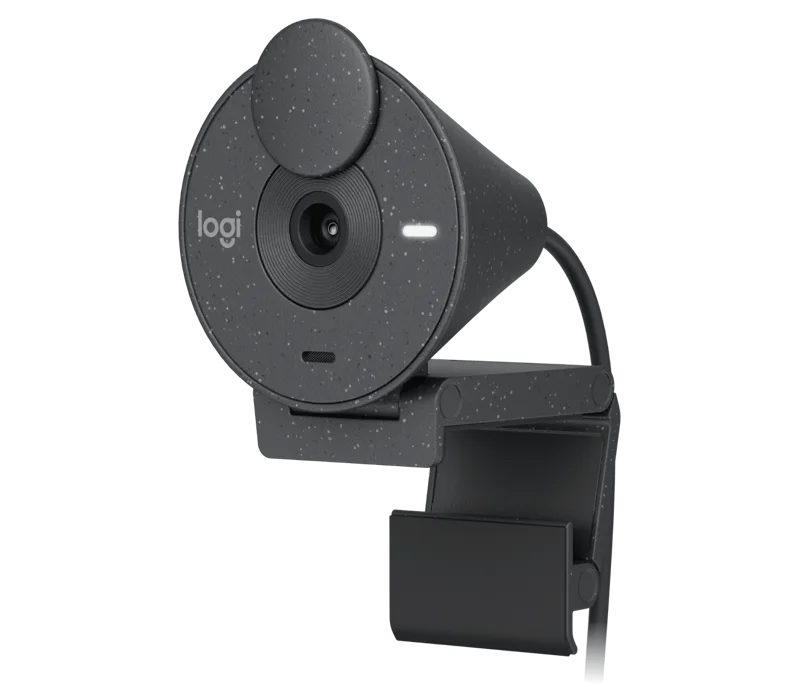
A compact, colorful 1080p USB-C webcam with auto light correction, a privacy shutter, a noise-reducing mic and plastic made with at least 48 percent recycled material.
Specifications
| Resolution | 1080p/30fps, 720p/30fps (2MP) |
|---|---|
| Field of View | 70 degrees diagonal |
| Focus | Fixed focus |
| Lens | 4-element with anti-reflective coating |
| Light Correction | RightLight 2 |
| Microphone | Mono, noise-reducing, up to 1.22 m |
| Connection | USB-C plug and play, 1.5 m attached cable |
| Privacy | Integrated shutter |
| Weight | 74.6 g |
| Certified | Teams, Zoom, Google Meet |
The Logitech Brio 300 is a small, stylish webcam for people whose video calls are frequent but whose needs are simple. Logitech describes it as a sleek, compact 1080p webcam with automatic lighting correction, certified for leading meeting platforms, made with at least 48 percent recycled plastic and available in three colors. It is not a streaming camera or a 4K camera, and it does not try to be. It is a tidy, plug-and-play upgrade over the low-resolution camera built into many laptops and monitors. This guide reads the specification closely, explains what each line means at a desk, and compares the Brio 300 with the other Logitech webcams we cover.
Resolution, frame rate and sensor
The Brio 300 records at 1080p (1920 x 1080) at 30 frames per second, or 720p (1280 x 720) at 30 frames per second, and Logitech lists a 2 megapixel camera. Thirty frames per second is the normal rate for video calls and is smooth enough for talking. If you want the smoother motion of 60 frames per second, look at the Logitech Brio 4K or a streaming-focused camera. Logitech does not publish a sensor size for this model on the page we read, so we cannot say how it will handle very dim rooms; our explainer on webcam sensor size and low-light performance covers why that number matters when it is available.
Lens, field of view and focus
The diagonal field of view is 70 degrees. It uses a custom four-element Logi lens with an anti-reflective coating and fixed focus, which means the camera does not hunt for focus, so it is simplest to place it at a normal seated distance and check that you look sharp. The specification lists a hardware zoom entry of "1x digital zoom", which in plain terms means there is no optical zoom to speak of. A 70 degree view is narrower than the 78 degrees of Logitech's C920s, so it frames you a little tighter and shows less of the room behind you. That can be a plus in a shared or untidy space. For a broader look at how a webcam compares with the camera in your laptop, read our webcam versus built-in laptop camera comparison.
Automatic light correction: RightLight 2
The Brio 300's headline feature is RightLight 2. Logitech says it automatically balances brightness, adjusts contrast and compensates for challenging light environments to create a natural presentation, and describes the feature elsewhere as basic auto light correction. In everyday terms, it tries to stop a dim room or a bright window from making you look dark or washed out. It will not turn a poorly lit room into a studio, but it is a real convenience compared with a camera with no correction at all. A footnote on the page also says a blurred background can be created by most video meeting platforms, so do not expect the camera itself to blur what is behind you.
Microphone
The camera has a mono microphone with noise reduction that captures and transmits your voice while suppressing background noise, with a listed range of up to 4 feet (1.22 metres). That range is fine for someone sitting at a desk facing the screen. It is not a replacement for a headset microphone if you move around or work in a noisy space. Logi Tune, the software Logitech names, is listed as supporting the camera, and you can read about audio alternatives in our headset buying guide.
Privacy shutter
An integrated privacy shutter sits above the lens. You spin it to block the camera completely when it is not in use and spin it open before your next meeting, according to Logitech. A physical shutter is a simple, reassuring feature that no software update can undo. The status light is a small LED beside the lens.
Connection, size and weight
The Brio 300 connects over USB-C with plug-and-play operation and has an attached cable 4.92 feet (1.5 metres) long. That is convenient if your laptop or monitor has USB-C, and Logitech's separate Brio 100 offers a USB-A version for older ports. The camera, including the clip mount and cable, measures about 65.6 mm high, 53.1 mm wide and 45 mm deep and weighs 74.6 grams (2.63 ounces). It is light enough to clip to a laptop lid or a monitor top. The mount is a folding clip; if your monitor is unusually thick, check that it can grip, and if you are still working out where the cable should run, our desk cable management guide helps.
Software and compatibility
Logitech says the Brio 300 works with Windows, macOS or ChromeOS and virtually any popular video-calling platform, and it is certified for Microsoft Teams, Zoom and Google Meet, and works with Chromebook. The specification mentions Windows 10 or later. The optional Logi Tune app lets you adjust color and image resolution and take advantage of features such as automatic firmware updates, but Logi Tune is not available for ChromeOS. If you use a Chromebook, the camera still works, but you will not have the app.
Colors and materials
The plastic parts are made with a minimum of 48 percent recycled plastic, which Logitech says gives a second life to end-of-life plastic from old consumer electronics and helps reduce its carbon footprint. It is available in three colors, and the graphite version is the one pictured here.
Price and how it compares
Logitech lists the Brio 300 at 59.99 dollars. The cheaper Brio 100, at 39.99 dollars, is a USB-A webcam with a narrower 58 degree view, an omnidirectional microphone and a sliding shutter, so the Brio 300's extras are USB-C, a wider view, a mono noise-reducing microphone and Logi Tune support. The C920s Pro HD is a step up in the field of view at 78 degrees but has a different cable and mount design. You can read about it on our C920s Pro HD page. For a step-up option in Logitech's range, see our review of the Logitech Brio 500. Overall, the Brio 300 sits in the value zone: it costs little more than a basic webcam, but adds USB-C, a shutter and better lighting help.
Who should buy it
The Brio 300 suits home-office workers, students and anyone who wants a clear, no-fuss upgrade over a laptop camera, particularly if they have a USB-C port and appreciate a privacy shutter. It is less suited to streamers who want 60 frames per second, to anyone who needs autofocus for moving around, or to people who want a large sensor for dim rooms. If you are still choosing between camera types, our webcam buying guide is a good next stop.
The short version
The Brio 300 is a compact, sensible 1080p webcam with a privacy shutter, automatic light correction and a USB-C cable. It is not ambitious, and for many desks that is exactly right.