Webcam Sensor Size and Low-Light Performance in 2026: What Actually Matters
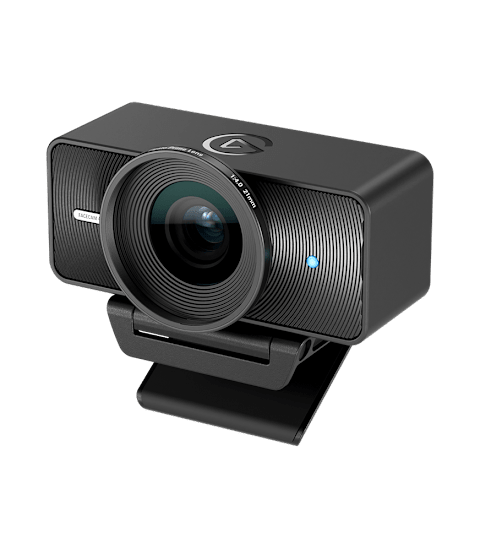
Every webcam box now advertises "4K" resolution, but resolution is the least important spec for how good you actually look on a video call or stream. The part of a webcam that does the real work — especially once the sun goes down or your home office doesn't have great overhead lighting — is the image sensor itself. A larger image sensor gathers meaningfully more light than a small one at the same resolution, and that difference is the single biggest reason some 1080p webcams look better in real rooms than some 4K ones.
Why sensor size matters more than megapixels
A camera sensor is a grid of individual photosites, each one capturing light for one pixel of the final image. Cramming more megapixels onto a sensor of a fixed physical size means each individual photosite has to be smaller, which means each one captures less light. A larger physical sensor with the same pixel count has bigger, more light-sensitive photosites, which produces a cleaner, less noisy image in anything but bright, even lighting. This is exactly why most webcams — which are compact devices with small sensors squeezed behind a small lens — visibly struggle the moment room lighting drops, regardless of what resolution they claim on the box.
What actually happens in low light
When a small sensor doesn't receive enough light, the camera's software compensates by amplifying the signal — increasing ISO sensitivity — which brightens the image but also amplifies sensor noise along with it, producing the grainy, speckled look common to cheap webcams in dim rooms. A larger sensor needs less amplification to reach the same brightness because it's collecting more real light to begin with, so the resulting image stays cleaner with less visible noise. This is the mechanism behind why a webcam like the Elgato Facecam 4K, built around a notably larger 1/1.2" sensor rather than the tiny sensors common in most webcams, holds up noticeably better once the lights dim than resolution specs alone would suggest.
Aperture: the other half of the light equation
Sensor size determines how much light-gathering area a camera has, but the lens aperture — how wide the lens opens — determines how much of the available light actually reaches that sensor. A wider aperture (a lower f-stop number, like f/2.0 versus f/2.4) lets in more light for a given exposure time, which helps low-light performance independently of sensor size. The two specs work together: a large sensor paired with a narrow aperture won't perform as well in dim rooms as the sensor size alone would suggest, and a webcam vendor emphasizing "4K" without mentioning sensor size or aperture is usually one worth being skeptical of for anything other than a brightly lit room.
Autoexposure and frame rate trade-offs
In low light, cameras often have to choose between a brighter image and a smooth frame rate, because gathering more light per frame typically means a longer exposure time per frame, which can introduce motion blur or force the camera to drop its frame rate to compensate. This is part of why some webcams look fine in a static product photo comparison but noticeably worse the moment you move or gesture on a call in dim light — the camera is stretching its exposure window to compensate for insufficient sensor light and struggling to keep up with motion as a result. A genuinely capable low-light sensor avoids forcing that trade-off as aggressively, maintaining both brightness and a usable frame rate without needing extreme software processing.
Where software processing helps — and where it doesn't
Modern webcam software increasingly leans on computational processing — noise reduction algorithms, AI-driven auto white balance, and exposure smoothing — to compensate for small sensor limitations, and this software has genuinely improved. But software noise reduction works by smoothing detail, which in extreme low light can leave footage looking waxy or smeared rather than genuinely clean, because it's papering over a hardware limitation rather than solving it. A webcam with a physically larger sensor needs to lean on that aggressive processing far less, which is why side-by-side low-light comparisons between small-sensor and large-sensor webcams tend to show a clear gap in fine detail and skin texture even when both images look similarly "bright" at a glance.
Why some 1080p webcams look better than some 4K ones
Resolution and sensor size are independent specs, and a manufacturer can ship a high pixel count on a small sensor purely for marketing purposes without improving actual image quality in normal conditions. A webcam that outputs 4K but crops or bins those pixels from a small sensor will generally look softer, noisier, and less color-accurate in typical home-office lighting than a well-engineered 1080p webcam built around a genuinely larger sensor, because the second camera is capturing more real light per pixel even though its final output resolution is lower. This is why sensor specifications, when a manufacturer actually publishes them, are worth checking before resolution, and it's part of why the Logitech Brio 500 — a 1080p-focused webcam built for consistent video-call quality rather than headline resolution — remains a strong pick for remote work despite not chasing the 4K spec race. A webcam's 1/1.2-inch sensor size paired with a modest resolution will frequently outperform a cheaper camera chasing "4K" on a sensor a fraction of that size.
Ring lights and desk lighting still matter
No sensor, however large, fully replaces adequate lighting. A basic ring light or even a well-placed desk lamp pointed toward your face dramatically reduces the amount of amplification any camera's software needs to apply, which improves image quality more reliably and cheaply than upgrading hardware alone. That said, for anyone who works in a dim home office or streams in the evening without professional lighting, sensor size is the spec that will make the most consistent difference in how usable your footage looks without extra equipment — more so than resolution, frame rate, or most of the other numbers printed on a webcam's box. Our webcam buying guide and our webcam vs. built-in laptop camera comparison both cover the rest of what to check before buying.