Webcam vs. Built-In Laptop Camera: Is an External Camera Actually Worth It?
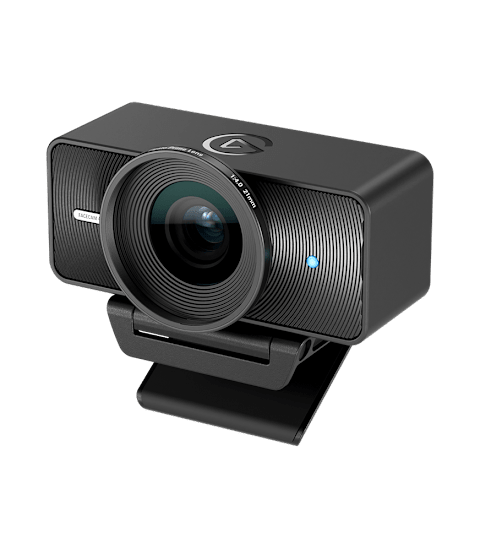
Every modern laptop already has a camera built into the lid, so the question of whether to buy an external webcam is really a question of how much video quality matters to you and how often you're on camera. For a handful of monthly calls, the built-in camera is probably fine. For daily video meetings, client-facing calls, or any kind of streaming or recording, the gap between a laptop's built-in camera and a dedicated external webcam is large enough that it changes how you're perceived on screen. This guide breaks down exactly where that gap comes from and when it's worth closing.
Why laptop cameras look worse, technically
The core issue is physical space. A laptop lid is only a few millimeters thick, which limits the built-in camera to a tiny sensor — often around 2 megapixels — and a small, simple lens. External webcams aimed at creators and remote workers can afford a much larger sensor and multi-element glass lens because they're not fighting for space inside a laptop chassis. The Elgato Facecam 4K, for example, uses a 1/1.8" Sony STARVIS 2 CMOS sensor shooting at 4K/60fps — that sensor alone is many times larger than what fits in a laptop lid, and sensor size is the single biggest factor in image quality, especially in anything other than perfect lighting.
Most built-in laptop cameras also cap out at 720p or a soft 1080p with heavy compression to keep file sizes and bandwidth usage low, since video calling software was originally built around saving bandwidth rather than maximizing quality. A dedicated external webcam like the Logitech Brio 500 targets 1080p at 30fps (or 720p at 60fps) as its baseline, with cleaner encoding and a wider field of view that can be narrowed for a more flattering, less "fisheye" framing.
Low light is where the difference is most obvious
Video calls happen at all hours, often in home offices with a single overhead light or a window that's gone dark by late afternoon. This is exactly where sensor size and software processing matter most. A tiny laptop sensor has very little light-gathering area, so in dim conditions it has to boost gain electronically, which introduces visible grain and smearing. Larger external webcam sensors gather more light per pixel and need less aggressive gain boosting, so the image stays cleaner. Software features help too — Logitech's RightLight processing and similar auto-exposure systems actively balance a backlit window or a dim room in ways that most laptop camera firmware doesn't attempt.
If you work from a dim room, near a bright window, or after sunset regularly, this single factor alone can justify an external webcam more than resolution numbers do — a sharp 4K image in bad light still looks worse than a well-exposed 1080p image.
Framing, angle, and field of view
Built-in cameras are fixed to your screen's viewing angle, which on a laptop usually means looking slightly up your chin or nose depending on how the lid is tilted — not a flattering angle, and one you can't easily change without raising the whole laptop on a stand. An external webcam clipped to the top of an external monitor sits at a more natural eye-level height, and most external webcams also offer an adjustable or software-cropped field of view so you're not stuck with either an oddly wide or oddly tight shot. Some, like the Brio 500, let you switch between a wide 90° view for showing your desk setup and a tighter 65° view for a more traditional headshot framing, controlled entirely in software.
Autofocus and depth of field
Built-in laptop cameras typically use fixed-focus lenses tuned for a single average distance, which is fine since your face rarely moves much relative to the screen. External webcams vary: some use fixed focus tuned specifically for typical desk distances (this avoids the visible "hunting" some autofocus systems do when something passes in the foreground), while others use true autofocus glass elements that can rack focus if you lean in or reach for something on your desk. Neither approach is universally better — autofocus is nice for people who move around a lot on camera, while a well-tuned fixed focus avoids distracting refocus hunting during a stream or a still, seated call.
Microphone quality: an underrated factor
A webcam purchase decision often comes down to the camera itself, but most external webcams also carry noticeably better microphones than a laptop's built-in array, which is usually positioned near the keyboard and picks up typing noise directly. External webcams mount the mic closer to your mouth and further from the keyboard, and many — like the Logitech Brio 500's dual noise-reduction microphones — apply active noise suppression tuned specifically for voice calls. If your laptop's built-in mic makes you sound distant or picks up every keystroke during meetings, that alone can be worth the upgrade even before you factor in video quality.
Software features you don't get from a laptop camera
Beyond raw hardware, most external webcams ship with companion software that laptop cameras rarely match. Auto-framing features track your position and recenter the shot if you shift in your chair, which matters more than it sounds during long meetings where you're leaning to grab a coffee or reaching for a notebook. Background blur and virtual backgrounds are available on many laptops too, but tend to render more cleanly on external webcams because the software has a cleaner, higher-contrast source image to work with — edge detection around hair and shoulders is noticeably worse on a noisy, compressed built-in feed. A physical privacy shutter is another small but genuinely useful feature that most laptops still don't build into the lid itself, giving you a hardware guarantee — not just a software toggle — that the camera isn't capturing anything when you don't want it to.
Streaming and recording: a different calculus
For anyone streaming, recording tutorials, or doing anything beyond basic video calls, the case for an external webcam gets much stronger. Software like OBS Studio and streaming platforms expect a dedicated capture device with configurable resolution, frame rate, and exposure settings that most laptop camera drivers simply don't expose. A camera like the Facecam 4K, built around a larger sensor and a proper lens filter thread for accessories, is designed from the ground up for that use case, whereas laptop cameras are an afterthought bolted onto a screen bezel. For a broader breakdown of what to prioritize when actually shopping, see our full webcam buying guide.
So when is the built-in camera actually fine?
If you're on camera rarely, in a well-lit room, for internal calls where nobody's judging your video quality, the built-in camera is genuinely fine — don't feel pressured to buy a webcam you don't need. But if you're on camera daily, meet clients or do interviews, work in inconsistent lighting, or plan to stream or record anything at all, the physical limitations of a laptop-lid camera (tiny sensor, fixed unflattering angle, weak low-light handling, mediocre microphone) are not something software updates can fix. That's a hardware ceiling, and it's exactly the gap external webcams like the Facecam 4K and Brio 500 exist to close.