Logitech Brio 500 Review: The Webcam Remote Work Actually Deserves
8.5/10
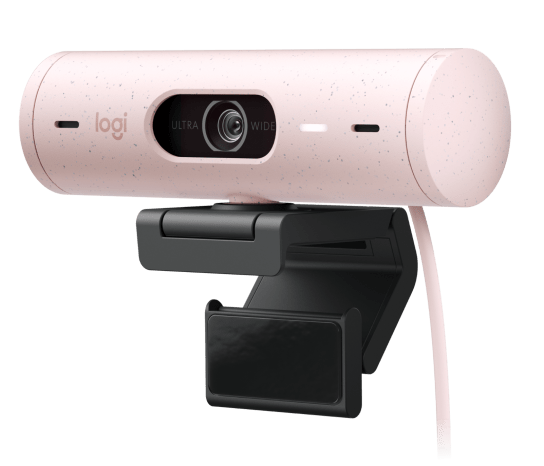
Webcams spent most of the last decade as an afterthought — a $20 accessory bundled cheaply because nobody video-called often enough to justify spending more. That changed permanently once remote work and video meetings became a daily reality for millions of people, and Logitech's Brio 500 is squarely a product of that shift: a genuinely thoughtful webcam built for people who now spend real hours per week on camera.
Image quality: good sensor, better software
The Brio 500 uses a 4MP sensor capable of 1080p video at 30fps, or 720p at a smoother 60fps for users who prioritize motion fluidity over resolution — a sensible option for anyone doing more casual, high-movement video content rather than a static talking-head meeting feed. On raw sensor specs alone, this isn't a class-leading number in 2026; several competitors now push 4K sensors even at similar price points. What separates the Brio 500 is Logitech's RightLight 4 processing, an auto-exposure and white-balance system that does real, visible work correcting for backlit windows, dim rooms, and mixed lighting — the situations that make most webcams look genuinely bad regardless of raw resolution.
In practice, RightLight 4 is the difference between a webcam that looks fine in a well-lit studio and one that looks reasonable in an actual home office with a window behind the desk and an overhead light that's slightly too warm. For most buyers, that adaptive processing matters more day-to-day than another megapixel or two of static resolution would.
Framing and field of view
A 90-degree diagonal field of view is the default, configurable down to 78 or 65 degrees depending on how much of the background you want visible — useful flexibility for anyone whose home office background isn't meeting-ready and would rather crop tighter around themselves. RightSight auto-framing adds a layer of automatic tracking that keeps you centered in frame as you move or lean, a feature borrowed from Logitech's conference-room hardware line and genuinely useful for anyone who gestures while talking or shifts position over a long call.
Microphones and audio
Dual noise-reduction microphones are built in, and while no built-in webcam mic is going to compete with a dedicated USB microphone or headset mic, the Brio 500's pair does a respectable job of suppressing keyboard clatter and background hum for casual meetings where a separate microphone isn't already part of the setup. For anyone doing serious podcasting, streaming, or voice work, this remains a "good enough for a quick call" microphone rather than a primary audio solution — pairing it with a dedicated mic or a headset with a boom mic like the SteelSeries Arctis Nova Pro Wireless will noticeably improve voice quality for anything beyond routine video calls.
Privacy and everyday design
A physical privacy shutter slides over the lens when not in use — a small feature that matters more than it sounds given how much security reporting has focused on webcam exploits and unauthorized access over the past several years. Being able to physically confirm the camera can't see anything, rather than trusting a software indicator light, is a meaningfully different level of reassurance. Show Mode, a feature that flips the camera downward to show an overhead view of a desk or physical object, is a nice addition for anyone doing occasional product demos, sketching, or unboxing on camera without needing a second camera angle.
The mounting clip attaches securely to most monitor tops, including curved panels, and a standard tripod thread on the base means it also works on a desktop stand or tripod for anyone whose desk setup doesn't have a monitor to clip onto.
Where it sits in Logitech's lineup
The Brio 500 sits below Logitech's higher-end Brio 4K models, which push true 4K resolution and HDR support at a noticeably higher price, and above the company's budget C-series webcams that skip most of the software-driven image processing entirely. For the specific buyer who wants meaningfully better video quality than a laptop's built-in camera and cares more about consistent, well-lit footage than chasing a 4K resolution spec, the Brio 500 sits in a genuinely well-considered middle tier rather than feeling like a compromise between the two extremes.
Against a streaming-focused alternative
It's worth directly comparing the Brio 500's meeting-first design philosophy against something built for a different audience: Elgato's Facecam 4K, aimed squarely at streamers and content creators rather than remote workers. Where the Brio 500 leans on automatic processing to look good with zero configuration, the Facecam 4K exposes manual controls — fixed focus options, uncompressed video output — that streamers want for consistent, controllable framing across long broadcast sessions. Neither webcam is objectively better; they're built for genuinely different workflows. Someone jumping between video calls all day wants the Brio 500's "it just works" auto-adjustment, while someone streaming for three hours with consistent lighting wants the Facecam 4K's manual control and willingness to skip the auto-corrections that can occasionally introduce inconsistency across a long session.
Software and connectivity
Logi Tune, Logitech's companion software for the Brio 500, provides access to the RightLight and RightSight toggles, field-of-view adjustment, and basic image tuning (brightness, contrast, color saturation) without needing to dig through Windows' native camera settings. The webcam connects over USB-C with a USB-A adapter included in the box, covering both modern and older ports without forcing a separate cable purchase — a small but appreciated detail given how often USB-C-only peripherals arrive without a legacy adapter included. Plug-and-play functionality works without installing Logi Tune at all, with the software layered on as an optional enhancement rather than a mandatory setup step, which is the right way to handle companion software for a peripheral this simple to use out of the box.
Verdict
The Brio 500 is a strong pick for remote workers, hybrid-meeting regulars, and anyone upgrading from a laptop's built-in camera who doesn't need flagship 4K resolution. Its real strength is software-driven image quality rather than raw specs, which shows up exactly where it matters most: making you look reasonably good on camera in an ordinary home office, not a studio.