Elgato Facecam 4K Review: Built for Streamers Who Are Done With Webcam Compromises
8.6/10
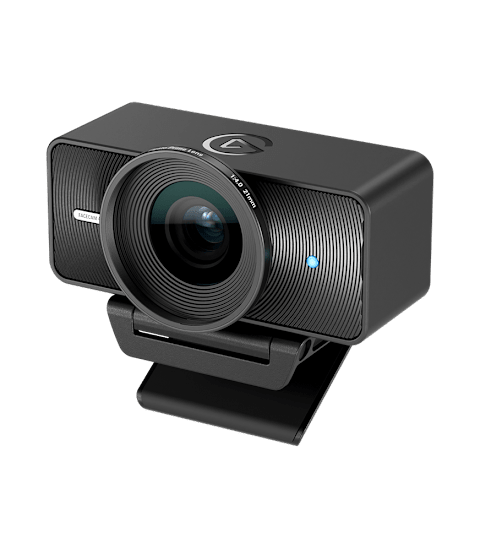
Most built-in laptop webcams, and even a lot of dedicated USB webcams, use small sensors optimized for videoconferencing rather than genuinely good image quality. The Elgato Facecam 4K takes the opposite approach, building around a proper 1/1.8" Sony STARVIS 2 CMOS sensor — a sensor size closer to what you'd find in a dedicated camera than a typical webcam — to deliver noticeably better image quality across a wide range of lighting conditions.
Maximum resolution is 4K at 60 frames per second, which matters less for the resolution number itself (most viewers watch at 1080p) and more for what a larger sensor and higher native capture resolution enable: better detail retention even after downscaling, better low-light performance because the sensor is gathering more light per pixel, and a level of dynamic range that keeps a face properly exposed even against a bright window — a scenario that regularly blows out the image on cheaper webcams entirely.
The lens uses a 49mm filter thread, an unusual but welcome inclusion that lets photography and videography enthusiasts attach ND or diffusion filters the same way they would on a mirrorless camera lens, rather than being stuck with whatever fixed optical coating the manufacturer chose. Focus is fixed but tuned across a practical desk-distance range, avoiding the hunting and re-focusing "breathing" artifacts that autofocus webcams sometimes introduce mid-call.
Elgato's Camera Hub software provides manual control over exposure, white balance, focus point, and field of view cropping, along with the ability to save multiple scene presets — useful if you record from more than one desk position or lighting setup. The Facecam 4K also integrates cleanly with Elgato's Stream Deck ecosystem if you already use one for stream or call control.
Not a plug-and-play convenience camera
Where the Facecam 4K asks more of the user than a typical webcam is lighting: because it doesn't aggressively auto-brighten a dim room the way built-in webcam processing usually does, results genuinely depend on having at least a basic key light or a well-lit room facing the camera. This is a deliberate trade-off — aggressive auto-brightening is exactly what introduces the grainy, washed-out look of budget webcams in anything less than very bright light, and the Facecam 4K instead trusts the larger sensor and lets the user (or a proper light) do the rest.
Who it's for
Streamers, YouTubers, and remote professionals who already invest in decent lighting and want camera quality that matches the rest of a well-built desk setup — alongside good audio and a clean monitor arrangement — will get the most out of this camera. If you're looking for a webcam that fixes bad lighting for you automatically with zero setup, a simpler, cheaper webcam with more aggressive auto-processing may actually serve that specific need better.
Verdict
The Facecam 4K is one of the best dedicated webcams available for anyone serious about their on-camera image, and a clear step up over built-in laptop cameras or general-purpose USB webcams in our webcam comparison.
Setting it up properly
Getting the most out of the Facecam 4K's larger sensor requires a small amount of setup effort that a plug-and-play webcam doesn't: positioning a key light (even an inexpensive LED panel) at roughly eye level facing you, rather than relying on overhead room lighting alone, makes a dramatic difference in image quality, since the camera's more neutral, less aggressive auto-exposure processing means it won't compensate for bad lighting the way a phone camera or built-in webcam typically does. Elgato's Camera Hub software lets you manually lock exposure and white balance once you've found a good setting, preventing the image from subtly shifting brightness or color temperature every time something changes in the background — a common annoyance with fully automatic webcams during long calls or streams.
Mounting and desk integration
The Facecam 4K ships with a standard 1/4"-20 tripod thread rather than being locked to a monitor-clip mount, which means it can be mounted on a proper desk arm, a small tripod, or a monitor-top clip depending on your setup — a small but meaningful flexibility difference from webcams that only clip onto a monitor bezel and can't be repositioned for a more flattering angle. Cable length and a braided USB-C to USB-A cable are adequate for most desk configurations, including routing behind a monitor or through a desk-mounted docking station.
Video call platforms and compatibility
As a standard UVC-compliant USB webcam, the Facecam 4K works without additional drivers across Zoom, Teams, Google Meet, OBS, and most streaming and conferencing software, appearing as a selectable camera source the same way any webcam would, with the Camera Hub app running alongside for deeper manual controls rather than acting as a required intermediary.
Comparing to a smartphone as a webcam
Using a smartphone as a webcam (via apps that repurpose a phone's camera over USB or Wi-Fi) has become a popular budget alternative for better-than-built-in image quality, and can produce comparable or even higher raw resolution than the Facecam 4K in good lighting. Where a dedicated webcam like this one wins out is reliability and dedicated purpose — no risk of a phone call or notification interrupting your video feed, no battery drain concern, and a camera that's always mounted and ready rather than needing to be set up each session.
Frequently asked
Does the Facecam 4K work well in a completely dark room with no additional lighting? No — like most cameras with this sensor size and processing philosophy, it needs at least modest ambient or key lighting to produce a clean image; in very low light without a light source, image noise increases noticeably, similar to how a DSLR or mirrorless camera behaves without adequate light. Is 4K60 output necessary, or does 1080p streaming look just as good from this camera? Even when streaming or calling at 1080p, footage captured from the larger 4K sensor and downscaled tends to look cleaner and more detailed than footage from a native 1080p sensor, because downscaling from a higher native resolution reduces noise and preserves more fine detail — so the 4K sensor is valuable even if your final output resolution is lower. Does it work as a standard document/overhead camera too? With the included mounting flexibility and manual focus range, many users do successfully use it for overhead desk-cam or document-camera purposes, though it isn't purpose-built for macro-range close focusing the way a dedicated document camera would be.