Logitech Logitech Brio 505 Business Webcam
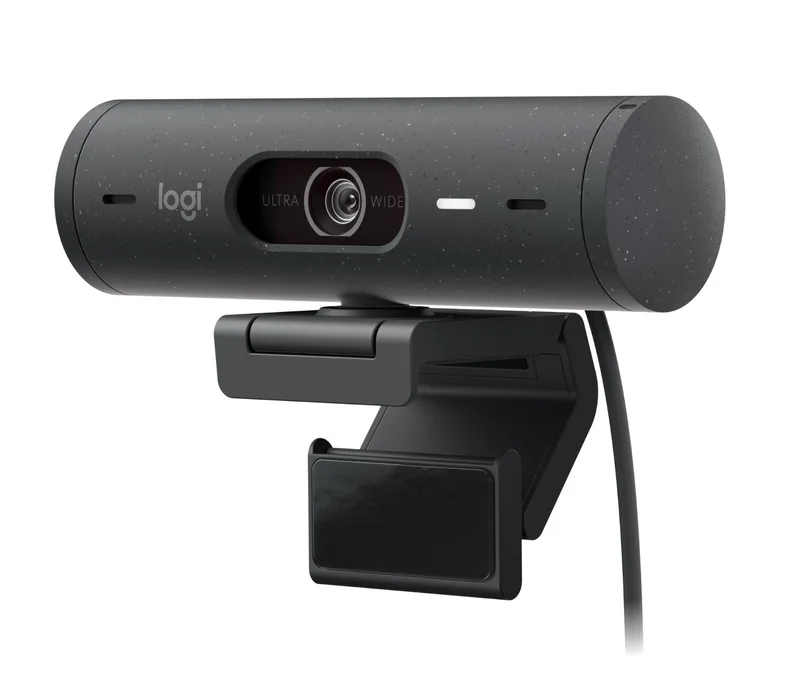
A business-oriented Full HD webcam with a 4 MP sensor, three selectable fields of view, autofocus glass lens, RightLight 4 with HDR, auto-framing, Show Mode, a privacy shutter and a three-year warranty.
Specifications
| Resolution | 1080p at 30 fps; 720p at 30 or 60 fps |
|---|---|
| Sensor | 4 MP |
| Field of View | Diagonal 90 / 78 / 65 degrees (selectable) |
| Zoom | 4x digital |
| Focus | Autofocus, glass lens |
| Light Correction | RightLight 4 with HDR |
| Framing | RightSight auto-framing and Show Mode (via Logi Tune) |
| Microphones | Stereo, range up to 1.22 m (4 ft) |
| Privacy | Integrated physical shutter |
| Connection | USB-C, attached 1.5 m cable, plug and play |
| Dimensions | Webcam 110 x 31.5 x 31.5 mm (W x H x D) |
| Weight | 121 g (webcam with mount and cable) |
| Certifications | Microsoft Teams, Zoom, Google Meet, Works With Chromebook (TAA compliant graphite model) |
| OS Support | Windows 8 or later, macOS 10.10 or later, ChromeOS |
| Colors | Graphite, off-white, rose |
| Warranty | 3-year limited hardware |
| Part Number | 960-001522 (graphite, TAA compliant) |
The Logitech Brio 505 is a business webcam that sits in Logitech's workplace range rather than its consumer shop line, although it looks and behaves much like a consumer product. Logitech describes it as a Full HD 1080p webcam with light correction, auto-framing and Show Mode, built for hybrid meetings and certified for the big video platforms. This guide is written from Logitech's own product page and its structured specification data. We have not tested the camera, so every figure below is the maker's, and where the page is silent we say so instead of guessing.
Picture quality and what the sensor does
The page lists a 4 MP camera and a maximum of 1080p video at 30 frames per second, with 720p available at 30 or 60 frames per second. That is a clear statement of what the camera is for: a sharp, steady picture for calls, not high-frame-rate streaming or 4K recording. The lens is glass and the focus is automatic. Logitech's headline feature is RightLight 4, which it describes as automatically adjusting to any lighting so people look natural even in poor light, and the page's FAQ adds that it uses HDR to produce a clear image from low light to direct sunlight. If you want to understand why light handling matters more than the resolution number, our article on webcam sensor size and low-light performance is a useful companion.
Field of view, zoom and framing
The camera supports three diagonal fields of view: 90, 78 and 65 degrees. A wider angle fits more of the room and more of the people in it; a narrower angle looks more like a head-and-shoulders portrait and crops out a cluttered background. There is also a 4x digital zoom. Two software features need the free Logi Tune application. RightSight auto-framing keeps the camera centred on you so you can stand or move during a meeting without leaving the frame, and Show Mode lets you tilt the camera down to show sketches, work in progress or objects on your desk. Logitech notes that the blurred background you may see in meetings is created by the video platform, not by the camera, so do not expect a built-in background effect.
Microphones and privacy
The built-in microphone is listed as stereo, with a range of up to 1.22 metres (4 feet), and the page's marketing text calls it a dual noise-reducing microphone setup. That is sensible for a person sitting in front of a laptop or monitor, and it will not replace a headset or a room microphone for a larger space. The privacy feature is an integrated, physical shutter that completely blocks the lens when you do not wish to be seen, which is simpler and more trustworthy than a software switch.
Connection, mounting and size
The camera connects with an attached USB-C cable of 1.5 metres (4.92 feet) and is plug and play. Logitech's mounting answer is an adjustable clip that sits the camera securely on top of a monitor. The webcam measures 110 millimetres wide by 31.5 millimetres high and 31.5 millimetres deep, and the whole package of webcam, mount and cable weighs 121 grams. The page also lists a separate set of dimensions that appears to belong to the clip, but it does not label them clearly, so we leave those out. Colours shown on the product page are graphite, off-white and rose, and the graphite model is a TAA-compliant part with the number 960-001522. The camera works with Windows 8 or later, macOS 10.10 or later and ChromeOS, and the page notes that Windows 8.1 or later is needed for resolutions above 1080p, a claim that sits oddly beside the 1080p ceiling listed elsewhere. Logi Tune is not available on ChromeOS.
Business certification and management
This is the part that separates the Brio 505 from its consumer siblings. The camera is certified for Microsoft Teams, Zoom, Google Meet and Works With Chromebook, and the page lists TAA compliance for the graphite model. Logitech Sync can show a central view of device deployment from desktops to conference rooms so IT teams can keep firmware up to date, with Logi Tune installed on individual devices. For a home user none of that matters. For an office that buys dozens of cameras and wants a consistent, supportable fleet, it is the reason to pick a business model. The warranty is three years limited hardware, which is longer than the one-year terms that Logitech lists on some of its consumer keyboards and mice.
How it compares with the consumer models in our database
The closest sibling is the Logitech Brio 500, which lists the same 4 MP sensor, the same 1080p at 30 fps ceiling with 720p at 60 fps, the same 90, 78 and 65 degree fields of view, an autofocus glass lens, RightLight 4, RightSight auto-framing, a privacy shutter and Show Mode. On paper the two cameras are almost identical, and the differences are in the positioning: the 505 is sold through the business channel with platform certification and device management, and it lists a stereo microphone. Our Brio 500 review describes how that camera behaves in everyday use, and the same picture-quality character is a fair expectation here, although the 505 has not been tested. Above both sits the MX Brio, which lists an 8.5 MP sensor, 4K at 30 fps, RightLight 5 and a 1/4-inch tripod thread. If you need 4K or higher frame-rate video, the 505 is not that camera.
Who it suits and what to check first
The Brio 505 suits people who want a reliable, no-fuss camera for video calls, and organisations that need certified, manageable hardware. It does not suit streamers who want 60 frames per second at 1080p or manual exposure control, because the page lists neither. Before buying, check how you will mount it, whether your monitor is thin enough for the clip, and whether you want the optional software features that need Logi Tune. Our webcam buying guide walks through the questions to ask, and the comparison with built-in laptop cameras explains why even a modest external webcam is usually a step up. The wider webcam category shows the alternatives.
What the page does not say
Logitech's page does not state a price outside the shop widget, does not give a sensor size or aperture, and does not publish low-light or HDR test data. It also leaves some details to the PDF datasheet, which we have not reproduced. Treat the numbers above as the manufacturer's specification, and read independent testing if picture quality in your own room is what decides the purchase.