Insta360 Insta360 Link
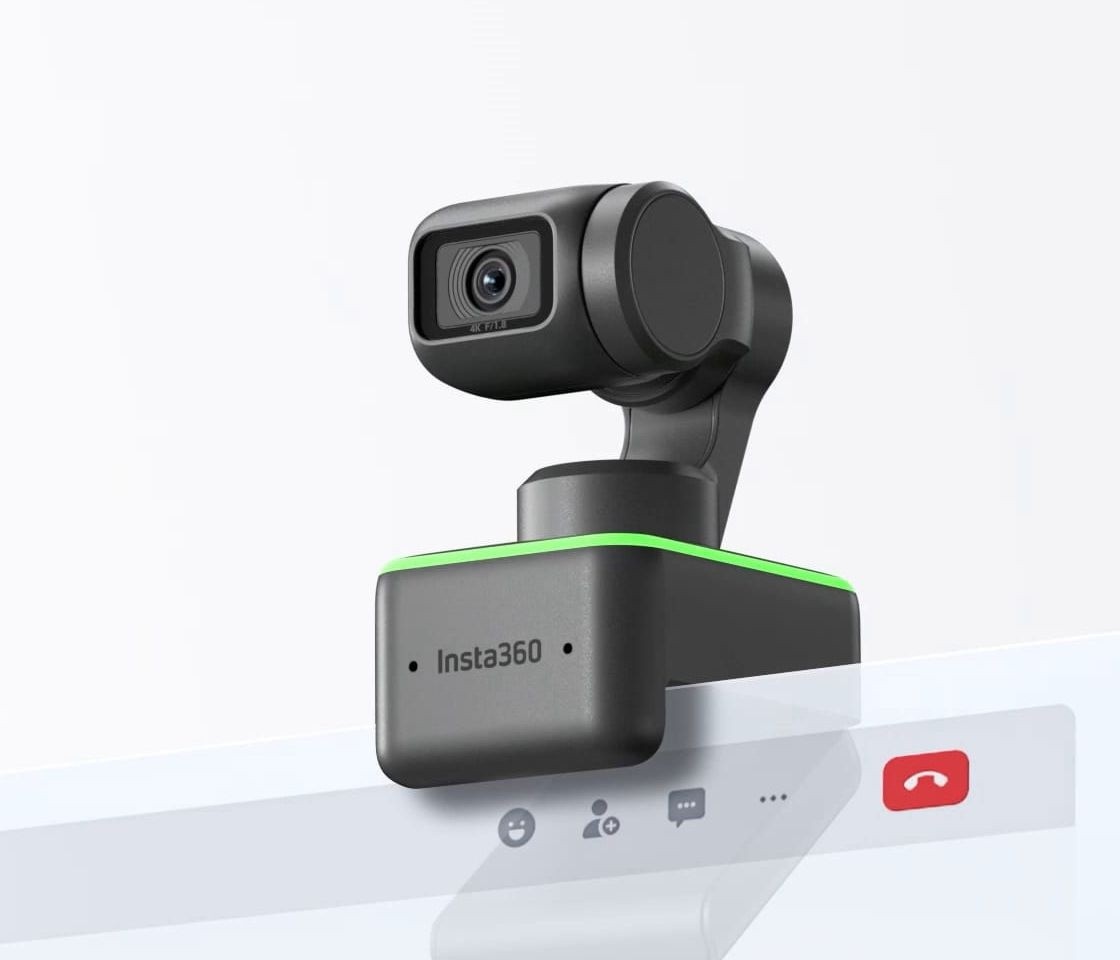
A 4K webcam on a three-axis gimbal with AI tracking, phase-detection autofocus, a 1/2-inch sensor, DeskView, Whiteboard, Overhead and Portrait modes, gesture control and an automatic privacy position.
Specifications
| Resolution | 4K at 24/25/30 fps, 1080p at 24/25/30/50/60 fps, 720p at 24/25/30/50/60 fps |
|---|---|
| Sensor | 1/2 inch (per Insta360 page text) |
| Lens | F1.8, 26 mm equivalent, fixed field of view 79.5 deg diagonal / 67 deg horizontal |
| Autofocus | Phase detection (PDAF), 10 cm to infinity |
| HDR | 1080p and 720p at 24/25/30 fps only |
| Gimbal | 3-axis with AI tracking (with or without AI zoom) |
| Modes | Portrait (9:16), Whiteboard, DeskView, Overhead |
| Zoom | Digital, up to 4x |
| Exposure | ISO 100-3200, shutter 1/8000 to 1/30 s, EV +/-3, white balance 2000-10000 K |
| Encoding | H.264, MJPEG; UVC 1.1, UAC 1.0 |
| Audio | Dual noise-canceling microphones |
| Connection | USB-C to USB-C cable (USB 2.0) or Type-C to Type-A adapter, 5 V / 1 A |
| Dimensions | 63 x 35 x 45 mm |
| Weight | 106 g |
| Mounting | Built-in clip for monitor, 1/4 inch tripod thread |
| Software | Link Controller (Windows 8 or later, 8.1+ for 4K; macOS 10.13 or later) |
| Operating Temperature | 0 to 40 C |
The Insta360 Link is the webcam that introduced the idea of a camera that moves. Instead of a fixed lens clipped to the top of a monitor, it carries a small three-axis gimbal, an AI tracking system that follows your movement and a set of modes that turn the same camera into a desk camera, a whiteboard camera or an overhead camera. Insta360 sells it as an AI-powered 4K webcam for calls, teaching and live streaming. This guide is built from Insta360's own product and specification page. We have not tested the camera, so the figures are the maker's, and where the page gives no number we say so.
4K video, sensor and lens
The Link records 4K at 24, 25 or 30 frames per second, 1080p at up to 60 frames per second and 720p at up to 60 frames per second, using H.264 or MJPEG encoding. Insta360 calls its sensor best-in-class at 1/2 inch, a size above the very small chips found in most webcams, and the lens is listed as F1.8 with a 26 mm equivalent focal length and a fixed field of view of 79.5 degrees diagonal (67 degrees horizontal). Autofocus uses phase detection (PDAF), which the company says focuses much faster than typical webcams, over a range from 10 centimetres to infinity. Exposure can be adjusted by plus or minus 3 EV, ISO runs from 100 to 3200, the shutter from 1/8000 to 1/30 of a second and white balance from 2000 to 10000 K. Digital zoom goes up to 4x. For a deeper explanation of why sensor size matters in dim rooms, see our article on webcam sensor size and low-light performance.
HDR and its limits
The Link has an HDR mode that balances highlights and shadows, so a bright window behind you does not blow out the background. The page is specific about a limitation that is easy to miss: HDR is supported only for 1080p at 24, 25 and 30 frames per second and 720p at 24, 25 and 30 frames per second. It is not available at 4K or at 50 and 60 frames per second. If you want HDR, you therefore trade away both the highest resolution and the highest frame rate, and that is worth knowing before you plan a streaming setup around it.
The gimbal and AI tracking
This is what makes the camera different. A three-axis gimbal lets the lens pan, tilt and roll, and an AI tracking algorithm follows you as you move, with automatic zoom and framing so you stay centred. The page says tracking works with and without AI zoom. Gesture control lets you manage the camera without touching it: a hand signal enables AI tracking, zooms in or out and turns on Whiteboard mode, with no clicks needed. When the camera has been inactive for ten seconds, the gimbal points the lens downwards, which Insta360 describes as built-in privacy protection. There is no physical shutter described on the page, so the downward position is the privacy mechanism.
Four modes beyond the normal view
DeskView mode lets you mount the camera on your screen, switch the mode on and have it adjust to show your tabletop, useful for presenting objects or documents. Whiteboard mode uses algorithms to focus on and square off a whiteboard so the audience gets a clearer view. Overhead mode, used with the camera on a stand, records squared-off, level footage from above for unboxing, sketching or playing an instrument. Portrait mode shoots uncropped 9:16 video by rotating the gimbal head, which Insta360 says gives better quality for phone viewing than cropping a landscape frame. These modes turn one device into several, and they are the main reason to prefer it over a fixed 4K webcam.
Audio, connection and software
Two noise-canceling microphones reduce background noise, and automatic gain control raises your voice. The camera connects by a USB-C to USB-C cable at USB 2.0 speed or through a Type-C to Type-A adapter, draws 5 V at 1 A and follows the UVC 1.1 and UAC 1.0 standards so it works as a plain webcam without drivers. A single touch key sits on the body. The Link Controller desktop software adjusts brightness, exposure, gimbal position and more. Requirements are Windows 8 or later (8.1 or later for 4K), macOS 10.13 or later and 2 GB of RAM for 1080p or higher (1 GB for 720p). Insta360 says the camera is certified for Zoom and compatible with Microsoft Teams, Skype, Google Meet and other apps, and that the stated resolution is subject to platform limits.
Size, mounting and operating range
The Link measures 63 by 35 by 45 millimetres and weighs 106 grams. It has a built-in clip for mounting on a monitor and a 1/4-inch mounting point for tripods. Operating temperature is 0 to 40 degrees Celsius, and the unit has no battery. Because the gimbal head sticks out above the clip, check that your monitor is thick enough and that the camera does not collide with a monitor arm or shelf when it rotates.
Where it sits in our database
The nearest relative is the Insta360 Link 2 and Link 2C, which lists the same 1/2-inch class sensor, F1.8 lens, 26 mm equivalent and 79.5 degree fixed field of view, but a two-axis gimbal on the Link 2 (none on the 2C), HDR at all resolutions and frame rates, a weight of 101.5 grams and software requiring Windows 10 or macOS 11. Set against it, the original Link has the third gimbal axis and the portrait-by-rotation behaviour, but its HDR is limited to 1080p and 720p up to 30 frames per second and it needs older minimum operating systems. Against the Logitech MX Brio, which lists an 8.5 MP sensor, 4K at 30 frames per second, selectable 90, 78 and 65 degree fields of view and no gimbal, the Link offers movement and modes instead of a wider field. Our webcam buying guide and the comparison with built-in laptop cameras help you decide whether you need that, and the whole webcam category is open for browsing.
What the page does not say
Insta360's page lists no price, no launch date and no warranty term, and it publishes no independent low-light or tracking results. It also does not say how fast the gimbal moves or how well the tracking copes with several people. Use this entry to check the facts that decide fit: the USB 2.0 connection speed, the HDR limits, the clip and gimbal size and the software requirements. Then read independent testing if tracking quality in your room is what matters.