Insta360 Insta360 Link 2 (and Link 2C)
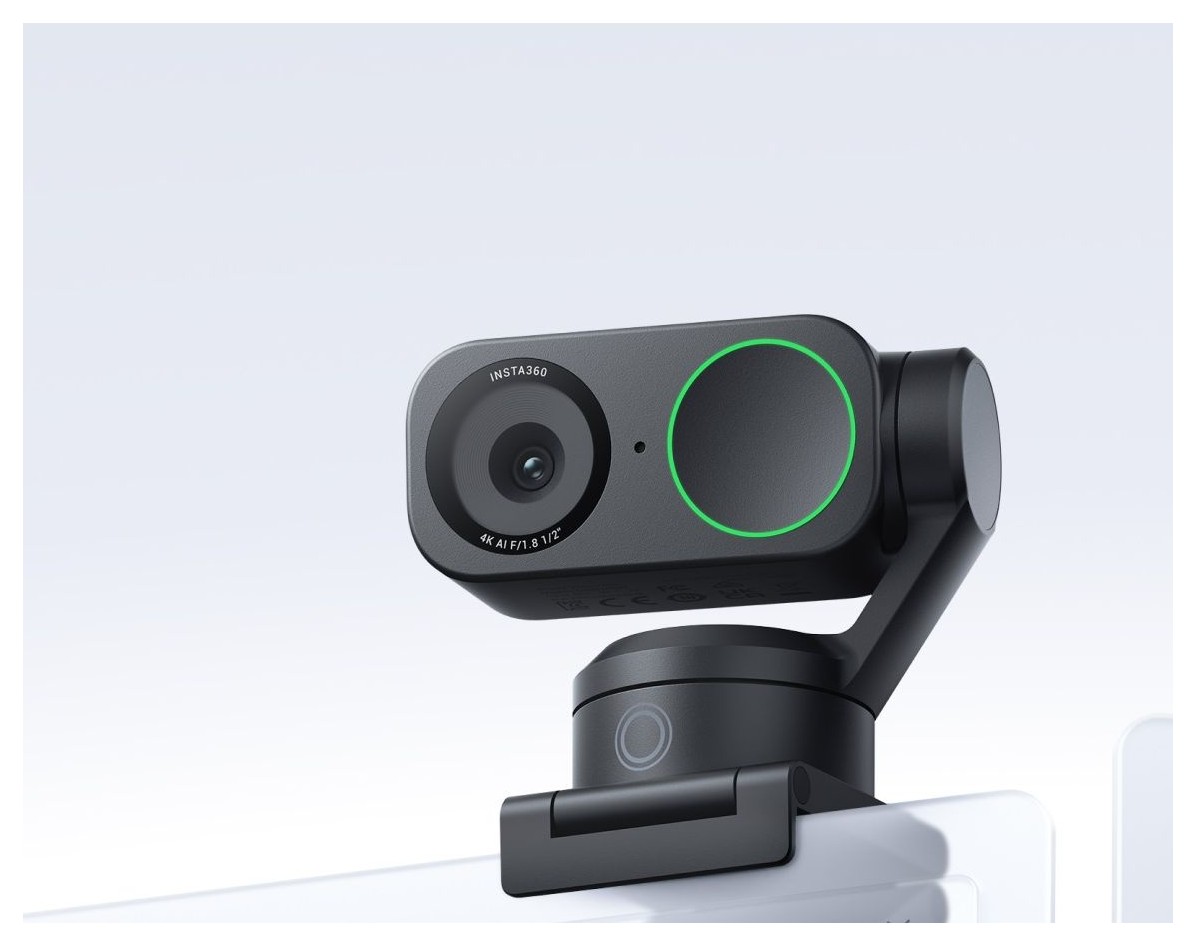
A 4K webcam with a 1/2-inch sensor, phase-detection autofocus and AI noise cancelling, sold as the Link 2 with a two-axis tracking gimbal or the gimbal-free Link 2C.
Specifications
| Resolution | 4K at 30/25/24 fps, 1080p up to 60 fps, 720p up to 60 fps |
|---|---|
| Sensor | 1/2-inch |
| Lens | F1.8, 26 mm equivalent, fixed 79.5 deg diagonal (67 deg horizontal) |
| Autofocus | Phase detection (PDAF), 10 cm to infinity |
| Zoom | Digital, up to 4x |
| HDR | All resolutions and frame rates |
| Gimbal | Link 2: 2-axis; Link 2C: none (Auto Framing) |
| Audio | AI noise cancelling with Voice Focus, Voice Suppression and Music Balance modes |
| Connection | USB-C cable (USB 2.0) or USB-C to USB-A adapter, 5 V / 1 A |
| Weight | Link 2: 101.5 g (166.5 g with magnetic mount); Link 2C: 46.5 g (111.5 g with mount) |
| Dimensions | Link 2: 71.3 x 58.9 x 38 mm; Link 2C: 62.7 x 30.2 x 26 mm |
| Software | Link Controller (Windows 10+, macOS 11+) |
The Insta360 Link 2 is the second generation of Insta360's desktop webcam, and it arrives as a pair: the Link 2, which carries a small two-axis gimbal that physically turns the camera to follow you, and the Link 2C, a fixed, smaller camera that keeps you in frame digitally. Both share one product page, one sensor, one lens and one piece of desktop software, so this guide covers them together and points out every place where they differ. Everything below comes from Insta360's own product page and its specification table. Insta360 lists no price there, so we do not quote one, and we do not add test results of our own; where a claim is marketing, we say so.
The picture: 4K, a 1/2-inch sensor and a bright lens
Both models record up to 4K at 30, 25 or 24 frames per second, 1080p at up to 60 fps, 720p at up to 60 fps and a 360p fallback. Insta360 puts a 1/2-inch sensor behind an F1.8 lens with a 26 mm equivalent focal length, and says the sensor captures more light and detail for lifelike images. That claim is the reason to read our explanation of webcam sensor size and low-light performance before you buy: a bigger sensor helps most in the ordinary, slightly dim room where most people actually take calls.
The field of view is fixed at 79.5 degrees diagonal (67 degrees horizontal). That is a natural, not-too-wide framing, closer to a portrait lens than to the wide-angle view of a conference-room camera. Digital zoom goes up to 4x. HDR is offered at every resolution and frame rate, exposure compensation runs plus or minus 3 EV, ISO spans 100 to 3200, the shutter runs from 1/8000 to 1/30 of a second and white balance can be set between 2000 K and 10000 K. Those are the manual controls you will find in the Link Controller software, and they are more than most webcams expose.
Autofocus and background blur
Insta360 uses phase-detection autofocus (PDAF), which it describes as faster and more accurate, working from 10 cm (4 in) to infinity. A short focus distance matters for a desk camera because it lets you hold up a product, a sketch or a document close to the lens.
The page also advertises a feature called Natural Bokeh, which uses AI to identify people and adjust the depth of field for a DSLR-like blurred background. The fine print matters here. On Windows, Natural Bokeh needs an NVIDIA GTX 1080 or later, or an RTX 2060 or later, and it does not support AMD graphics; on a Mac it needs an M1 chip or later and does not support Intel chips. The simpler Background Blur and Background Replacer options are more forgiving: they support all NVIDIA GPUs on Windows and macOS 13 or later, while AMD graphics may run into compatibility issues, and Insta360 asks buyers with AMD cards to contact customer service first. It lists a Radeon RX Vega 10, the 780M, the RX 560, RX 6600 and RX 6750 GRE as verified. If your computer is older, treat these effects as a bonus rather than a reason to buy.
What the gimbal changes: Link 2 versus Link 2C
The Link 2 has a two-axis gimbal. In its AI tracking mode the camera physically pans and tilts to follow you around the room, and you can choose whether it follows one person or a group. A Pause-Track Area lets you draw a boundary in which the camera stops tracking, so you can move within a marked zone without the frame chasing you. DeskView mode tilts the camera down automatically to show your desk, which is handy for sketches or hands-on demonstrations.
The Link 2C has no gimbal. It offers Auto Framing instead, which zooms and adjusts digitally to keep one person or a group in view. The Pause-Track Area is only available on the Link 2. DeskView is possible on the 2C too, but you must tilt the mount by hand and then change the angle in the software. Size follows from the mechanics: the Link 2 measures 71.3 x 58.9 x 38 mm and weighs 101.5 g without its magnetic mount (166.5 g with it), while the 2C measures 62.7 x 30.2 x 26 mm and weighs 46.5 g (111.5 g with the mount). Both come in Graphite Black and Arctic White. Which one suits you? If you present standing up, teach, or move about, the gimbal earns its place. If you sit at a desk, the smaller and lighter 2C is enough, and it clips discreetly on a thin monitor bezel.
Whiteboard, portrait mode and gestures
Whiteboard Mode uses AI to keep board content in focus and square it off, and it can be switched on with a gesture, without touching any app. Smart Whiteboard Mode lets you fine-tune the board in Link Controller. Portrait Mode gives you 9:16 video at up to 4K30 when you rotate the camera on a tripod, which suits social video. Gesture control lets you start tracking or framing, zoom in and out and turn Whiteboard Mode on with hand signs from a distance. Virtual backgrounds, creative filters and one-click makeup are also in the software, and you can control the camera from a phone. Virtual Camera, which the software installs automatically, carries several of these effects to other apps, but Insta360 notes that it does not support 50 or 60 fps and that 4K Beautify and Makeup currently work only on macOS.
Audio
Insta360 stresses audio as much as video. AI noise cancelling filters out background sound and offers three modes: Voice Focus, which highlights your voice when you are alone; Voice Suppression, which filters nearby voices and background noise in busy places; and Music Balance, which balances your voice against background music for streams. Insta360 does not publish microphone specifications such as the number of capsules, so we cannot describe the hardware, only the processing. You can also pair the Link 2 with Insta360's separate Wave speakerphone for speaker tracking, but the Wave is sold separately and not covered here.
Privacy, mounting and connection
For privacy, the Link 2 flips its lens down after 10 seconds of inactivity, or you can lower it manually, while the Link 2C has a shutter you slide across the camera. A magnetic mount is in the box for laptops and monitors, and both cameras have a 1/4-inch thread for a tripod. Connection is by USB-C cable (USB 2.0) or a USB-C to USB-A adapter, with power use of 5 V and 1 A. Insta360 says the camera is officially Zoom certified and works with Microsoft Teams, Twitch and other major platforms, noting that the video resolution you get depends on each platform's limits.
Formats and requirements to check
Video is delivered as H.264 or MJPEG, but 4K and 1080p60 portrait mode do not support H.264. Link Controller runs on Windows 10 or later (not ARM-based Windows) and macOS 11 or later; the Virtual Camera needs macOS 13. Insta360 asks for an Intel Core i5 of the fifth generation or later and 8 GB of memory, with some advanced features needing a tenth-generation i5 and 16 GB. Operating temperature is 0 to 40 degrees Celsius. The compatibility footnotes are long, so read them against your own computer before you order.
Who should buy it
Choose the Link 2 if you present, teach or stream on your feet and want a camera that keeps up. Choose the Link 2C if you want the same 4K picture and audio processing in a smaller, lighter body. Skip both if you need a built-in microphone specification, a wide conference-room view, or a low-spec computer that cannot run the effects. To compare with other cameras, our webcam buying guide explains resolution, frame rate and field of view, and our comparison with built-in laptop cameras shows why an external camera helps. For alternatives on the site, look at the Elgato Facecam 4K and the Logitech Brio 4K, or browse all webcams.