Elgato Elgato Facecam Pro
A discontinued but well-documented 4K60 webcam with a 1/1.8-inch Sony STARVIS sensor, an f/2.0 eight-element lens, 90 degree field of view and on-board settings memory.
Specifications
| Status | Discontinued (notice on Elgato page) |
|---|---|
| Sensor | Sony STARVIS CMOS 1/1.8 inch |
| Resolutions | 2160p60, 2160p30, 1080p60, 1080p30, 720p60, 720p30 |
| Lens | f/2.0, 21 mm (full-frame equivalent), 8 elements, anti-reflective coatings |
| Field of View | 90 degrees diagonal |
| Focus Range | 10 cm to infinity |
| Encoding | H.264 or MJPEG (4K60) |
| Connection | USB Type-C, USB 3.0, UVC compatible |
| Dimensions | 116 x 38 x 79 mm (without mount) |
| Weight | 240 g (without mount) |
| Box | Camera, mount with 1/4 inch thread, 180 cm USB-C to USB-C cable, quick start guide |
| Software | Elgato Camera Hub (Windows 11+, macOS 13.3+) |
| Listed Price | US$299.99 |
The Elgato Facecam Pro was introduced as the first webcam able to record true 4K at 60 frames per second. Elgato's own page now carries a notice that the camera is discontinued and no longer available, with a list price of 299.99 US dollars still shown in the header. We include it because the camera remains in circulation on the second-hand market and in many existing streaming setups, and because Elgato's documentation is detailed enough to say a lot about how it works. This guide draws on the product page and its specification table. We have not tested the camera, and the discontinued status is the single most important fact for any buyer.
A large sensor and true 4K at 60 fps
Elgato fits the Facecam Pro with a 1/1.8-inch Sony STARVIS CMOS sensor and says the camera supports native 4K at 60 frames per second without scaling. The supported resolutions in the table are 2160p at 60 and 30 fps, 1080p at 60 and 30 fps and 720p at 60 and 30 fps. A larger-than-usual sensor helps in dim rooms, and Elgato makes this a point: the page promises excellent low-light sensitivity with low noise. High frame rates matter mostly for motion, so 60 fps footage looks smoother when you gesture or move, which is the main reason streamers chase it. Elgato also describes a feature it calls enhanced 1080p color resolution. Instead of reducing the color detail of each pixel as a standard 1080p webcam does, the camera uses the full 2x2 sensor matrix per pixel, so each output pixel carries full color information. This is worth knowing if you intend to run at 1080p most of the time, since you still benefit from the 4K sensor. For general guidance on why sensor size changes low-light results, see our article on webcam sensor size and low-light performance.
The lens
Much of the page is devoted to the optics. The lens has an aperture of f/2.0, a focal length of 21 mm in full-frame terms, eight elements and anti-reflective coatings. Elgato says it uses aspherical elements to maximize sharpness at the edge of the frame, low dispersion glass to reduce chromatic aberration, an infrared cut filter and a scratch-resistant optical glass cover. The company claims ultra-low distortion that removes the need for geometric correction, which would mean the image uses every pixel without the digital stretching common on wide-angle webcams. The field of view is 90 degrees diagonal, wide enough for group shots but not so wide that the picture bends at the edges. The focus range runs from 10 cm out to infinity. Autofocus can be left on or you can lock focus manually, and Elgato says you can even dial focus in down to the centimeter in its software, which is a useful trick for showing a product at a desk.
The image engine and exposure control
Elgato calls the processor inside an image engine and lists a long chain of corrections it applies: demosaicing, black level compensation, defect correction, color correction, white balance, exposure weighting, gain and shutter control, adaptive noise reduction, lens shading and chromatic aberration correction, tone curve mapping, sharpening, flicker compensation, contrast and saturation enhancement and more. Most of this is the ordinary work of any camera, and the list says more about how much processing happens than about how good the result is. What matters in practice is the control you get. Exposure can be set manually or automatically, with average, center-weighted and spot metering. Autofocus metering uses center-weighted or spot modes. Real-time encoding delivers 4K60 in H.264 or MJPEG, whichever your software handles best. That is a sensible design for a camera that sends a lot of data over a single USB connection, though the page does not say how heavy the processing load is on the host computer.
Camera Hub and Stream Deck
The camera is paired with Elgato Camera Hub, which provides pan, tilt and zoom effects without pixelation, exposure control with ISO and shutter speed, contrast, saturation and white balance, variable focus, background replacement and bokeh blur effects and a compact mode that keeps settings close inside apps like OBS Studio, Zoom, Slack and Teams. Stream Deck owners can assign keys to re-frame the shot, change focus and toggle effects. The camera stores your image settings in on-board flash memory, so they survive a restart or a move to another computer, which spares you from reapplying them each time. Elgato also publishes short guides on dynamic range, noise reduction and a low light mode in Camera Hub.
Build and connection
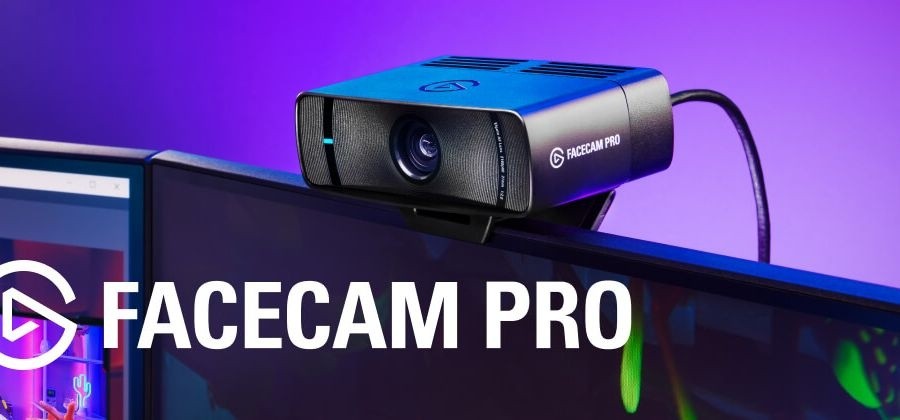
The Facecam Pro connects with a USB Type-C cable, and the listed connection is a USB 3.0 interface that is UVC compatible, so it works as a standard video device without special drivers. The camera measures 116 by 38 by 79 millimetres and weighs 240 grams without the mount. A custom machined heat sink keeps it cool, and the mount can clamp onto a monitor or attach through an industry-standard 1/4-inch thread to a multi mount. The box holds the camera, the mount, a 180 cm USB-C to USB-C cable and a quick start guide. System requirements are Windows 11 or newer on an Intel or AMD processor, or macOS 13.3 Ventura or newer. The page does not describe a microphone, and we note that nothing in the summary suggests a built-in one, so plan on a separate microphone.
The discontinued notice
The notice on the page is blunt: the Facecam Pro has been discontinued, and Elgato suggests its other webcam options. That affects three things. Stock is limited, so prices on resale markets can differ widely from the 299.99 US dollars listed. Warranty and support terms may be different for older units, and the page gives no warranty figure. And newer cameras may offer similar quality for the money. For current options from the same maker, take a look at the Elgato Facecam MK.2 and our review of the Elgato Facecam 4K. If a modern competitor interests you, the Razer Kiyo Pro Ultra is built around an even larger sensor, and our webcam buying guide for home office and streaming helps weigh the choices. All models are listed on our webcams page.
Our take
As a design, the Facecam Pro was ambitious: a big sensor, a carefully specified lens, a flexible image engine, on-board memory and a software suite that treats a webcam like a small camera. The documentation is unusually transparent about its optics, which makes it easy to compare. The obvious drawback is that you can no longer buy it from the maker, so any purchase involves second-hand risk. If you already own one, the page explains how to get more from it. If you are shopping new, treat it as a reference point for what a premium 4K60 webcam should offer, and look at current models before you spend.