Logitech Brio 4K
Logitech's 4K webcam with a 13MP sensor, RightLight 3 with HDR, three selectable fields of view, dual noise-cancelling mics and Windows Hello.
Specifications
| Resolution | 4K/30fps (4096x2160), 1080p/60fps, 720p/90fps |
|---|---|
| Sensor | 13MP |
| Field of View | 90/78/65 degrees diagonal |
| Focus | Autofocus, glass lens, 5x digital zoom |
| Light Correction | RightLight 3 with HDR |
| Microphone | Dual omnidirectional, noise cancelling |
| Windows Hello | Infrared sensor |
| Connection | USB-A or USB-C (plug and play), 1.5 m cable |
| Privacy | Attachable shutter |
| Weight | 85 g |
| Certified | Zoom, Google Meet, Microsoft Teams |
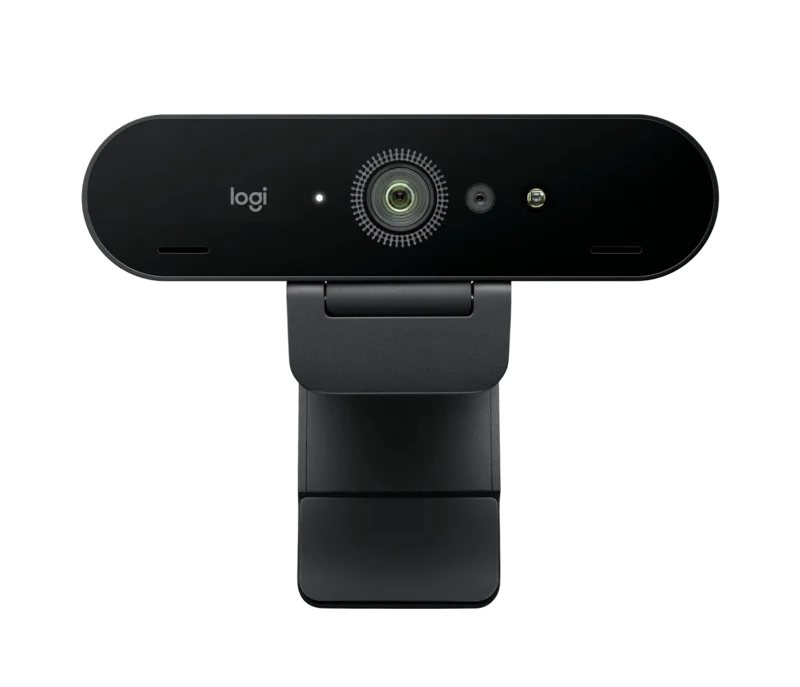
The Logitech Brio 4K is the webcam for people who want one camera to cover video calls, recordings and the occasional stream, and who would like the camera to cope with a badly lit room without a lighting kit. It records 4K at 30 frames per second, offers three field-of-view presets, includes an infrared sensor for Windows Hello face sign-in, and ships with a privacy shutter in the box. This guide walks through what those specifications mean in daily use, where the marketing and the specification table disagree, and whether the Brio 4K is the right size of purchase for your desk.
Resolution and frame rates in plain language
Logitech lists three supported modes: 4K at 30 fps (up to 4096 x 2160 pixels), 1080p at 60 fps and 720p at 90 fps. The product text also promises "ultra-smooth" sharing and recording "at up to 90fps", and it is worth noting that the 90 fps figure belongs to the 720p mode, not to 4K. The sensor is rated at 13 megapixels, which is more than the roughly 8.3 megapixels of a 4K frame, and that extra resolution is what makes the digital zoom (5x) and the framing presets usable without the picture falling apart immediately. Be realistic about where 4K helps. Many video-call applications send only 720p or 1080p to other participants, so the largest advantages of 4K appear when you record locally, when you stream to a platform that accepts high resolution, or when you crop into the frame after recording. The 1080p 60 fps mode is the sweet spot for smooth-looking calls and streams, and it is a mode that virtually every application can use.
Light handling: RightLight 3 with HDR
The feature Logitech leads with is RightLight 3 with high dynamic range (HDR), which automatically adjusts the exposure for low light, direct sunlight and high-contrast scenes so that your face stays visible when the window behind you is bright. The camera uses autofocus with a glass lens, and Logitech's Logi Options+ app on Windows and macOS lets you adjust colour and brightness. We cannot test light performance in a specification article, and the real-world result depends on your room, but the approach is clear: the camera does the balancing work automatically. If you want to understand why the sensor matters in dim rooms, our article on webcam sensor size and low-light performance explains the trade-offs.
Three fields of view
You can pick from three diagonal fields of view: 65, 78 and 90 degrees, using presets in Logi Options+. The 65-degree setting is a tight head-and-shoulders frame, good for eye contact and for hiding a messy room. The 78-degree preset shows more of your surroundings while keeping good eye contact, and the 90-degree setting is the wide option for showing a whiteboard, a shelf or a second person at your desk. Because field of view is adjustable in software, you do not need to move the camera to change the framing. Note that the presets require the Options+ app, which is only available on Windows and macOS, so users of ChromeOS should expect to use the default view.
Microphones: 3 feet or 1.2 metres?
There are two numbers for the microphone range on Logitech's own page. The feature text says the dual omnidirectional microphones capture sound "up to 3 feet away", which is about 0.9 metres. The specification table says the mic range is up to 1.2 metres, roughly four feet. Both statements describe the same hardware, and the sensible reading is that the microphones work well within about a metre of your seat. Active noise cancellation is included to suppress background noise. If you sit further from the camera or share a noisy room, a headset or a separate microphone will give you clearer speech than any webcam microphone, and the webcam buying guide discusses when to plan for one.
Windows Hello, privacy and compatibility
The Brio 4K includes infrared sensor technology, which enables Windows Hello facial recognition for signing in to a Windows PC without a password. It is certified for Zoom, Google Meet and Microsoft Teams, works with Chromebook, and is compatible with Windows 8 or later, macOS 10.10 or later, ChromeOS and Microsoft DirectShow. An attachable privacy shutter is included, which is a small item that many people appreciate. The system requirement is an available USB port, with 2 GB of RAM or more recommended for 1080p streaming and about 1 GB for 720p. The camera connects by a 1.5-metre cable that offers plug-and-play use with either USB-A or USB-C, since the box includes a USB-A to USB-C cable.
Mounting, size and weight
The webcam itself measures about 102 x 27 x 26.5 mm and weighs 85 grams. It comes with a detachable universal mounting clip that fits monitors, LCD displays and laptops, and it has a quarter-inch thread for tripod mounting. The clip alone weighs 69.2 grams, so the combination is heavier than a light laptop lid would like: if you clip it to a thin laptop, test that the screen holds its angle. Packaging contains the webcam, the removable mounting clip, the privacy shutter, the USB-A to USB-C cable and user documentation.
How it compares on this site
The Brio 4K sits between simpler and more expensive options. Below it in price, the Logitech Brio 500 is a 1080p webcam that leans on smart software such as auto-framing and RightLight 4 rather than resolution. Above it in price, the Logitech MX Brio is another 4K camera, with RightLight 5, a Show Mode for desk sharing and a USB-C cable. The main distinguishing feature of the Brio 4K is its native 4K recording and its three FOV presets together with the Windows Hello sensor. If you only take calls at 1080p and never record, one of those other models may serve you as well for less. For a deeper look at the difference between a dedicated camera and a laptop's built-in one, read our webcam versus laptop camera comparison.
Price
On the Logitech US page we checked, the Brio 4K was listed at 169.99 USD. That is a mid-to-high price for a webcam, and it makes sense if you use the 4K mode, the HDR light handling and the Windows Hello sensor. If your use is limited to daily meetings, you may find a cheaper 1080p camera adequate. Browse the webcams category to compare alternatives.
Conclusion
The Brio 4K offers a well-rounded set of features: 4K at 30 fps, 1080p at 60 fps, RightLight 3 with HDR, three fields of view, noise-cancelling microphones and a privacy shutter. Its main choices are practical ones, so decide how often you will really use 4K, check that your software takes advantage of it, and enjoy a camera that is designed to make you look reasonable in awkward light.