Logitech C920s Pro HD
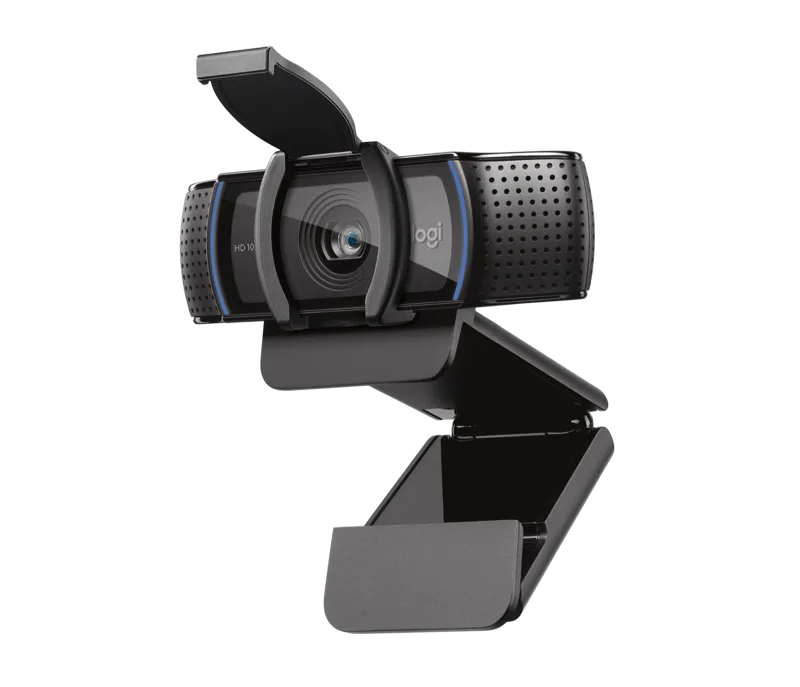
A dependable 1080p webcam with a five-element glass lens, autofocus, dual stereo microphones and a built-in privacy shutter at an entry-level price.
Specifications
| Resolution | 1080p/30fps, 720p/30fps |
|---|---|
| Field of View | 78 degrees diagonal (fixed) |
| Focus | Autofocus, five-element glass lens |
| Digital Zoom | 1.2x |
| Microphone | Dual stereo, up to 1 m |
| Light Correction | HD auto light correction |
| Cable | 1.5 m attached USB-A |
| Privacy | Built-in shutter |
| Weight | 162 g (with clip) |
| Software | Logi Tune |
The Logitech C920s Pro HD is not a flashy webcam, and that is precisely its appeal. It records Full HD video at 30 frames per second, uses a glass lens with autofocus, adjusts itself to the room's light, records stereo audio through two microphones and closes a shutter over the lens when you want privacy. For daily meetings, online lessons and recorded demos it does the job simply and reliably, at a price that leaves money for a good headset or a desk lamp. This page explains what the specifications mean in practice, what the camera does not do, and how to decide whether you need to spend more.
What you get: resolution and frame rate
Logitech lists the C920s at 1080p at 30 fps and 720p at 30 fps, with a 3-megapixel sensor. There is no 60 fps mode and no 4K, and that is a real difference from more expensive webcams. For video calls this is rarely a problem: most conferencing applications limit outgoing video to 30 fps anyway, and 1080p is more than the other participants will normally receive. Where 30 fps shows its limits is fast movement, for example if you are demonstrating a physical product, playing with a pet on camera or streaming gameplay. If smooth motion is a priority, a camera with a 60 fps mode is a better match, and our webcam buying guide discusses when the higher frame rate is worth paying for.
Lens, focus and field of view
The camera uses a full HD five-element glass lens with autofocus that Logitech says adjusts smoothly and precisely. Glass elements matter because they tend to hold sharpness better than plastic ones, though the final image still depends on the sensor and on your light. The diagonal field of view is fixed at 78 degrees, and there is a small 1.2x digital zoom. A fixed 78-degree view is a comfortable, natural framing for one person seated at a desk: it shows your head and shoulders and a reasonable amount of the room behind you. It is not adjustable in the way that the presets on the Logitech Brio 4K are, so if you want a tight crop or a wide view for a whiteboard, you need to move the camera or your chair.
Light correction
Logitech's page describes automatic HD light correction and names its RightLight 2 technology, which adjusts to lighting conditions to produce a bright, contrasted image, even in a dim setting. That is a helpful helper, but it has limits that every webcam shares: a small sensor cannot invent light that is not there. The most effective thing you can do with any webcam is to put a soft light source in front of you, ideally a window or a lamp bounced off the wall, rather than behind you. Our article on webcam sensor size and low-light performance explains why bigger sensors cope better and why software correction only goes so far.
Stereo audio, with one caveat
There are two microphones, one on either side of the camera, that record stereo sound, and Logitech lists their range at up to 3 feet (about 1 metre). Stereo capture from two microphones gives voices a natural, open quality in calls, but it also means that room echo and keyboard noise are captured too. For a quiet home office this is fine. If you sit further away, work in a large echoing room or share space with others, a headset microphone will give clearer speech than any webcam microphone; if you are choosing one, our headset buying guide is the place to start.
Privacy shutter and software
A privacy shutter is built in, and you flip it closed to cover the lens, so there is no separate cover to lose. The software situation is slightly confusing on Logitech's page, because it mentions both Logi Tune, described as webcam software for video conferencing where you can adjust settings such as zoom and field of view, and Logitech G HUB, described as a portal for Logitech G gear including webcams. Read this as: the camera works as plug-and-play without either program, and either app can be used for optional adjustments. Do not expect the advanced controls of a creator camera.
Size, cable and mounting
Including its fixed mounting clip, the C920s measures about 43.3 mm high, 94 mm wide and 71 mm deep, and weighs 162 grams. A 1.5-metre USB-A cable is permanently attached. That is convenient because there is nothing to lose, and slightly inconvenient if your PC is far away or you only have USB-C ports, since you will need an adapter. The universal mounting clip fits laptops, LCD screens and monitors, and it is tripod-ready with a standard thread, though a tripod is not included. The package contains the webcam with its attached cable, the privacy shutter and user documentation.
Who should choose it
The C920s suits people who want a clear step up from a laptop's built-in camera without paying for features they will not use. If you attend meetings, teach or record talking-head videos in a room with reasonable light, it gives you a noticeably better image than many built-in cameras, as we explain in our webcam versus laptop camera comparison. If you want smart auto-framing, you would look at the Logitech Brio 500. If you want 4K recording, HDR light handling and adjustable fields of view, the Brio 4K is the step up. If your work depends on excellent low-light quality or 60 fps, plan for one of the higher-tier cameras in the webcams category.
Price
On the Logitech US page we read, the C920s was listed at 69.99 USD. That places it in the entry-level range, and for that money you receive a genuinely usable camera and a privacy shutter. It is worth spending the savings on lighting: a simple desk lamp often improves the picture more than a more expensive camera in a dim room.
Conclusion
The C920s Pro HD is a straightforward, sensible webcam. It is 1080p at 30 fps with a glass lens, autofocus, stereo microphones and a built-in shutter, and it asks for very little configuration. Choose it for everyday calls, and skip it if you need high frame rates, 4K or advanced controls.