Corsair Corsair KATAR ELITE WIRELESS
A 69 g compact wireless mouse with the Marksman 26,000 DPI sensor, Slipstream and Bluetooth, up to 110 hours of battery and zero-gap Quickstrike buttons.
Specifications
| Weight | 69 g |
|---|---|
| Sensor | Corsair Marksman optical: 26,000 DPI, 650 IPS, up to 50 G |
| Connectivity | Slipstream Wireless (sub-1 ms), Bluetooth, wired USB Type-C (detachable braided cable) |
| Battery | Up to 60 h (hyper-fast, 1,000 Hz) / up to 110 h (low-latency) |
| Buttons | 6 programmable; Quickstrike zero-gap Omron switches, 60 million clicks |
| Lighting | 2-zone RGB |
| Feet | 100% PTFE, replaceable |
| Grip | Claw and fingertip (compact) |
| Software | Corsair iCUE, onboard profile storage |
| Page Price | US$79.99 |
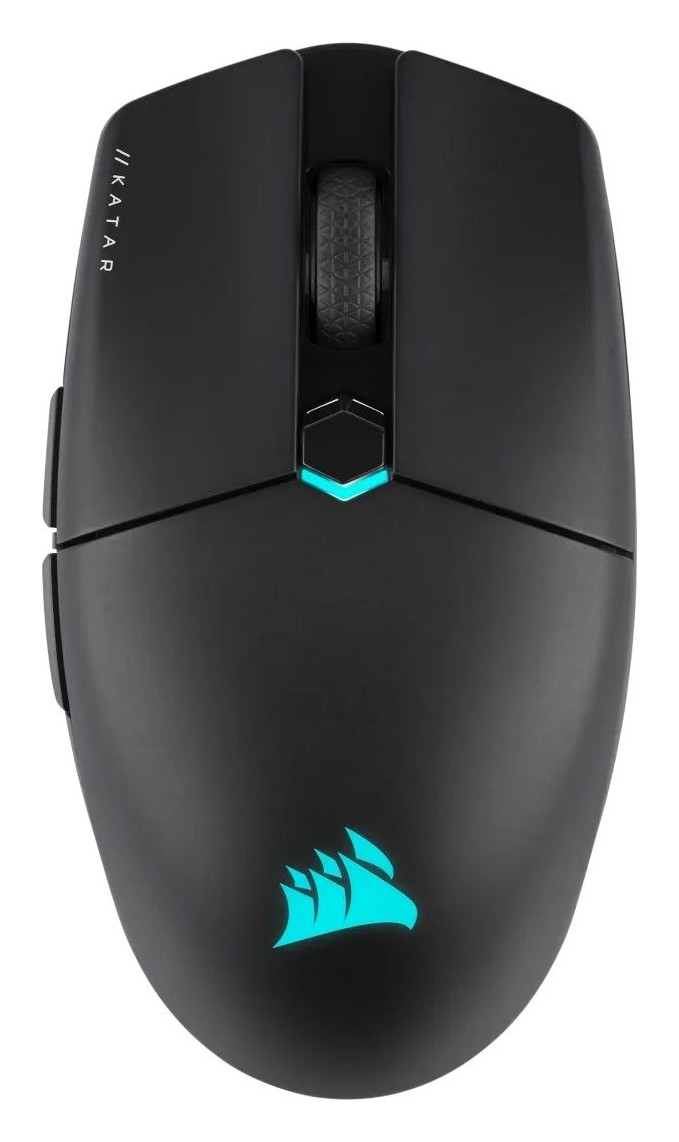
The Corsair Katar Elite Wireless is a small, light wireless mouse for players who grip with their fingertips or claw the mouse. It weighs 69 g, connects by Slipstream 2.4 GHz wireless, Bluetooth or a detachable USB Type-C cable, and Corsair lists it at 79.99 US dollars. This guide is based on Corsair's product page for the mouse and its listed guides and downloads. We have not tested the mouse ourselves, so we describe what Corsair states, mark the marketing language and say where the page is unclear.
Shape and grip
Corsair says the compact, ultra-lightweight design is perfect for claw and fingertip grips. That sets the expectation early: this is a small mouse. The page shows the mouse from the top, bottom, front and back but does not give length, width or height in numbers, and it does not say whether the shape is ambidextrous or right-handed only, so check dimensions on a retailer's specification table before you buy. As with any small mouse, people with large hands who rest their palm on the mouse should be cautious, while people with small or medium hands or a fingertip grip are the intended audience. Our guide to the best mouse for productivity versus gaming explains how grip and hand size steer the choice.
The Marksman sensor
The mouse uses the Corsair Marksman optical sensor, which the page describes as capturing every movement with extreme precision. The numbers given are up to 50 G of acceleration, 650 IPS of tracking speed and a 26,000 DPI optical sensor. Corsair does not say what DPI stages the mouse ships with, so treat 26,000 as the ceiling of the sensor and not as a setting you will use. If DPI, IPS and polling rate are unfamiliar, our explainer on DPI, sensors and polling rate explains what to look for and what is marketing headline.
Wireless modes and battery
Corsair offers three ways to connect. The first is Slipstream Wireless, which the page describes as sub-1 ms, hyper-fast and ultra-stable. The second is Bluetooth. The third is a wired USB connection through a detachable braided USB Type-C cable, which also charges the mouse. The battery figures are given by mode: up to 60 hours in the hyper-fast mode with 1,000 Hz hyper-polling, and up to 110 hours in the low-latency mode. The page does not explain exactly how the two Slipstream modes differ beyond those labels, and the words multipoint connection also appear next to the hyper-fast figure without further explanation, so we do not claim what multipoint means here. What the page does say plainly is that 1,000 Hz hyper-polling delivers inputs up to twice as fast as standard wireless gaming mice, and that the wireless link uses strong 128-bit AES encryption. If your PC has no free USB port for the receiver, the small compartment under the mouse stores it when you travel. For a broader view of the trade-offs between 2.4 GHz and Bluetooth, read our piece on wireless mouse latency.
Quickstrike buttons
The main buttons are Corsair Quickstrike buttons. The page describes a spring-loaded design that delivers zero gap between the primary buttons and the Omron mechanical switches, giving shorter travel and quicker clicks, and it lists 60 million clicks guaranteed. Corsair has a separate article on how mouse switches work, linked from the page, and the short version is that a shorter pre-travel gap means the click registers a fraction sooner. Whether you can feel this is subjective, but the claim is at least specific and testable in a shop.
Buttons, DPI and lighting
The Katar Elite Wireless has six fully programmable buttons that support remapping and custom macros, and onboard profile storage lets you take those settings between computers. DPI can be switched on the fly, without interrupting a game. A physical control lets you turn the mouse off when it is not in use or switch between wireless and Bluetooth mode. Lighting is limited to two dynamic RGB zones, controlled with preset effects or your own in Corsair iCUE. If you run other iCUE devices, the mouse joins the same ecosystem; if you do not, you can ignore the software after setup and rely on onboard memory.
Glide and build details
The feet are large 100 percent PTFE glide pads. Corsair says they give the smoothest glide and quickest movements, and that they are easily replaceable if they wear down. That last part is useful: the feet are the wear item on any mouse, so being able to swap them extends the life of the mouse. In the box are the mouse, a USB charging and data cable, the wireless USB transceiver, a safety leaflet and a warranty card. The page does not state the warranty length in the text we read.
How it compares to the alternatives
The Katar Elite adds Bluetooth to its Slipstream receiver, which not every light wireless mouse offers, so check that against the alternatives. Corsair's own catalogue includes the M75 Wireless and the Sabre V2 Pro Ultralight Wireless, both in our database, and Glorious's Model O 2 Wireless is another well-known light option. We can compare features on the pages, but without weight, shape and testing data from our own hands, we do not rank them. Corsair's page also names newer wireless mice, the Nightsabre Wireless and the Darkstar Wireless, in a guides section, which is a hint that the product line has moved on, so it is worth checking whether the Katar Elite is still the right price-to-features pick when you shop.
What to check before you buy
- Your hand size and grip. This is a compact mouse designed for claw and fingertip grip.
- Dimensions and shape symmetry, which the page does not list.
- Which battery mode you will really use: 60 hours at 1,000 Hz hyper-polling, or 110 hours in low-latency mode.
- Whether you want two-zone RGB, or would rather have a mouse with no lighting to save battery.
- Whether you need Bluetooth for a laptop or tablet in addition to the receiver.
In short, the Katar Elite Wireless is a straightforward compact gaming mouse with a strong feature list for its price: a sensor with generous headline numbers, three ways to connect, zero-gap buttons and long battery life in its low-latency mode. Its weak points are what the page does not tell us, namely dimensions and shape handedness. Browse our mice page to compare it with other wireless options at similar prices, and use the return window if the size does not suit your hand.