Logitech Logitech Lift Vertical Ergonomic Mouse
A wireless vertical ergonomic mouse with a 57-degree angle, six customizable buttons, quiet clicks, 400-4000 DPI, Bluetooth or Logi Bolt, Easy-Switch for three devices and up to 24 months from one AA battery.
Specifications
| Design | Vertical, 57 degree angle, for small to medium hands (left-handed model available) |
|---|---|
| Sensor | Logitech Advanced Optical Tracking |
| DPI | 400-4000 in 100 DPI steps (1000 nominal) |
| Buttons | 6 (left/right click, back/forward, middle button, scroll wheel with middle click) |
| Connectivity | Bluetooth Low Energy or Logi Bolt USB receiver (included) |
| Multi-Device | Easy-Switch, up to 3 devices |
| Range | 10 m (32.8 ft) |
| Battery | 1 x AA (included), up to 24 months |
| Software | Logi Options+ (Windows, macOS) |
| Dimensions | 108 x 70 x 71 mm (H x W x D) |
| Weight | 125 g |
| Warranty | 1-year limited hardware |
| Part Number | 910-006466 |
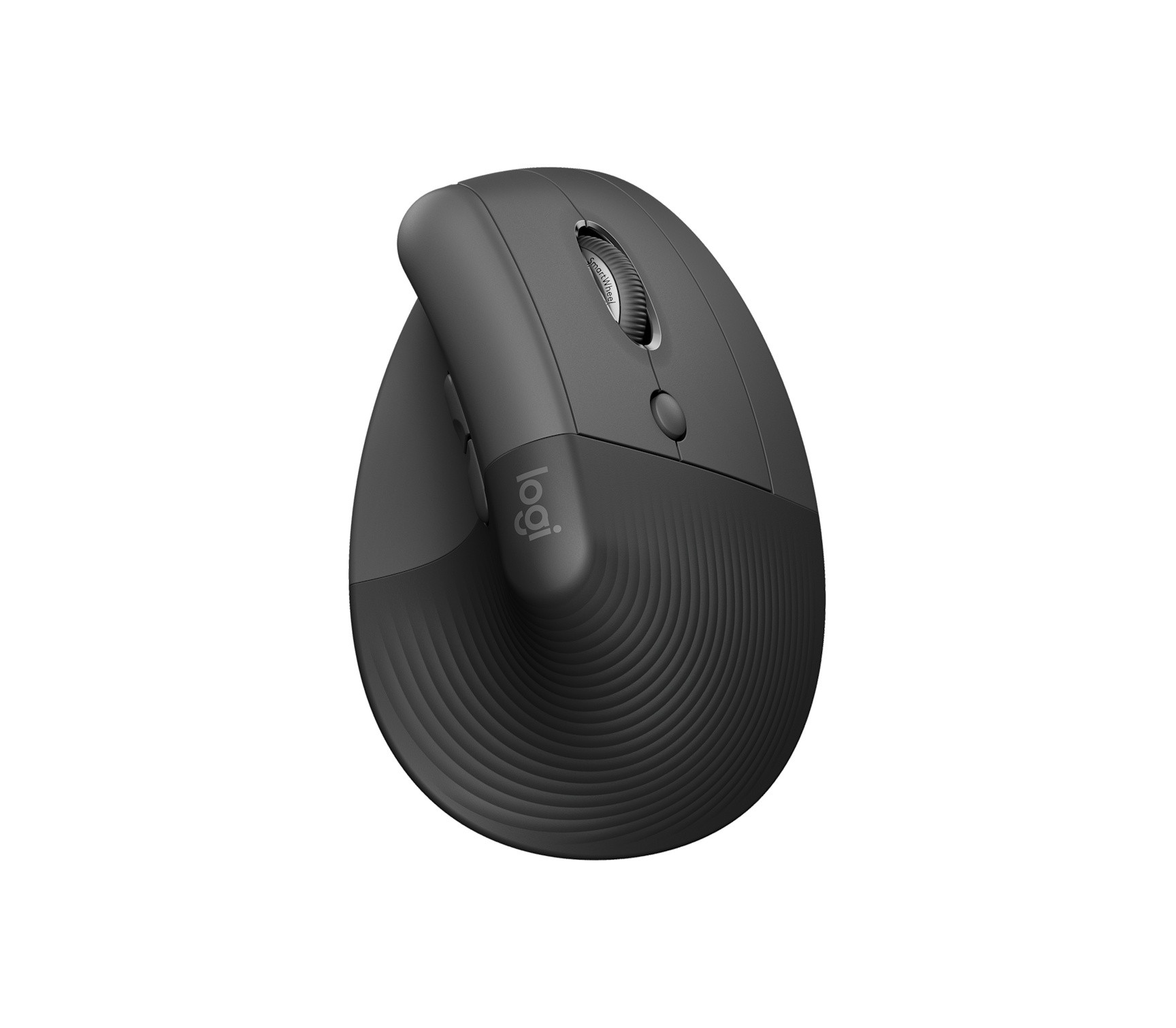
The Logitech Lift is Logitech's vertical ergonomic mouse for small to medium hands. Instead of lying flat under your palm, it stands upright so your hand rests in what Logitech calls a natural handshake position, a design meant to take pressure off the wrist and put the arm and upper body in a more relaxed posture. The company describes it as a fresh take on workplace ease, and the page lists three colours plus a dedicated left-handed model. This guide is written from Logitech's product page, its structured specification data and its FAQ. We have not tested the mouse, so every figure is Logitech's, and where the page gives no number we say so.
The vertical design
The key number is the angle: Logitech says Lift has a 57 degree vertical angle that places you in a handshake position. In a conventional mouse your forearm twists so that the palm faces down, while a vertical mouse lets the forearm stay closer to a neutral position, which is the reasoning behind the shape. The mouse has a softly textured grip with a thumb rest and easy-to-reach buttons, and Logitech says its organic silhouette is specially sculpted by its ergonomics and design experts to fit small to medium hands like a glove. That qualifier matters: Lift is not designed for large hands, and a person with a big palm should look at a bigger vertical or ergonomic mouse. The page's FAQ says it is optimised for small to medium hands. A dedicated left-handed version exists, which many ergonomic mice do not offer.
Clicks, scrolling and buttons
Logitech describes whisper-quiet clicks and a smooth, quiet scroll wheel that adapts to the lightest touch, aimed at an all-day office setting. The mouse has six buttons: left and right click, back and forward, a middle button and the scroll wheel with middle click. All six are customisable in the optional Logi Options+ app. There is no dedicated horizontal scroll wheel, and the FAQ says so plainly, noting that side-scrolling shortcuts can be mapped through the app instead. That is a real difference from the larger MX mice, so if you scroll horizontally often in spreadsheets or timelines, take note.
Sensor and tracking
The sensor is listed as Logitech Advanced Optical Tracking with a nominal 1000 DPI and an adjustable range of 400 to 4000 DPI in steps of 100. That is a modest range by gaming standards and a comfortable one for office work, where most people run a 2000 DPI setting or lower on a large monitor. Logitech does not publish a polling rate, an acceleration or a tracking-speed figure on this page, and it makes no claim about tracking on glass. For an explanation of how DPI and the other sensor numbers relate to how a mouse feels, our guide to mouse DPI, sensors and polling rate covers the basics.
Wireless connection and multi-device use
The mouse connects through Bluetooth Low Energy or through the included Logi Bolt USB receiver, with a stated range of 10 metres (32.8 feet). Easy-Switch pairs up to three devices and lets you switch between them. The page lists support for Windows 10, 11 or later, macOS 10.15 or later, iPadOS 14 or later, ChromeOS, Linux and Android 8 or later, with basic functions working on systems other than Windows and macOS without extra drivers, and it recommends Bluetooth for ChromeOS users. It is also engineered for Intel Evo laptops. Logi Options+ on Windows and macOS provides the optional customisation, and the page notes that internet access is only needed to download it.
Battery
Lift runs on one AA battery, included in the box, and Logitech says it can last up to 24 months, with the usual caveat that battery life varies with user and computing conditions. Using a replaceable AA cell is a deliberate choice: there is no charging cable to forget and no battery that wears out over the years, and when the cell dies you swap it in seconds. The trade-off is that the mouse is a little heavier than a mouse with a small lithium cell, and you need a spare AA.
Size and weight
The mouse measures 108 millimetres high, 70 millimetres wide and 71 millimetres deep and weighs 125 grams. That is lighter than the larger MX mice in our database. The warranty is a one-year limited hardware warranty and the part number for the model on the page is 910-006466. The page shows a price range in its shop widget that we do not reproduce.
Where it sits in our database
Two Logitech mice make the comparison. The Logitech MX Master 3S lists an 8K DPI optical sensor, a MagSpeed electromagnetic scroll wheel, six buttons, Quiet Click, up to 70 days of battery, Logi Bolt plus Bluetooth Low Energy and a weight of 141 grams. The MX Master 4 lists 8000 DPI, a haptic panel, an Actions Ring, up to 70 days of battery with USB-C charging and a weight of 150 grams. Set against them, the Lift is simpler and cheaper in spirit: a vertical shape instead of a sculpted horizontal one, a basic 4000 DPI sensor, an ordinary scroll wheel without an electromagnetic mode and a replaceable AA battery in place of a rechargeable one, while keeping Easy-Switch, Bluetooth and Bolt and the Options+ app. Our MX Master 3S review shows how the mainstream MX approach feels in use. For a wider look at what suits different kinds of work, our guide to the best mouse for productivity versus gaming helps, and the mouse category lists the alternatives.
What the page does not say
Logitech's page does not state a polling rate, a switch rating, a surface or tracking-speed limit, or the exact materials. It does not describe the shape from a hand-measurement perspective beyond the small-to-medium guidance. Use this entry to check the facts that decide fit: 57 degrees, small to medium hands, six buttons without a horizontal wheel, 4000 DPI and one AA battery. Then, if possible, hold one before committing, because the most important quality of a vertical mouse is how it feels in your own hand.