Logitech MX Master 4
A productivity mouse with haptic feedback, an Actions Ring, a MagSpeed steel scroll wheel, an 8,000 DPI sensor and up to 70 days of battery.
Specifications
| Sensor | 8000 DPI, tracks on glass (4mm min. thickness) |
|---|---|
| Scroll Wheel | MagSpeed electromagnetic, machined steel |
| Haptics | Haptic Sense Panel, Windows 11 Advanced Haptics |
| Shortcuts | Actions Ring |
| Connectivity | Bluetooth Low Energy, Logi Bolt USB-C receiver |
| Multi-Device | Up to 3 devices |
| Battery Life | Up to 70 days, 3 hours from 1-minute charge |
| Charging | USB-C (cable not included) |
| Weight | 150g |
| Software | Logi Options+ |
| Warranty | 1 year |
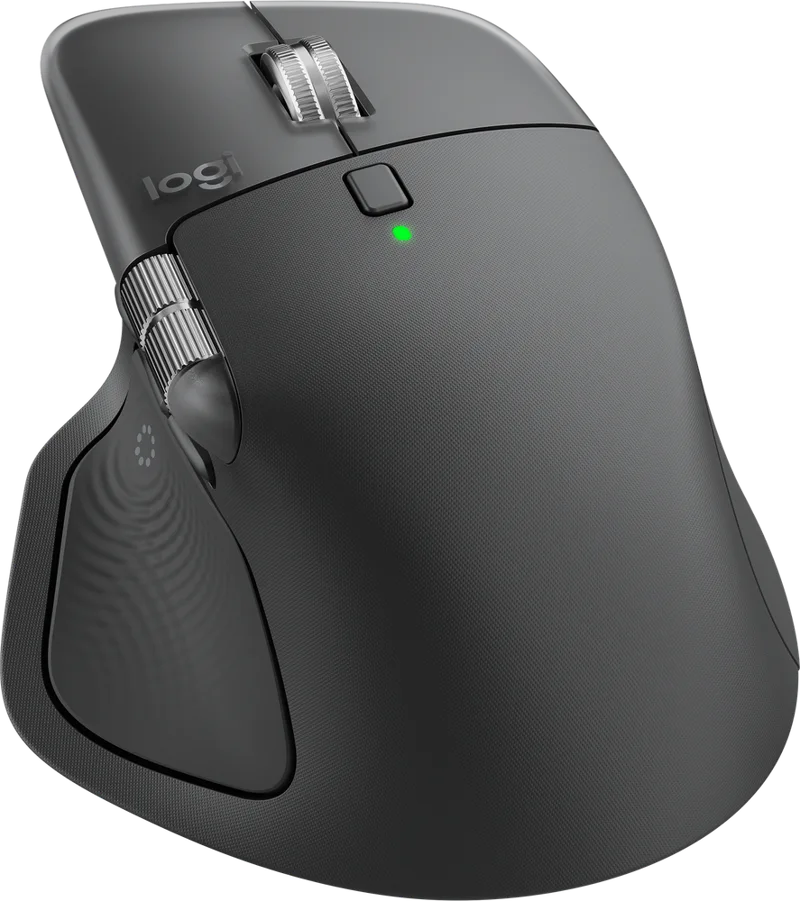
The Logitech MX Master 4 is the latest flagship of Logitech's Master Series, the line of large, comfortable productivity mice aimed at people who work at a computer all day. Its headline additions are haptic feedback, which lets the mouse "tap" your thumb when something happens on screen, and the Actions Ring, a radial menu of shortcuts that appears at your cursor. Alongside them are the features Master Series users already know: an electromagnetic steel scroll wheel, a sensor that works on virtually any surface, three-device switching and long battery life. This page explains what the features do in daily work, which claims come with fine print, and who should upgrade.
Haptic feedback: what it is and what it is not
The MX Master 4 has a Haptic Sense Panel under the thumb. Logitech says it can give customisable haptic feedback on specific actions, shortcuts and notifications: the snap of a window aligning to a grid, a notification arriving, a desktop switch or a slider adjustment. You control the pattern and the intensity in Logi Options+, and plugins can add feedback for third-party apps. Think of it as a small, precise vibration under your thumb that confirms an action, rather than a rumble effect for games. Logitech also says the mouse is the first productivity mouse with native integration with Advanced Haptics on Windows 11, so on a current Windows 11 update (Logitech specifies the update from the end of March 2026 onward), you can feel actions such as managing windows or aligning objects in PowerPoint, and you can control the native haptics in Windows settings. Firmware updates are done from the device settings page in Options+. If you dislike the idea, the intensity can be turned down, and it does not stop the mouse working as an ordinary, comfortable mouse.
Actions Ring and Options+
The Actions Ring brings your favourite tools, shortcuts and actions to your cursor so you do not need to dig through menus. Logitech says it can save up to 33% of your time and reduce mouse movement by up to 63%, based on its own Ergo Lab study from 2025 with 37 MX Master users tested on eight desktop actions, and it points out that results vary depending on the shortcuts you assign. Treat these as manufacturer figures from a small study, not as a promise. Still, the idea is sound: a ring of shortcuts that appears where you are already looking is quicker than moving to a toolbar. In Logi Options+ you can set app-specific presets for tasks such as editing, designing or coding, add plugins for third-party apps and build Smart Actions, which automate multi-step tasks. Options+ is available for Windows and macOS.
MagSpeed scroll wheel and 8K sensor
The scroll wheel is machined steel and electromagnetic. You can switch between a ratchet mode, where each notch is distinct, and a fast free-spin mode that Logitech says can scroll 1,000 lines per second. Logitech claims the ratchet mode is 87% more precise than an older MX Master 2S with smooth scrolling enabled, and the fast mode is 90% faster than a regular Logitech mouse without an electromagnetic wheel. The wheel is described as smooth, quiet and weighted for glide control. If you spend hours in long spreadsheets, code or documents, the free-spin mode is a delight; if you prefer precision, ratchet mode is a good choice. A thumb wheel handles horizontal scrolling.
The sensor is rated at 8,000 DPI, and Logitech says it works on virtually any surface, including glass with a minimum thickness of 4 mm. High DPI is not about moving faster; on large or multiple displays, it means you can cross a wide screen with a small hand movement. For a clear picture of how DPI, sensors and polling rates work, see our DPI and sensor guide.
Connectivity and battery
You can connect with Bluetooth Low Energy or the Logi Bolt USB receiver, and the mouse remembers up to three devices, which you switch with the Easy-Switch buttons on the mouse or via the Actions Ring. The keyboard follows the mouse automatically when you switch devices if you use a compatible Logitech keyboard, and you can transfer files across devices with Options+. Logitech says the MX Master 4 has twice as good connectivity as before, thanks to an advanced radio chip, optimised antenna placement and a new USB-C dongle, and that the dongle is compatible with both USB-C and USB-A. For a broader view of why a dedicated receiver usually feels quicker than Bluetooth, our news article on 2.4 GHz versus Bluetooth mouse latency is a good read.
Battery life is listed as up to 70 days per full charge, with 3 hours of use from a one-minute quick charge. You can use the mouse while charging over USB-C, but the cable is not included in the box. That is a small annoyance at this price, so make sure you have a USB-C cable ready. The mouse weighs 150 g (5.29 oz), which is heavy compared with esports mice but typical for a large productivity model, and its shape is angled to keep your arm in a natural posture, with buttons placed for quick thumb navigation. Logitech also mentions improved stain resistance, which matters on a light-use, all-day work surface.
Setting it up
Give yourself half an hour with Options+ on the first day. Choose which three or four actions go on the Actions Ring, keep the haptic intensity moderate until you know what you like, and set the scroll wheel to the mode you use most. If you connect several computers, pair each to a different Easy-Switch slot and note which is which, so that you are never guessing. A mouse of this size works best with a desk that has room for your whole forearm, so check your posture at the same time; a neutral wrist matters more than any feature on the box.
Materials, warranty and price
Logitech lists the mouse in Graphite. Its sustainability section refers to recycled plastic, low-carbon aluminium, recycled cobalt in the battery and responsibly sourced packaging. The warranty is one year limited hardware, and the price on the Logitech US page we checked was 119.99 USD, with a note that stock was low. Prices and stock change quickly, so check the current listing.
Who should buy it
The MX Master 4 is for people who spend their day in spreadsheets, documents, design tools or code, who move between several computers, and who value a comfortable, large right-handed shape. It is a good match for a keyboard such as the Logitech MX Keys S, because both are managed by the same software. If you already own an MX Master 3S, the upgrade is mostly about haptics, the Actions Ring and the stronger connection, so it will feel most valuable for people who will actually use those features. It is not the right choice for small hands, left-handed users, or those who want an ultralight gaming mouse; for that, see our guide to choosing a mouse for productivity versus gaming. To compare with the previous generation and other options, browse the mice category and check the Logitech MX Master 3S.