The Best Mouse for Your Desk: Productivity vs. Gaming in 2026
A mouse feels like the least interesting purchase on a desk setup checklist, right up until you use a genuinely good one and realize how much friction the wrong one was quietly adding to every workday. The category has split cleanly into two philosophies over the last several years: productivity mice built around ergonomics and multi-device workflow, and gaming mice built around raw sensor performance and low weight. Trying to buy one mouse that does both well usually means buying a mouse that does neither particularly well, so the more useful question isn't "which mouse is best" but "which category actually matches how you use your computer."
The productivity case: Logitech MX Master 3S
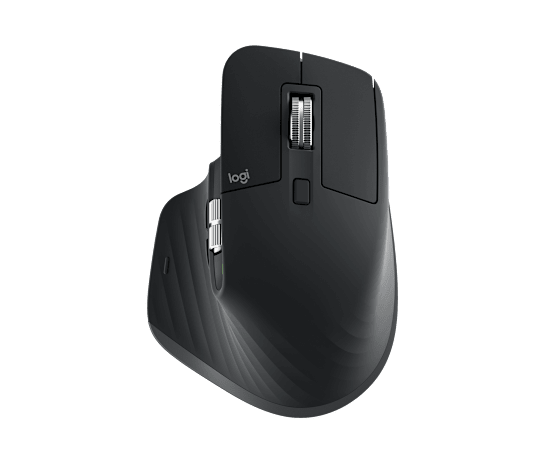
The Logitech MX Master 3S is the reference point for the productivity side of this split, and for good reason. Its MagSpeed electromagnetic scroll wheel spins near-silently at up to 1000 lines per second, which sounds like a spec-sheet number until you've scrolled through a long spreadsheet or a dense PDF and felt how much faster it is than a ratcheted wheel fighting you the whole way down. The six programmable buttons, including an app-switch button that most people never rebind but genuinely miss once it's gone, are tuned for the kind of workflow where you're jumping between a browser, a document, and a spreadsheet dozens of times an hour.
What actually matters day to day, though, is less glamorous: quiet clicks that don't announce every action to an open-plan office or a video call, a shape that supports a relaxed hand position for eight-hour stretches, and a battery that lasts up to 70 days on a charge so it essentially disappears from your list of things to maintain. None of that shows up in a highlight reel, but it's the difference between a mouse you notice and a mouse you forget about, which is the actual goal for anything you touch for hours every single day.
The gaming case: Razer DeathAdder V3
The Razer DeathAdder V3 represents the opposite set of priorities entirely. At 62 grams, it weighs less than half of what the MX Master 3S weighs, and that difference is immediately obvious the first time you flick it across a mouse pad — there's simply less mass to accelerate and decelerate, which matters enormously in fast-twitch aiming scenarios where every gram of inertia works against you. The Focus Pro 30K optical sensor and 8000Hz polling rate capability exist for a similar reason: competitive shooters reward the tightest possible gap between physical hand movement and on-screen response, and this is a mouse engineered almost entirely around closing that gap.
The tradeoff is that the DeathAdder V3 is a wired-only mouse with none of the multi-device Bluetooth pairing, app-switching shortcuts, or all-day scroll-wheel comfort that make the MX Master 3S so good at office work. It has exactly one job, and it does that job better than almost anything else on the market — it's just not the same job.
Sensor technology: what DPI numbers actually mean
Both mice advertise sensor resolutions well beyond what any human actually needs — 8K DPI on the MX Master 3S, 30K DPI on the DeathAdder V3 — and it's worth being honest about what that number does and doesn't tell you. DPI (dots per inch) measures sensitivity, not accuracy or tracking quality; a cheap sensor at 16,000 DPI is not better than a well-tuned sensor at 1,600 DPI, and most people never run their mouse above 1,600–3,200 DPI in practice regardless of what the box says. What the high ceiling actually buys you is headroom and, in the gaming mouse's case, a sensor architecture built for consistent tracking at very high hand speeds without smoothing or acceleration artifacts creeping in — that consistency at speed is the real gaming-relevant spec, not the DPI number printed on the packaging.
Grip style and hand size
Shape matters as much as spec sheet for both use cases, and it's the one thing you genuinely cannot evaluate from a product photo. The MX Master 3S has a sculpted, right-hand-specific body designed to be rested on rather than gripped tightly, which works well for a palm grip during long sessions but feels bulky if you're used to a smaller, more neutral shape. The DeathAdder V3's ergonomic shell is also right-hand-specific but designed around a firmer palm-to-claw grip that suits fast directional changes — comfortable for gaming sessions, less naturally suited to being rested on passively for hours of scrolling and clicking between documents.
Wired vs. wireless: does it matter anymore?
Wireless latency used to be a legitimate reason to stick with a wired mouse for competitive gaming, but that gap has effectively closed for any mouse using a dedicated low-latency 2.4GHz receiver rather than Bluetooth — modern wireless gaming mice from most major brands are functionally indistinguishable from wired in blind testing. The DeathAdder V3 reviewed here is the wired variant specifically, which remains the cheaper and marginally simpler option with one less battery to think about, but buyers who want the same sensor in a cable-free package should look at Razer's wireless DeathAdder variants rather than assuming wireless is automatically a downgrade in 2026.
Which one should you actually buy
If your day is built around office work, research, writing, or generally living inside a browser and a handful of productivity apps, the MX Master 3S is the better purchase by a wide margin — the ergonomics and workflow features solve real, repeated friction points that a gaming mouse's sensor specs simply don't address. If your priority is competitive or fast-paced gaming and you can tolerate a mouse that's mediocre for spreadsheet work, the DeathAdder V3's weight and tracking performance are worth the tradeoff. For anyone who genuinely splits time evenly between both — heavy gaming sessions and a full workday — the honest answer is that two mice, one on each side of the desk or swapped via a USB switch, usually beats compromising on either.
Whichever direction you land on, the mouse pairs with the rest of a desk setup more than any other peripheral — a mismatched surface, monitor height, or desk arrangement can undo a lot of what a well-chosen mouse is trying to fix, so it's worth treating the decision as part of the whole setup rather than in isolation.