Razer Razer Viper V3 HyperSpeed
A right-handed symmetrical esports mouse for claw and fingertip grips, with the Focus Pro 30K optical sensor, 82 g weight with its AA battery and up to 280 hours of battery life.
Specifications
| Shape | Right-handed symmetrical, claw/fingertip |
|---|---|
| Weight | 82 g with AA battery (59 g without) |
| Dimensions | 127.1 x 63.9 x 39.9 mm |
| Sensor | Focus Pro 30K optical: 30,000 DPI, 750 IPS, 70 G |
| Switches | Razer Mechanical Mouse Switches Gen-2, 60 million clicks |
| Connectivity | HyperSpeed Wireless 2.4 GHz (dongle); no cable |
| Battery | Up to 280 h at 1000 Hz (AA); up to 50 h at 8000 Hz with HyperPolling dongle (sold separately) |
| Polling Rate | 1000 Hz default; 8000 Hz with HyperPolling dongle per FAQ (launch video said 4000 Hz) |
| Controls | 8 programmable controls (6 buttons) |
| Memory | 1 on-board profile |
| Feet | 100% PTFE |
| Warranty | Up to 2 years |
| Starting Price | US$69.99 |
The Razer Viper V3 HyperSpeed is a wireless esports mouse that takes the shape of earlier Viper mice and updates it for current competitive play. Razer lists it from 69.99 US dollars. It uses the same Focus Pro 30K optical sensor as the company's top wireless mice, runs on a single AA battery and weighs 82 grams with that battery installed. It is the more affordable counterpart to the premium Viper V3 Pro, trading a rechargeable lightweight design for a replaceable battery and a lower price. This guide is based on Razer's product page and specification list. We have not tested the mouse, so what follows is what the manufacturer states, along with notes on where the page is inconsistent.
Shape and grip
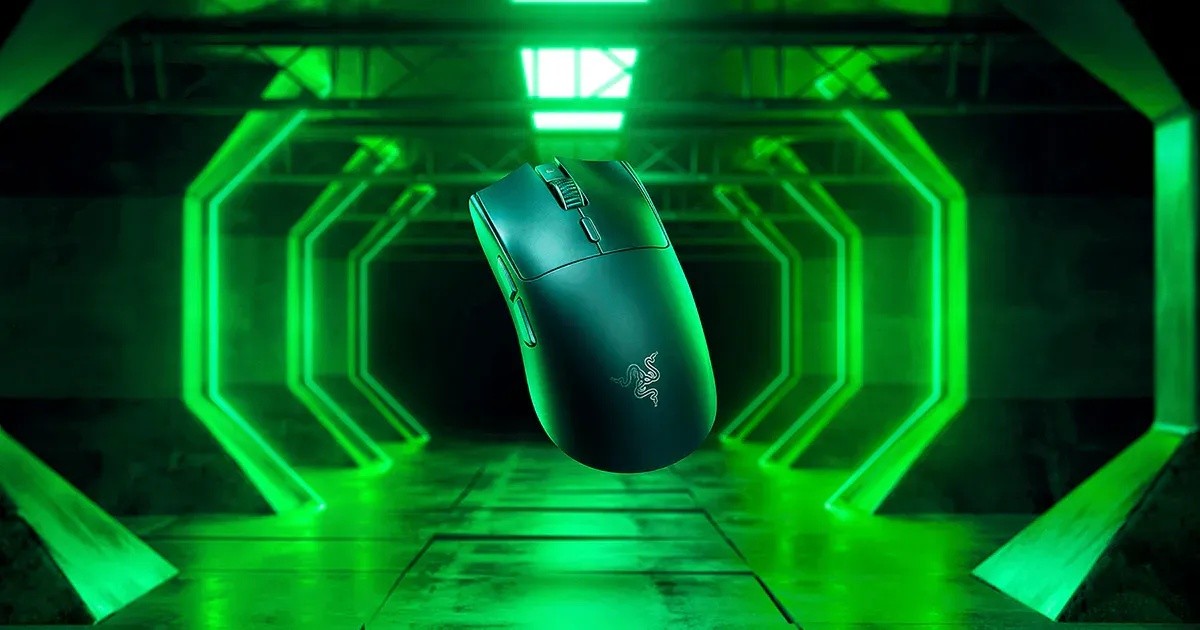
The Viper V3 HyperSpeed is a right-handed symmetrical design that Razer says is best suited for claw and fingertip grip styles. The page lists the improvements over earlier shapes: a ring finger ledge to prevent finger pinching, flatter sidewalls for different grip styles and hand sizes, pronounced finger grooves, a raised rear-shifted hump for support and updated side buttons for easier reach. The measurements are 127.1 mm long, 63.9 mm wide and 39.9 mm high, which places it in the medium-to-compact range. The surface has a smooth-touch finish that Razer describes as soft and smooth but easy to grip. A symmetrical body suits people who like to move between grip styles. If you use a palm grip with a large hand, our guide on choosing the best mouse for productivity or gaming can help you work out which shapes fit your habits.
Weight and feet
The listed weight is 82 grams with the included AA battery and 59 grams without it. That makes the mouse light, but not as light as the lightest wireless designs, because the battery is a significant part of the weight. The page states that the mouse feet are 100 percent PTFE, the slippery material that helps a mouse glide. The page does not describe the shape of the skates or whether replacement feet are included in the box.
The Focus Pro 30K optical sensor
Razer lists a maximum sensitivity of 30,000 DPI, a maximum speed of 750 inches per second and a maximum acceleration of 70 G. The page focuses on three intelligent functions. Asymmetric Cut-off lets you set a lift-off distance and a landing distance separately, with 26 levels of height adjustment compared with only three in the previous version. Smart Tracking auto-calibrates across different surfaces so lift-off distance stays consistent. Motion Sync matches the sensor's signals to the exact intervals at which the PC reads data, which Razer says gives more current position updates and more consistent tracking. The sensor also tracks on glass, with the note that the glass should be at least 4 mm thick. A number like 30,000 DPI is mostly a ceiling, and most players use a fraction of it. For a clear explanation of what DPI, IPS and polling rate really mean, read our guide to mouse DPI, sensors and polling rate.
Wireless, battery and polling rate
The mouse uses Razer HyperSpeed Wireless, a 2.4 GHz connection through a USB dongle. Battery life is up to 280 hours at 1000 Hz on the included AA battery, and up to 50 hours at 8000 Hz when used with the optional HyperPolling Wireless Dongle and cable, which are sold separately. Out of the box, battery level reporting is tuned for alkaline cells. You can select lithium or rechargeable NiMH in the Power tab of Razer Synapse. The page is inconsistent about the top polling rate: a text overlay in the launch video says upgradeable to 4000 Hz, while a section of the page and the FAQ say the optional dongle enables a true 8000 Hz wireless polling rate. We treat the current FAQ as the more recent statement, with the caveat that you should confirm it with Razer. The mouse also supports multi-device pairing, so it can share a single dongle with a compatible Razer keyboard, which frees a USB port. For background on why wireless latency and polling rates matter, see our guide on mouse sensors and polling rate alongside our comparison of the Viper family below.
Switches and buttons
The mouse uses Razer Mechanical Mouse Switches Gen-2 with gold-plated contact points and a 60-million click lifespan. There are eight programmable controls, which includes six buttons, all configurable in Razer Synapse for macros and shortcuts. Synapse also stores one onboard profile, which is based on your last used profile and includes DPI, polling rate and lift-off distance, so your settings follow the mouse to another computer. There is no RGB lighting, and the mouse has no cable, so you cannot use it wired.
What is in the box and the warranty
The package contains the mouse, the HyperSpeed wireless dongle and the product information guide. The page earlier mentions an included AA battery. Razer offers up to two years of warranty and 14 days of risk-free returns on purchases from its own store.
What to confirm
The key point to confirm is the maximum polling rate, since the page cites two different figures and the faster rate needs an extra accessory. It does not say how many DPI stages are preset, and it does not specify the sensor's resolution accuracy or the lift-off distance range in millimetres. As usual, the page includes marketing lines about pro endorsements, which we have left out as they are not specifications.
How it compares
The premium sibling in our database is the Razer Viper V3 Pro, which is lighter and rechargeable and costs more. If you prefer an ergonomic shape with many buttons, the Razer Basilisk V3 X HyperSpeed is the other new addition. For a broader point of reference, our review of the Razer DeathAdder V3 shows how the maker handles an ergonomic esports shape, and every model sits on our mice page.
Our take
The Viper V3 HyperSpeed makes sense as an accessible way into the Viper shape and Razer's best sensor. You get a well-regarded symmetrical form, strong battery life and an upgrade path to higher polling rates, all at a price far below flagship mice. The compromise is weight, since 82 grams is not ultralight, and the reliance on an AA battery, which some players prefer and others do not. If you play fast-paced games with a claw or fingertip grip, it deserves a spot on the shortlist.