Corsair SABRE v2 PRO ULTRALIGHT WIRELESS
Corsair's lightest mouse: 36 g, 33,000 DPI MARKSMAN S sensor, 8,000 Hz wireless polling, up to 70 hours at 1 kHz and configuration in the browser.
Specifications
| Weight | 36 g |
|---|---|
| Sensor | CORSAIR MARKSMAN S optical, 100-33,000 DPI (50 DPI steps), 750 IPS, 50 G, 99.7% resolution accuracy |
| Polling Rate | 1,000 Hz default, up to 8,000 Hz (wired and wireless) |
| Battery | Up to 70 h at 1 kHz, up to 16 h at 8 kHz, 90 min full charge |
| Connectivity | 2.4 GHz receiver and USB-C wired; no Bluetooth |
| Switches | Mechanical, rated 100 million clicks |
| Dimensions | 119.25 x 62.55 x 38.21 mm |
| Software | CORSAIR Web Hub (browser based) |
| Included | USB-C receiver, 1.8 m cable, grip tape, spare skates |
| OS | Windows; not macOS |
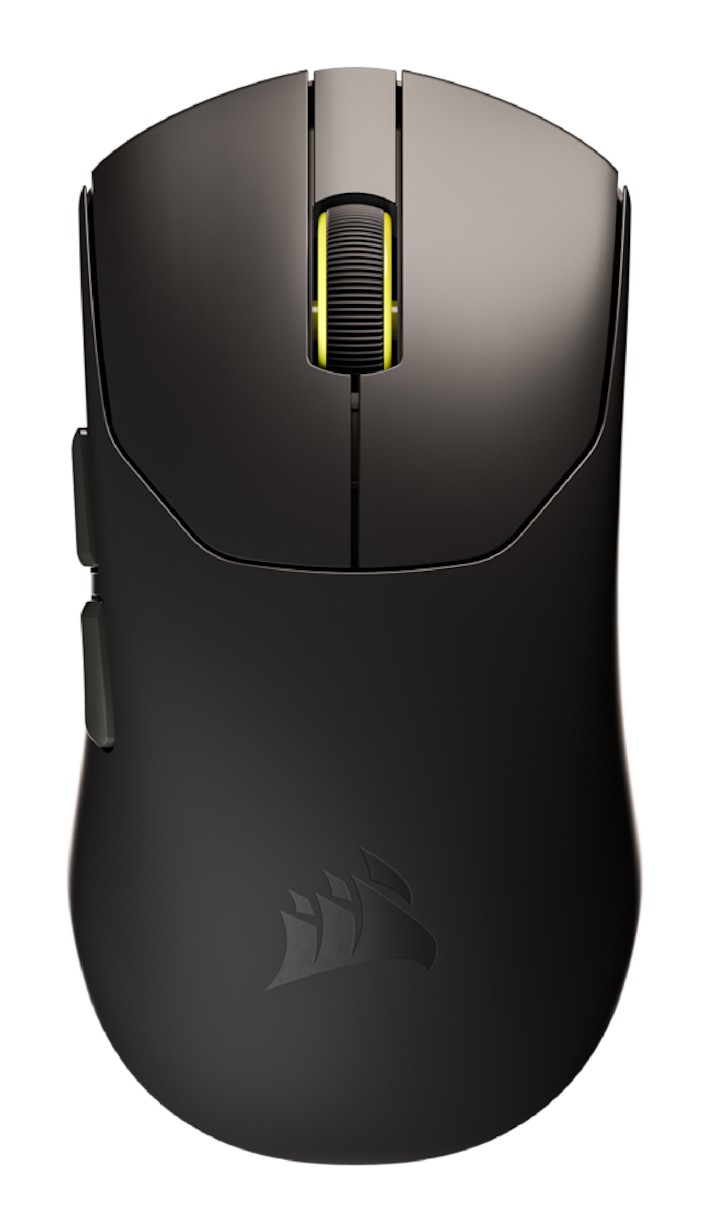
The Corsair SABRE v2 PRO Ultralight Wireless is a mouse built around one number: 36 grams. Corsair calls it its lightest mouse ever and says it was designed from the ground up for competitive first-person shooter players. Around that weight it wraps an 8,000 Hz wireless polling rate, a 33,000 DPI sensor and a battery rated for up to 70 hours. The product page listed it at $99.99 when we read it, and Corsair supports it with an explainer article and a detailed FAQ. This page goes through those sources, points out where different parts of them do not quite agree, and helps you decide whether a very light, fairly small, wireless-only mouse is the right kind of tool for you.
The 36 g design
Corsair's argument for low weight is straightforward: a lighter mouse makes fast, precise movements easier, which it describes as good for flicks, tracking and quick target switches, and it says a 36 g mouse reduces wrist and arm fatigue over long sessions. The company also insists the shell is not a hollowed-out afterthought: every gram was engineered to maintain structural integrity. The dimensions in the FAQ are 119.25 mm long, 62.55 mm wide and 38.21 mm high, each with a tolerance of half a millimetre. Corsair describes the mouse as symmetrical and relatively small compared with ergonomic mice, made for fingertip and claw grips, and generally used by right-handed players. It adds that the mouse suits players who move it rapidly with less fatigue. Corsair also lists heavier versions with magnesium alloy and carbon fibre construction on separate pages, so if weight is your priority, this is the ultralight one. Our guide to choosing a mouse for productivity or gaming discusses how weight and shape affect the choice.
The MARKSMAN S sensor
The mouse uses Corsair's MARKSMAN S optical sensor. The company states a DPI range of 100 to 33,000 in steps of 50, a tracking speed of 750 IPS, an acceleration limit of 50 G and a resolution accuracy of 99.7%. You cycle through five DPI stages by holding the right mouse button and the back button (labelled E in the FAQ) for three seconds, and the scroll wheel LED blinks in a colour that indicates the current stage. Lift-off distance, polling rate and button assignments can be set in software. If you want to understand what these numbers mean in practice, our DPI, sensor and polling rate guide explains the terms used in the sensor specification above.
8,000 Hz polling, and what it does to battery life
By default the mouse runs at 1,000 Hz. Through the browser configuration tool it can be set to 8,000 Hz, meaning the mouse reports its position every 0.125 ms instead of every 1 ms, and Corsair says this works at full rate both wired and wirelessly. The company promotes it as its first mouse with wireless 8 kHz polling. To keep the signal clean at these rates the mouse comes with a dedicated receiver with a clip, and Corsair advises placing the receiver close to the mouse, for example on the desk or clipped to the mouse pad, to reduce interference and delay. The explainer also mentions a dongle extender.
Battery life needs careful reading, because Corsair gives different impressions in different places. The headline claim is up to 70 hours of wireless use, which the footnote and the FAQ tie to 2.4 GHz at 1,000 Hz polling. The FAQ then gives up to 16 hours at 8,000 Hz. A separate section on the page says that at 8,000 Hz you get "a full day of scrims", which is compatible with 16 hours but is much less than the headline figure. The practical reading is simple: plan on about 70 hours if you leave polling at the default and about 16 hours if you switch to 8 kHz. A full charge takes 90 minutes and there is no quick-charge feature. The included 1.8 m USB-C cable lets you play while charging.
Switches, skates and grip
The main buttons use custom-tuned mechanical switches rated for 100 million clicks. In the box you get a USB-C receiver, the 1.8 m USB-A to USB-C cable and a tailor-made four-piece PU grip tape kit. Corsair also mentions replacement mouse skates, so you can change glide or grip to match your hand and your pad.
CORSAIR Web Hub instead of software
Corsair intentionally avoids a heavy installation: the mouse is configured through the browser-based CORSAIR Web Hub, where you set DPI, map buttons, assign macros, save and sync profiles and update firmware under device settings. No software has to be installed, which is convenient on a borrowed or locked-down computer. There is a caveat in the guides list: a Corsair blog post says iCUE support for the SABRE v2 PRO is in development and coming soon, so if you already manage the rest of your Corsair gear in iCUE, be prepared to use the Web Hub for this mouse for now.
What the page says about compatibility
Here two parts of the page contradict each other, so it deserves a clear note. The use-case section describes a portable laptop user with wireless, compact and Bluetooth in the same breath, and says the browser-based configuration works on any Windows laptop. The FAQ, however, states that the mouse connects by 2.4 GHz through the receiver and by cable only, and that Bluetooth is not supported on this model. It also states that the mouse is not supported on macOS, and there is no compartment for storing the receiver on the mouse. We take the FAQ as the more specific source, so plan on a Windows computer with a free USB port, and keep the receiver somewhere you will not lose it.
How it fits among other lightweight mice
Ultralight wireless mice are a crowded category. If you want to compare, look at the Logitech PRO X SUPERLIGHT 2, the Razer Viper V3 Pro and Corsair's own M75 WIRELESS, which take different approaches to weight, shape and wireless features. If you prefer a shape with more palm support, the Razer DeathAdder V3 is a more classic ergonomic design. Use these pages side by side with the numbers above: weight, polling, battery, connection types and operating system support are the differences that matter most.
Who should buy it
The SABRE v2 PRO suits competitive shooter players who want the lightest mouse Corsair makes, who are comfortable with claw or fingertip grip, and who use Windows. It is a poor match for anyone who needs Bluetooth, macOS support, side buttons for macros or a large palm-grip shape. The 8 kHz option is best treated as an extra to try rather than the reason to buy, given the drop in battery life it brings. At $99.99 and with grip tape and spare skates in the box, it is a clear, honest package once you separate the marketing from the FAQ.