Corsair M75 Wireless
An 89g ambidextrous wireless FPS mouse with a 26,000 DPI optical sensor, zero-gap optical switches, swappable magnetic side buttons and Slipstream or Bluetooth connectivity.
Specifications
| Weight | 89g |
|---|---|
| Sensor | Corsair Marksman optical, 26,000 DPI |
| Max Speed | 650 IPS |
| Acceleration | Up to 50G |
| Polling Rate | Up to 1,000Hz |
| Switches | Optical (Quickstrike), rated for 100 million clicks |
| Connectivity | Slipstream Wireless 2.4GHz, Bluetooth, USB |
| Battery Life | Up to 105 hours (2.4GHz, RGB off), up to 210 hours (Bluetooth, RGB off) |
| Shape | Ambidextrous, swappable magnetic side buttons |
| Software | Corsair iCUE |
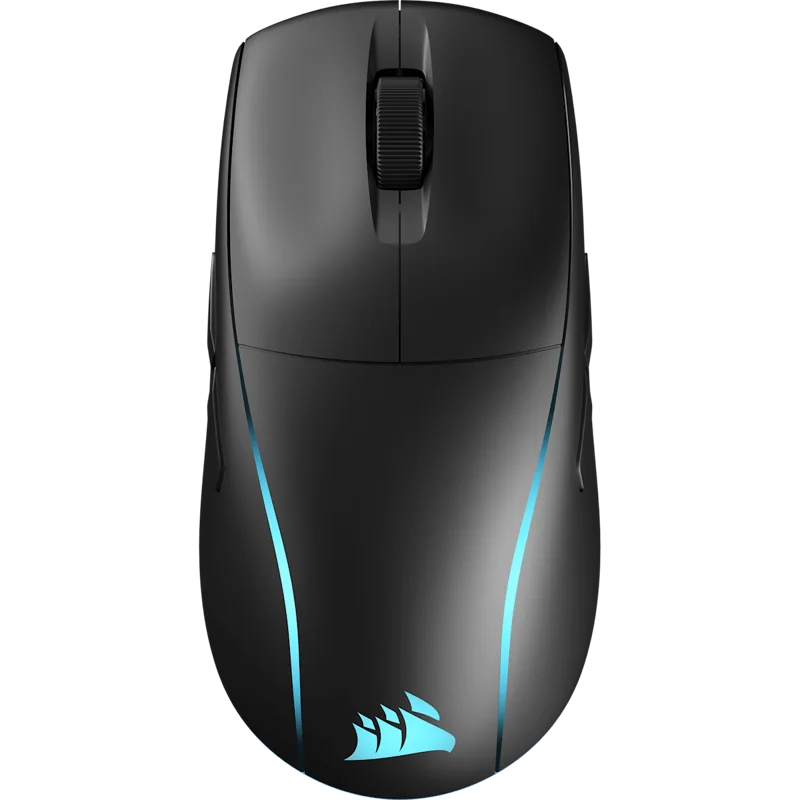
The Corsair M75 Wireless is a lightweight, ambidextrous gaming mouse built with first-person shooters in mind. At 89 grams it is not one of the featherweights that dominate esports, but it is far lighter than the traditional, heavy gaming mice, and it comes with features that lighter mice often skip: swappable magnetic side buttons, a compartment for the wireless receiver and a choice between 2.4GHz and Bluetooth. This page explains what each spec means, resolves the differences between two battery claims on Corsair's own page, and helps you decide whether the M75 Wireless deserves a place on your desk.
Weight and shape
Corsair says it tested dozens of shapes before settling on the M75's lightweight, ambidextrous form, and states that at 89 grams the mouse lets you move with speed and precision. Ambidextrous means the shape is symmetrical, so left-handed and right-handed players can use it, and the side buttons are designed to work on either side. Symmetrical mice tend to suit claw and fingertip grips and people who move the mouse with their fingers and wrist. If you use a palm grip and prefer a mouse with a pronounced hump, a symmetrical shape can feel flat, so try to hold one before buying. If you are not sure which grip you use, our guide to choosing a mouse for productivity or gaming covers the basics of size, shape and weight.
Swappable magnetic side buttons
This is the M75's most distinctive feature. The side buttons attach magnetically, and you can choose between raised, assignable buttons and smooth, non-clickable covers. A right-handed player might put functional buttons on the left side, where the thumb rests, and a smooth cover on the right, so that a resting ring finger does not trigger a stray click. A left-handed player reverses the arrangement. It is a neat answer to a real problem with symmetrical mice, which otherwise have buttons on both sides that you never use.
Sensor and switches
The Corsair Marksman optical sensor supports up to 26,000 DPI, 650 inches per second of tracking speed and up to 50G of acceleration, with a polling rate of up to 1,000Hz. Those numbers are more than enough for any human aim: most players use a few hundred to a few thousand DPI, and the maximum figure is mostly a marketing measure. For an explanation of how DPI, tracking speed and polling rate interact, see our guide to mouse DPI, sensors and polling rate. The primary buttons use Corsair's Quickstrike technology, which Corsair says removes the gap between the button and its optical switch so that clicks register without delay. The optical switches are rated for 100 million clicks, which is a long life for any switch.
Wireless and battery: two sets of numbers
Corsair's Slipstream Wireless connection promises a no-lag, sub-1ms link, and you can also connect over Bluetooth, and a power and connectivity button on the mouse cycles between wireless mode, Bluetooth and off. Corsair's page also states its wireless connection relays inputs faster than the closest competitor, which is a claim we cannot verify, so treat it as marketing. If you want to know how 2.4GHz and Bluetooth compare in practice, our news article on wireless mouse latency explains the difference.
The battery information on Corsair's page is not consistent, so here is how to read it. The main description says you can play up to 105 hours on a single charge with the lighting off, and recharge fully in 95 minutes or less, with up to 210 hours over Bluetooth with the lighting off. The feature callout further down says up to 100 hours and a full recharge in 75 minutes or less. The two versions differ slightly in both numbers, and we cannot tell which is newer. A reasonable summary is about 100 hours on 2.4GHz with RGB off, up to 210 hours on Bluetooth with RGB off, and a recharge in somewhere between 75 and 95 minutes. With the lighting on, expect noticeably less; Corsair's figures assume it is off.
Small details that matter
The feet are 100 percent PTFE, so the mouse should glide smoothly on most surfaces. A DPI button switches through your presets, and the receiver has a storage compartment on the underside of the mouse, which is a good detail for people who carry the mouse between locations. Corsair's iCUE software controls DPI presets, key assignments, lighting and surface calibration. The M75 Wireless carries lighting on its shell, and Corsair's promotional image shows a glowing accent; if you prefer no lighting, turn it off, which also improves battery life.
How it compares
At 89 grams, the M75 Wireless is heavier than the ultralight mice on this site, such as the Logitech G PRO X Superlight 2 at 60 grams and the Razer Viper V3 Pro at 54 grams. The trade-off is that it offers a fuller feature set for the money and a shape that some people find sturdier and easier to control. If you want a light mouse with a different build, the honeycomb-shell approach is represented here by the SteelSeries Aerox 5 Wireless; see the Aerox 5 Wireless page. The M75 does not chase the lowest weight, and many players do not need to. It is the sensible middle path.
Setting it up
A short routine gets the best from the mouse. Plug the receiver into a USB port, switch the mouse to wireless mode with the connectivity button and install iCUE. Then define two or three DPI stages, for example a low one for precise aiming, a medium one for everyday use and a higher one for quick turns, and run the surface calibration on your mouse pad. Finally, decide which side buttons to attach and try both arrangements for a week before settling.
Price
On the Corsair US page we read, the M75 Wireless in black was priced at 129.99 USD, and the white version was shown as out of stock at the time. That price is reasonable for a wireless mouse with these sensor and switch specifications, and it sits below the priciest ultralight models. Check the current price and stock, since availability by colour can change. You can compare more options in the mice category.
Who should buy it
Choose the M75 Wireless if you want a lightweight ambidextrous mouse with wireless and Bluetooth, if you like the idea of swapping side buttons to suit your hand, and if you do not need the absolute lowest weight. Choose something else if you want a sub-60-gram mouse, a mouse with an ergonomic palm-grip shape or a polling rate above 1,000Hz.