Logitech PRO X Superlight 2
A 60g symmetrical wireless esports mouse with the HERO 2 sensor, Lightforce hybrid switches, up to 8,000Hz polling and up to 95 hours of battery life.
Specifications
| Weight | 60g |
|---|---|
| Sensor | HERO 2, 100-32,000 DPI (spec table) / up to 44K DPI (marketing text) |
| Max Speed | >888 IPS |
| Acceleration | >88G |
| Polling Rate | Up to 8000Hz |
| Switches | Lightforce hybrid optical-mechanical, 70 million clicks |
| Buttons | 5 |
| Battery Life | Up to 95 hours |
| Connectivity | Lightspeed wireless, USB-C charging, Powerplay compatible |
| Dimensions | 125 x 63.5 x 40 mm |
| Software | G HUB |
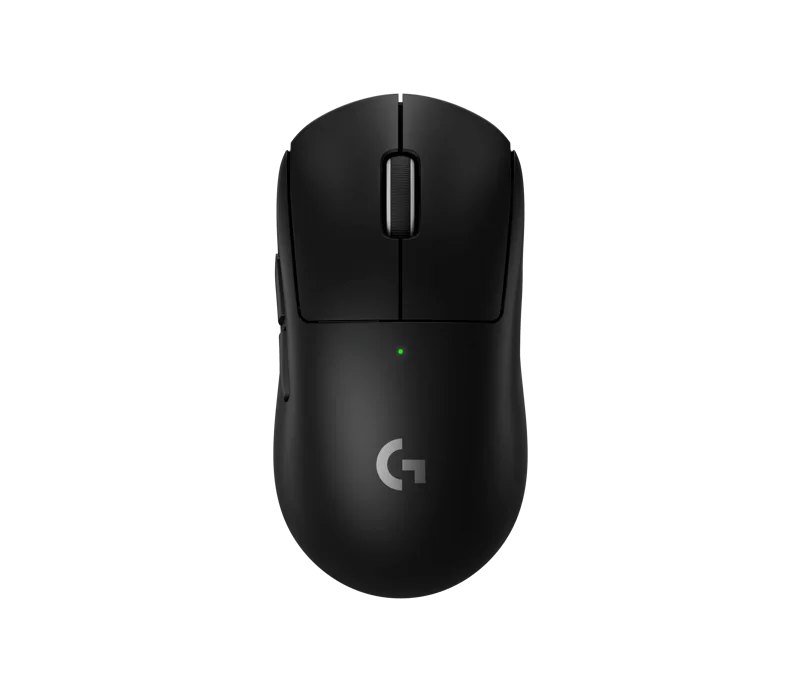
The Logitech G PRO X Superlight 2 is the successor to one of the best-known esports mice, and it keeps the recipe that made the original famous: a symmetrical shape, five buttons, no lighting and a weight of 60 grams. What changes is the technology underneath: a new HERO 2 sensor, hybrid optical-mechanical switches, USB-C charging and a wireless link that can report up to 8,000 times per second. This page explains what those upgrades mean, flags one place where Logitech's own page gives two different sensor numbers, and helps you judge whether a mouse this minimal is right for you.
60 grams and a shape made by pros
Logitech describes the mouse as designed in collaboration with leading pro players, and the physical specifications are compact: 125 mm long, 63.5 mm wide, 40 mm high and 2.12 ounces (60 grams). At 60 grams it is very light for a mouse whose shell is not perforated, meaning it has no holes. That matters for people who dislike the feel of honeycomb shells or worry about dust. The shape is symmetrical and low, which favours claw and fingertip grips and smaller to medium hands. Palm-grip users with large hands may prefer a bigger mouse; our guide to choosing a mouse for productivity or gaming explains how hand size and grip interact with shape.
The sensor number problem
Here is a place to read carefully. Logitech's page has a heading that says the HERO 2 sensor supports 44K DPI, and the text below it promises tracking over 888 inches per second and up to 44,000 DPI. But the technical specification table on the same page lists a resolution of 100 to 32,000 DPI, with a maximum speed of more than 888 IPS and a maximum acceleration of more than 88G, both tested on a Logitech G640 mouse pad. We treat the specification table as the dependable figure, so plan for 32,000 DPI; the 44,000 figure may refer to a different configuration or to the sensor's capability in newer software, and it makes no practical difference. Almost nobody plays above a few thousand DPI. The numbers that matter are the tracking speed and acceleration, and those are the same in both descriptions. If you would like to know how DPI, speed and polling rate combine, read our mouse sensor guide. The sensor also has zero smoothing, acceleration or filtering, which means the mouse does not modify your movement, a desirable trait for aim training. G HUB lets you calibrate the X and Y axes independently, adjust lift-off distance to match your grip and sync sensitivity with another mouse.
Lightforce hybrid switches
The main buttons use Logitech's Lightforce hybrid switches, which combine the speed and reliability of optical switches with the crisp, clicky feel of a traditional mechanical microswitch. They are rated for 70 million clicks, which Logitech says avoids sacrificing battery life. In practical terms, the design gives you fast actuation without the debounce delay of an old-style switch, and the mechanical feel means the click has a defined bump instead of the mushy sensation some optical switches have.
Wireless: Lightspeed at up to 8,000Hz
The mouse uses Logitech's Lightspeed wireless technology and supports polling up to 8,000Hz, or one report every 0.125 milliseconds. There is a condition: the advanced features require the G HUB software, so 8,000Hz is not something you get by default. Higher polling rates increase CPU load and drain the battery faster, and the benefit is most visible at high refresh-rate monitors and fast mouse movements, so it is a setting worth trying rather than assuming. For background on the wireless side, our article on wireless mouse latency compares 2.4GHz with Bluetooth. The mouse has a 32-bit ARM processor and, importantly, it has no Bluetooth listed on the page: it connects through the Lightspeed USB adapter. It charges through USB-C and can also use Logitech's Powerplay wireless charging.
Battery life
The specification lists a battery life of 95 hours in constant motion. Logitech adds the usual caveat that battery life varies with user and computing conditions. A figure of 95 hours is long, and with typical desk use you can go weeks between charges, but running a higher polling rate will reduce it. The mouse has 5 buttons, no RGB and no onboard fluff, which is part of why it lasts.
Feet, grip and small details
The feet are no-additive PTFE, which Logitech says reduces fatigue and increases precision, and the box includes an optional aperture door with a PTFE foot and optional grip tape for those who want a firmer hold. The package also contains the USB Lightspeed adapter, an adapter extension, a USB-A to USB-C charging and data cable and the documentation. System requirements are a Windows 10 or later PC with a USB 2.0 port, and an internet connection to download G HUB.
How it compares
Within our catalogue, the closest rival is the Razer Viper V3 Pro, which is even lighter at 54 grams and reaches 8,000Hz polling with Razer's HyperPolling dongle, with a different shape and an optical switch. The Corsair M75 Wireless is heavier at 89 grams but offers swappable side buttons and Bluetooth. Which is best depends on your hand, so if you can, hold each one. The Superlight 2 stands out for being unperforated, tidy and consistent, with a strong reputation among players who value predictability.
Price
On the Logitech G US page we read, the PRO X Superlight 2 was priced at 159.99 USD. That is a premium price for a five-button mouse, and it reflects the sensor, the switches and the wireless technology rather than features. If you are new to lightweight mice, a cheaper model may be a good way to find out whether you like the format before you spend this much. The mice category lists many alternatives.
Who it suits
The Superlight 2 suits players who want the lightest reliable wireless mouse without holes in the shell, who value a familiar, simple shape and who do not need programmable extras. It is less suited to people who use many macros, since it only has five buttons, or to those who need Bluetooth for a laptop or tablet, since the specification lists only the Lightspeed connection. If those are not deal-breakers, it is a dependable tool.