Glorious Model O 2 Wireless
A 68g honeycomb-shell wireless mouse with the BAMF 2.0 sensor, 2.4GHz and Bluetooth 5.2, up to 110 hours of battery on 2.4GHz and up to 210 on Bluetooth.
Specifications
| Weight | 68g |
|---|---|
| Sensor | Glorious BAMF 2.0 optical |
| Sensitivity | Up to 26,000 DPI |
| Max Speed | 650 IPS |
| Acceleration | 50G |
| Polling Rate | Up to 1,000Hz |
| Buttons | 6 programmable |
| Switches | Glorious switches, 80M clicks |
| Connectivity | 2.4GHz wireless, Bluetooth 5.2 LE, wired |
| Battery Life | Up to 110 hours (2.4GHz), up to 210 hours (Bluetooth) |
| Feet | 100% PTFE |
| Cable | 2 m ultra-flexible |
| Warranty | 2 years |
| Software | Glorious CORE (optional) |
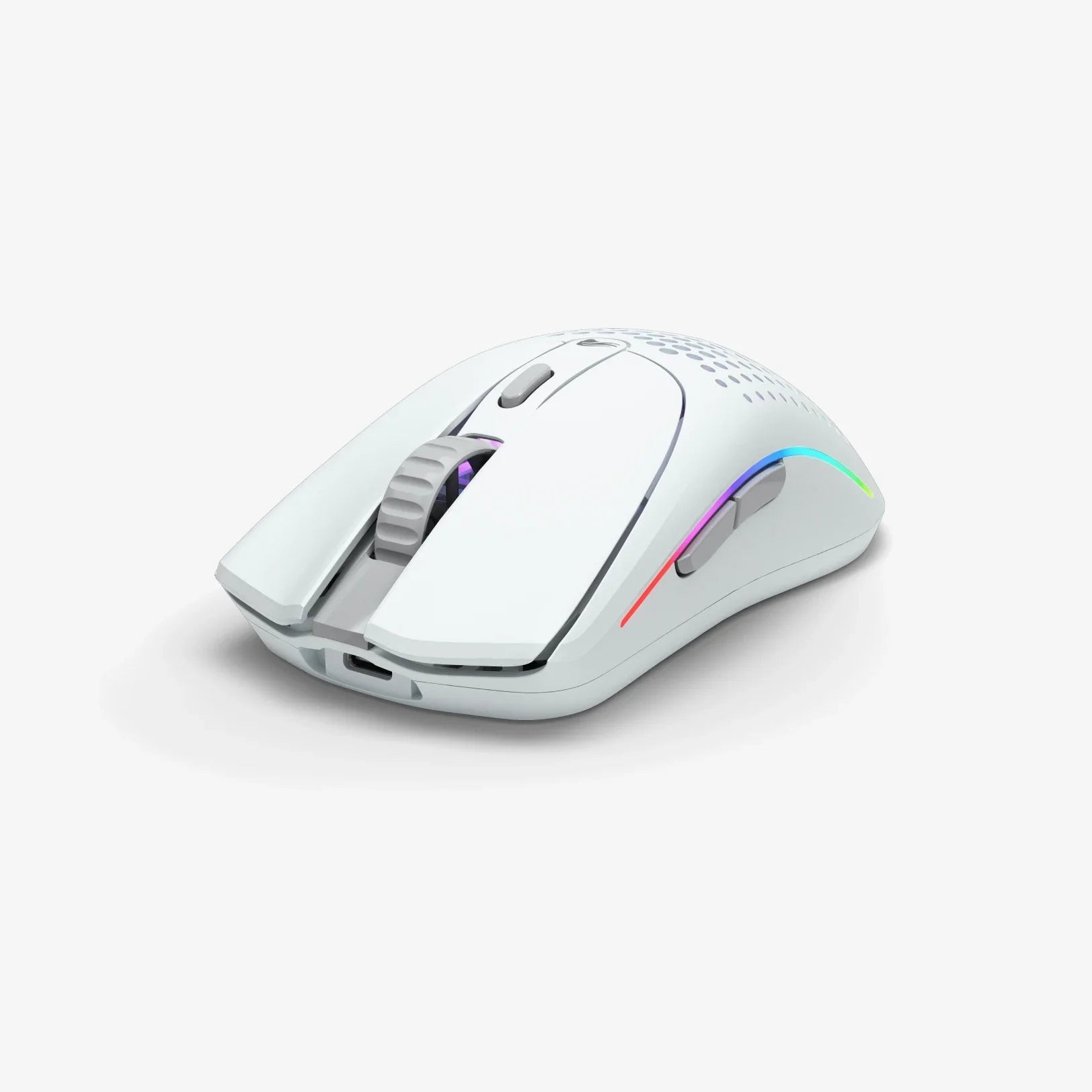
The Glorious Model O 2 Wireless continues one of the most recognisable shapes in gaming mice: a lightweight shell with a honeycomb pattern of holes, low to the desk, with a familiar, comfortable curve. It weighs 68 grams, uses a new BAMF 2.0 optical sensor, connects by 2.4GHz wireless or Bluetooth 5.2 LE, and claims up to 110 hours of battery life on 2.4GHz and up to 210 hours on Bluetooth. This page explains what the specification sheet says, notes the small inconsistencies on the manufacturer's page, and helps you decide whether this is the right lightweight mouse for your hand and your desk.
Weight, shape and grip
Glorious describes the Model O 2 Wireless as an ultralight 68-gram mouse and points out that a lower weight lets you move, accelerate and stop the mouse with more precision, which makes it easier to track targets and hit flicks. The company recommends palm, claw and fingertip grips, and lists the size as standard. There is a small inconsistency in how the shape is described: the page lists a right-handed symmetrical shape, while some retailer listings call the mouse ambidextrous. The two are compatible in practice, since a symmetrical body can be held by either hand, but because the shape is described as right-handed, left-handed players should try one before buying. If you are choosing between shapes and weights, our guide to choosing a mouse for productivity or gaming is a helpful starting point.
Sensor: BAMF 2.0
The mouse uses Glorious's BAMF 2.0 optical sensor, with a maximum sensitivity of 26,000 DPI, a maximum speed of 650 inches per second and a maximum acceleration of 50G. The polling rate is up to 1,000Hz. As with other modern mice, the DPI number is more than any player will use; the useful parts are that the sensor tracks accurately at high speed and does not spin out during fast flicks. For a clearer picture of DPI, tracking speed and polling rate, read our guide to mouse DPI, sensors and polling rate. Glorious describes the sensor as next-generation and says you will not miss shots due to inaccurate tracking, which is a marketing statement rather than a measurement.
Switches and buttons
The mouse has six programmable buttons and uses Glorious's own switches rated for 80 million clicks. The company says that the main buttons have a redesigned hinge that, combined with its custom switches, makes each click feel more responsive. The mouse remembers up to three custom profiles onboard, so your settings travel with it. Optional configuration is done in the Glorious CORE software, and the mouse works on Windows, macOS and Linux.
Wireless and battery life
The mouse offers a hybrid wireless connection. In 2.4GHz mode, which Glorious describes as lag-free and blazing fast, you get up to 110 hours of gameplay. In Bluetooth 5.2 LE mode, which pairs with phones, tablets and other devices, the battery life nearly doubles to up to 210 hours. Glorious also lists the 210-hour figure as the maximum battery life in its headline details, so the two numbers are two modes and not a contradiction. Both figures are the maximums stated by the manufacturer, so assume less if you run bright lighting. Our news article on wireless mouse latency explains why you would use 2.4GHz for games and Bluetooth for everything else.
Lighting, feet and cable
The mouse offers 16.8 million colour RGB lighting with eight effects, which shines through the honeycomb holes. The feet are 100 percent PTFE G-Skates. The wired mode uses an ultra-flexible cable listed as 2 metres (6.5 feet) long. Here is one more inconsistency on the manufacturer's page. The summary of what is included lists a Type-A to Type-C paracord charging cable and the receiver, while the specification tab lists a USB receiver, an Ascended USB-A to USB-C cable and a USB-A to USB-C adapter. The likely explanation is that the cable was updated and the page was not, so do not be surprised by either version of the braid. Either way, the box includes the mouse, the 2.4GHz receiver and a USB-C charging cable.
What it is like to live with
A honeycomb shell means holes, and holes have consequences. On the plus side, they reduce weight and let the RGB glow through the shell; on the downside, they let in dust and can feel different under a sweaty palm. If you like the idea of a light mouse but not the honeycomb look, an unperforated design such as the Logitech G PRO X Superlight 2 is a solid alternative, at 60 grams and with a higher polling rate ceiling. If you prefer a slightly heavier mouse with swappable side buttons, the Corsair M75 Wireless weighs 89 grams. Both differ enough that the best choice depends on how you hold a mouse.
Getting started
Start by plugging the 2.4GHz receiver into a USB port close to your mouse pad, and use the mouse for a few days with its default settings before you change anything. Install Glorious CORE only when you want to reassign buttons, set DPI stages or turn off the lighting, since lighting off also saves battery. Pair Bluetooth for a laptop or tablet only if you will really use it, and save the profiles you like in the mouse's onboard memory so that they are waiting on any computer you plug it into. Small habits like these make a lightweight mouse feel like your own within a week.
Warranty, returns and price
Glorious lists a two-year warranty and 45-day returns, and free shipping on contiguous US orders of 99.99 USD and above. On the Glorious US page we read, the Model O 2 Wireless was priced at 99.99 USD, which is a mid-range price for a wireless gaming mouse with these specifications. At the time of our reading, the page showed the product as out of stock in the configuration we saw, with a notify-me option, so check availability before you plan a purchase. Compare more options in the mice category.
Who it suits
The Model O 2 Wireless suits people who like a light mouse with a familiar, comfortable shape, who want both a fast 2.4GHz link and Bluetooth for other devices, and who value a long battery life over extra buttons. It is less of a match if you use a lot of programmable buttons, need a left-handed mouse with side buttons on the right, or dislike a perforated shell. For a lightweight all-round mouse at a friendly price, it deserves a place on the shortlist.