Plugable USB-C 4K Triple Display Docking Station UD-ULTC4K
A DisplayLink-based USB-C dock with three video outputs, 100W host charging, four USB-A ports and Gigabit Ethernet, built to run three 4K 60Hz screens from a single USB-C cable.
Specifications
| Host Connection | USB-C 10Gbps (rear), up to 100W Power Delivery (96W certified) |
|---|---|
| Ports | 13: 3x HDMI 2.0 or DisplayPort 1.2, 1x USB-C host, 1x USB-C (front), 4x USB (5Gbps), SD, audio in/out, Gigabit Ethernet |
| Displays | Up to 3x 4K 60Hz (DisplayLink; DP 1.4 Alt Mode hosts) |
| Power Supply | 135W (20V 6.75A) |
| Dimensions | 200 x 73 x 136 mm |
| Weight | 624 g |
| Software | DisplayLink driver required for full functionality |
| Compatibility | Windows 10/11, macOS, ChromeOS 100+ |
| Warranty | 2 years |
Most docks in this category lean on Thunderbolt. The Plugable UD-ULTC4K takes a different route: it uses DisplayLink technology, which sends video over an ordinary USB connection and needs a small piece of driver software. In exchange it does something Thunderbolt docks often cannot: it can drive three displays even from a laptop whose own USB-C port only outputs one. If you have a base-model Apple Silicon MacBook or a modest Windows ultrabook and want a three-monitor desk, this is the reason the UD-ULTC4K exists. This page goes through the specification, the software you will need, and the fine print worth knowing before you buy.
How it gets three displays out of one cable
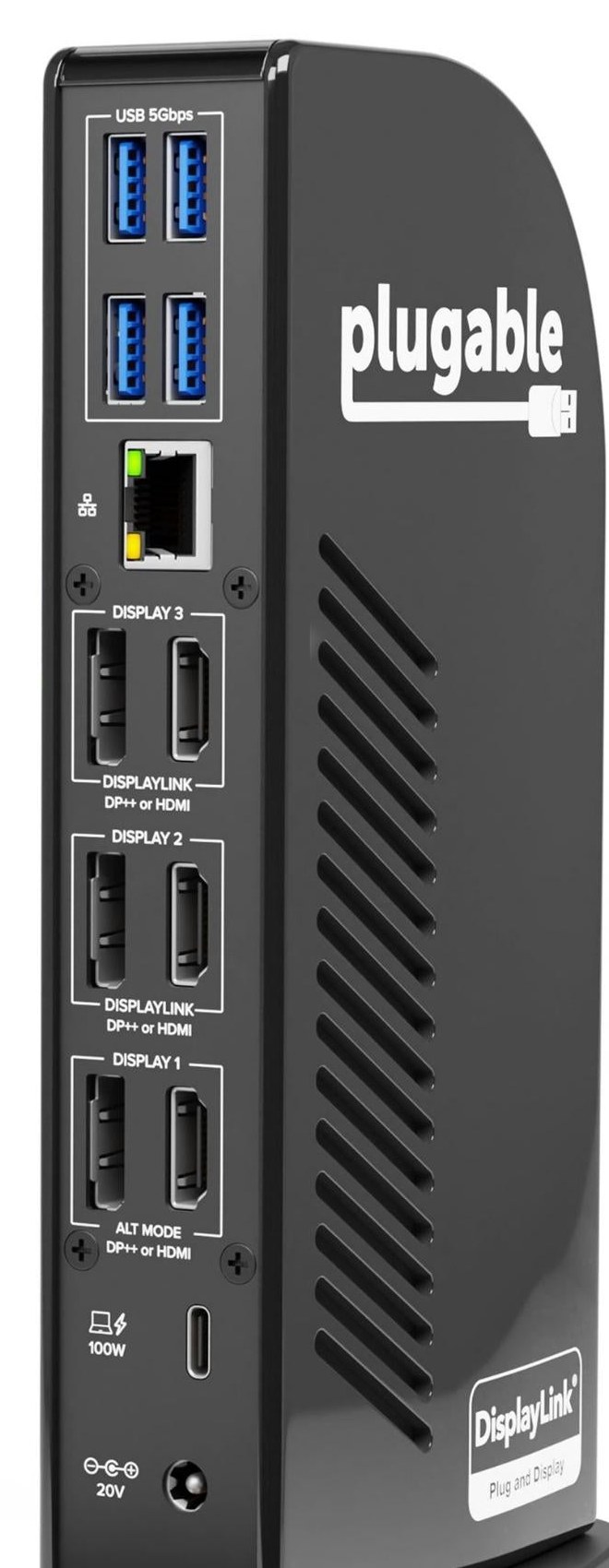
The rear of the dock has three display groups, labelled Display 1, 2 and 3. Each group offers one HDMI port and one DisplayPort port, marked "DP++ or HDMI", and you use one output from each group. Plugable's text says "3x HDMI or 3x DisplayPort", and its comparison table lists three HDMI 2.0 or DisplayPort 1.2 outputs. Display 1 relies on the host's own USB-C Alt Mode, while displays 2 and 3 are handled by DisplayLink. That is why the FAQ can say plainly that the dock supports three displays even on base M1, M2 or M3 Macs, provided the DisplayLink Manager software is installed on the Mac. By contrast, Plugable's Thunderbolt dock, the TBT4-UDZ, is limited to two displays on the same class of Mac.
Resolution depends on the host. With Thunderbolt 5, Thunderbolt 4, Thunderbolt 3, USB4 and USB-C hosts that support DisplayPort 1.4 Alternate Mode or better, Plugable says you get three 4K screens at 60Hz. On hosts limited to DisplayPort 1.2 Alternate Mode, the compatibility note lists one 4K 30Hz output plus two 4K 60Hz outputs, which reads oddly, so contact support or check your laptop's specification if you are close to that limit. Older displays with a 1366x768 resolution are not supported on the DisplayLink outputs, and HDCP is not supported, which matters if you plan to play protected video on these screens. For help deciding whether three monitors suit your workflow, see our multi-monitor and KVM guide.
The software trade-off
Plugable is direct: DisplayLink software is required for full functionality. On Windows the installation is typically automatic and needs administrator rights. On macOS the DisplayLink Manager app must be installed manually, and macOS asks you to grant Screen Recording permission. Plugable explains that this is how the driver sends data over USB to the display, and that no images or pixels are stored or recorded. ChromeOS 100 or later needs no download. The page also lists the recommended system: Windows 10 or 11, macOS 10.15.7 or newer, an Intel Core i5 or i7 of sixth generation or later, an AMD Ryzen of 2.4GHz or better or an Apple M1 to M4, and graphics such as Intel HD 620, AMD Vega or NVIDIA GeForce 900 series or newer. One inconsistency: the feature text says macOS 11 or newer, while the system requirements say macOS 10.15.7 or newer, with extra notes for Big Sur and Catalina, so treat macOS 11 as the safe floor.
Ports and power
Plugable counts 13 ports. Around the back you find the USB-C host port at 10Gbps, three groups of displays, four USB-A ports at 5Gbps, a Gigabit Ethernet jack and the power input. The front carries a headphone jack, a microphone jack, an SD card slot and a second USB-C port at 10Gbps with 20W of charging. Plugable stresses that the rear USB-C port is the only one that connects to your computer; the front port is a hub port only. The dock draws from a 135W adapter at 20V and 6.75A and can pass up to 100W of USB Power Delivery to a laptop, certified at 96W. High-power gaming laptops may not charge properly, and not every USB-C port supports both Power Delivery and video output, so check both. Most desktop computers, for example, do not support DisplayPort Alternate Mode over USB-C, and Plugable says so.
Networking, audio and card reader
Ethernet is Gigabit and, like the audio and two of the video outputs, runs through the DisplayLink DL-6950 chip. Audio is 16-bit, 48kHz analogue, with separate line-out and microphone jacks on the front. The card reader uses a Genesys Logic GL3232S. None of this is high-end audio or networking, and it does not need to be. It is a practical spread for a home office: a headset, a webcam, a keyboard and mouse, a network cable and a memory card. Our docking station buying guide can help you count what your own desk needs.
Size, weight and in the box
The dock is 20 x 7.3 x 13.6 centimetres and weighs 624 grams, and it stands upright on a broad base with a glossy black finish. In the box you get the dock, a 1-metre USB-C to USB-C cable rated at 10Gbps, the 135W power adapter with a 1.88-metre power cable and a quick-start guide. With a host cable, power cable and up to three video cables, the rear can get crowded, so a little desk cable management is worth planning.
How it compares with Plugable's other docks
Plugable's comparison table shows the UD-ULTC4K at 245.99 dollars with three displays, five USB ports and 100W charging. The UD-ULTCDL, at 194.99 dollars, also drives three displays, but with older HDMI and DVI outputs limited to one 4K 30Hz plus two 1920x1200 60Hz screens. The UD-6950Z, at 159.99 dollars, handles two 4K 60Hz displays and does not charge the laptop. The UD-3900C4, at 244.99 dollars, drives four 1080p60 HDMI displays with 100W charging, and the Thunderbolt TBT4-UDZ at 289.99 dollars offers four 4K screens on Windows Thunderbolt hosts but two on Macs. If you want a simple hub rather than a multi-monitor dock, our page on the Anker 555 USB-C hub shows the other end of the market. If your laptop has Thunderbolt and you want to keep that speed for storage, our explainer on Thunderbolt and USB-C compatibility will help.
Price
Plugable lists the UD-ULTC4K at 245.99 dollars. Prices move, so check the current amount, and check the warranty terms on the page you buy from.
The short version
Buy the UD-ULTC4K if you want three displays from a laptop that could not manage them on its own, you can live with driver software and you do not need HDCP-protected video. Skip it if you run Linux, if your laptop's USB-C port lacks Alt Mode, or if you want the raw bandwidth of Thunderbolt for fast storage.