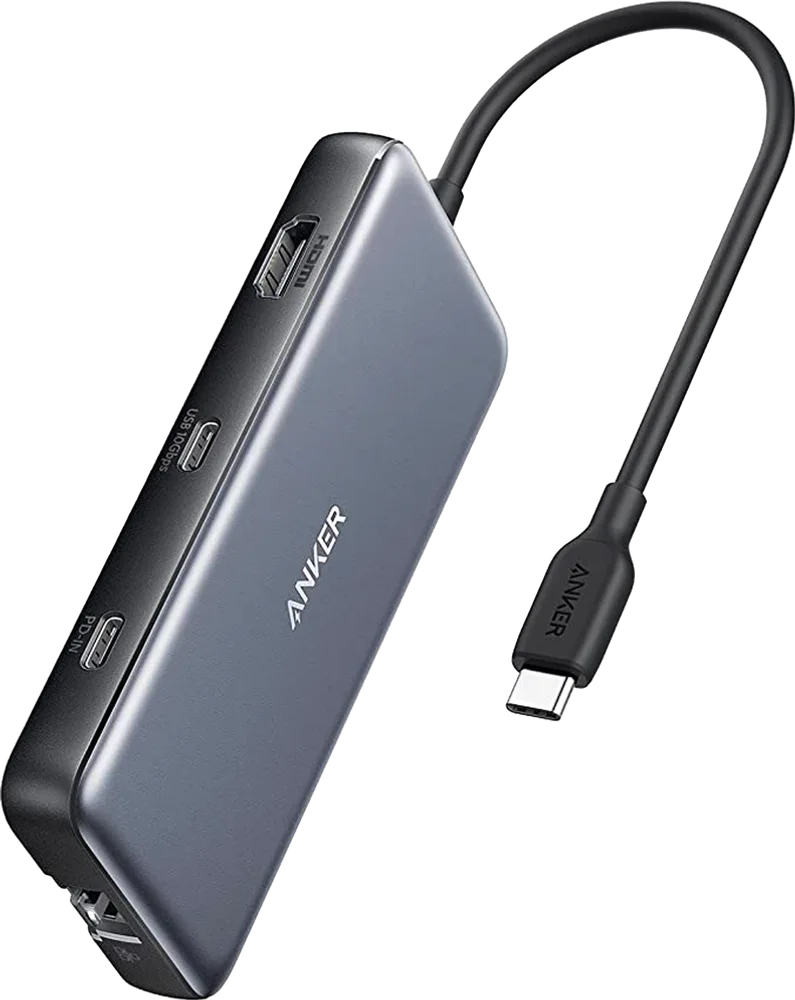
Anker 555 USB-C Hub (8-in-1) A8383
A slim 8-in-1 USB-C hub with 4K 60 Hz HDMI, gigabit Ethernet, SD and microSD readers, 10 Gbps USB ports and 100 W pass-through charging.
Specifications
| Ports | 8: HDMI, gigabit Ethernet, SD, microSD, USB-C data, 2x USB-A, USB-C power input |
|---|---|
| Data Transfer | Up to 10Gbps (USB-C data and USB-A ports) |
| Display Support | Single 4K @ 60Hz via HDMI |
| Power Delivery | Up to 100W pass-through (15W used by hub) |
| Ethernet | 1Gbps |
| Dimensions | 4.76 x 2.17 x 0.6 in |
| Weight | 4.4-4.5 oz |
| Model | A8383 |
The Anker 555 USB-C Hub (8-in-1), model A8383, is a slim, portable hub that turns one USB-C port on a laptop into eight connections: HDMI, gigabit Ethernet, two card readers, three USB ports and a power input. It is not a full desktop docking station like a Thunderbolt dock, and it is honest about that: it has one video output, and it draws its data connection from the laptop's USB-C port. But for many people, this is the exact tool needed: a small, affordable hub that lives in a laptop bag and plugs into a monitor, a network cable and a few accessories when you reach a desk. This page explains what the ports do, what the fine print says, and how to judge whether a hub like this is enough for you.
What is in the eight ports
Anker's eight ports are a 4K HDMI output, a gigabit Ethernet port, an SD card slot, a microSD card slot, a USB-C data port, two USB-A ports and a USB-C power input. The two USB-A ports and the USB-C data port run at up to 10 Gbps. You may see the standards described in two ways on Anker's page: the marketing text talks about USB 3.2 Gen 2, while the specification table lists older names such as USB 3.1 Type-A and USB 3.0 Type-C. These are different generations of naming for the same family of ports, and the 10 Gbps figure is what matters: it is fast enough for external SSDs and for moving large photo or video folders in a reasonable time. The Ethernet port offers up to 1 Gbps, which gives a stable wired connection when Wi-Fi is unreliable. The two card slots are useful for photographers and drone or camera owners, who can copy files without a separate reader.
Video: one monitor at 4K 60 Hz
The HDMI port supports an external monitor at 4K and 60 Hz, which is the level most current 4K monitors and TVs can use. That gives you a sharp, smooth desktop for office work and video. Note two limits. First, there is only one video output, so this hub is not the tool for a triple-monitor setup; for that, see the dock options below. Second, the USB-C data port on the hub does not carry video and does not support screen mirroring, so do not try to plug a USB-C monitor into it. Your laptop must also support video output over its USB-C port; if it does not, no hub will provide it. For help understanding what each USB-C and Thunderbolt port on your laptop actually supports, read our news article on Thunderbolt and USB-C docking compatibility.
Charging: 100 W in, less out
The hub has a power input that accepts a USB-C charger, and it passes power through to the laptop. Anker says it supports up to 100 W of pass-through charging, minus 15 W for the hub's own operation, so about 85 W reaches the laptop. That is enough to charge a 15-inch MacBook Pro at full speed according to Anker, as long as your own charger is powerful enough; the charger is not included. The hub does not need a wall charger to work; you only need to plug one in if you want to charge the host laptop. There are important limits on charging other devices: the hub's USB-A ports and the USB-C data port are for data, and they do not support charging phones or tablets. Also, Anker notes that when using the original wall charger that came with a phone or a tablet, pass-through charging is not available due to the power input limits of mobile devices; for an iPad Pro, use an adapter that supports at least 15 V (45 W).
Compatibility and limits
Anker's compatibility list includes MacBook Pro models from 2015 to 2020, MacBook Air models from 2018 to 2020, iPad Pro models from 2018 to 2020, the Dell XPS 13 and 15 and the Pixelbook (2017). The list reflects when the hub was launched, and other laptops with a full-featured USB-C port will usually work too, but check that yours supports video output and power delivery. The hub is listed as incompatible with the Nintendo Switch and with the USB SuperDrive. Because the hub may become warm (Anker says it is normal for it to reach about 122 degrees Fahrenheit, roughly 50 degrees Celsius) when fully loaded or connected to a power adapter, do not bury it under papers or in a pouch while it is working.
Size and portability
The hub measures 4.76 x 2.17 x 0.6 inches (about 121 x 55 x 15 mm) and weighs about 4.4 to 4.5 ounces (roughly 125 g); Anker's marketing text gives 4.4 oz and the specification table gives 4.5, which is a rounding difference rather than a real disagreement. It has a fixed USB-C cable that plugs into the laptop, so you do not have a separate cable to lose. It fits easily into a laptop sleeve, which is the point: this is a travelling hub, not a fixture for a permanent desk. If you plan to leave the hub on a desk, our cable management guide shows how to keep the cable path tidy.
Everyday scenarios
Picture three typical days. In a hot-desk office you arrive, plug the hub into your laptop, connect the monitor by HDMI, the network cable and your charger, and you are working in under a minute. On a photo shoot you copy a card straight from the SD slot to a fast external drive on one of the 10 Gbps ports. At a client's meeting room you plug into their HDMI display and keep your laptop charged from the power input. In each case one small part replaces a bag of adaptors, which is the strongest argument for a hub like this one.
Price and value
On the Anker US page we checked, the price was 49.99 USD. That is inexpensive for eight ports, and it is a sensible purchase if your needs are a single external display, wired internet, a couple of USB devices and a card reader. As with any hub, check that your laptop's USB-C port matches your needs; a laptop that only supports USB 2.0 speeds or lacks video output would limit what the hub can do.
Hub or dock: which one do you need?
A hub is a small adaptor; a dock is a desk device with its own power supply and, often, support for more than one display and many more ports. Choose a hub like the 555 if you travel, use one monitor and need a handful of ports. Choose a dock if you want two or more monitors, an always-connected desk with many peripherals or higher charging power. Our docking station buying guide explains how to count what you actually need. To see the larger options on this site, browse the docking stations category, and compare the Anker 575 Docking Station, a bigger desk dock, and the Belkin Connect Pro Thunderbolt 4 Dock, a full Thunderbolt 4 dock with dual-display support.