Plugable Plugable TBT4-UDX1 Thunderbolt 4 and USB4 HDMI Docking Station
An 11-port Thunderbolt 4 dock with two downstream Thunderbolt ports, 2.5 Gb Ethernet, 96 W host charging and dual 4K 60 Hz output using an included USB-C to HDMI adapter.
Specifications
| Ports | 11: 3x Thunderbolt 4 (1 host, 2 downstream 15 W), 1x HDMI 2.0a, 4x USB-A 10 Gbps, 2.5 Gb Ethernet, UHS-II SD, combo audio |
|---|---|
| Host Charging | Up to 100 W (96 W certified); 81 W with one and 66 W with two Thunderbolt devices attached |
| Power Supply | 135 W |
| Displays | Two 4K 60 Hz (HDMI + included USB-C to HDMI adapter) or one 8K 30 Hz |
| Mac Support | M4/M5 and Pro/Max M1-M3 dual display; base M1/M2 single; base M3 dual in clamshell only |
| Size | 3 x 20 x 7.5 cm, 445 g |
| Cable | 1 m 40 Gbps Thunderbolt 4 |
| Warranty | 2 years, lifetime support |
| Price | US$249.95 |
The Plugable TBT4-UDX1 is a Thunderbolt 4 and USB4 dock with an unusual mix: two downstream Thunderbolt 4 ports, one HDMI output and a USB-C to HDMI adapter in the box. Plugable lists it at 249.95 US dollars, and the page marks it out of stock at Amazon US, so availability is worth checking. It also says the dock is TAA compliant, which matters to some government and enterprise buyers. This guide is based on Plugable's product page, its comparison table and the technical detail further down the page. We have not tested the dock ourselves, so we describe what Plugable states and point out where limits apply.
The port count, checked
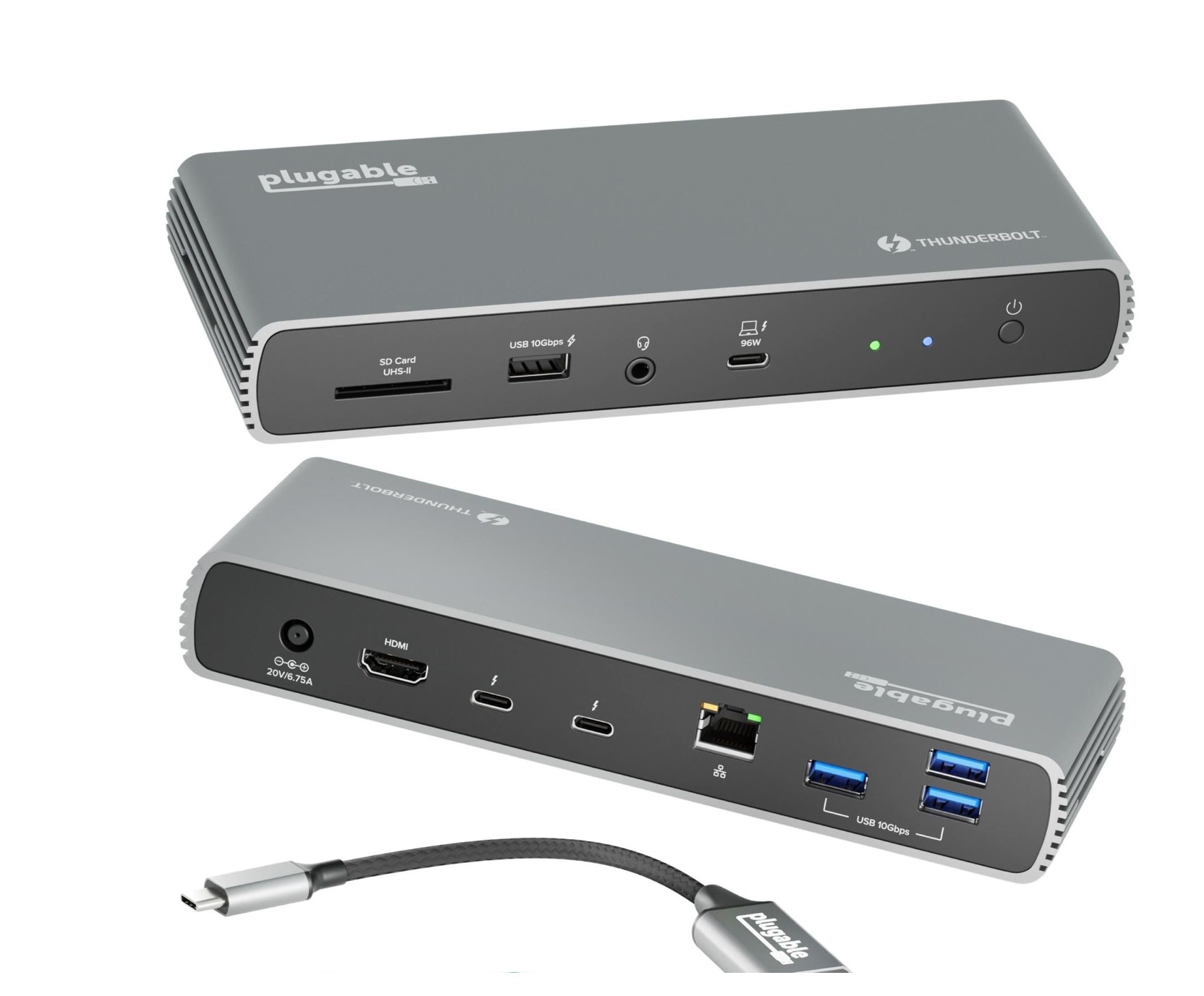
Plugable calls it an 11-port dock, and the arithmetic works if you count the host connection. There are three Thunderbolt 4 ports: one on the front that connects to your computer, and two on the back for devices like an SSD or a phone. Then there are one HDMI output, four USB-A ports, one 2.5 Gb Ethernet port, one SD card reader and one combo audio jack, for a total of eleven. The four USB-A ports run at 10 Gbps; three of them are at the back at 5 V and 900 mA, and one is on the front with Battery Charging 1.2 at 5 V and 1500 mA. The SD reader supports SD, SDHC, SDXC and MMC cards at UHS-II speeds, up to 312 MB/s. The audio port is a front 3.5 mm TRRS headset jack. Plugable's own comparison table shows an SD entry as not applicable for some docks, so if a card reader matters to you, confirm it on the current page. Our docking station guide on how many ports you need can help you judge whether eleven is right for your desk.
Two downstream Thunderbolt ports: why they matter
Many docks give you one Thunderbolt connection for the computer and rely on USB-C or USB-A for everything else; in Plugable's own comparison table, most of the other docks list no downstream Thunderbolt ports. The UDX1 gives you two 40 Gbps Thunderbolt 4 ports at the back, each able to supply up to 15 W. That lets you connect a fast external SSD, a Thunderbolt monitor or another Thunderbolt device without using up the laptop's own ports. The trade-off is power: Plugable says that when one Thunderbolt device is connected the host receives 81 W, and when two are connected it receives 66 W. So the charging headroom is affected by what you plug into the downstream ports. The dock's own power supply is a 135 W adapter and the host connection delivers up to 100 W, 96 W certified; the page says a 14 inch MacBook Pro can charge from 0 to 50 percent in about 30 minutes, based on Plugable's internal testing. Charge times on your laptop will vary.
Displays: what you actually get
This is the part that needs care. The dock supports up to two 4K monitors at 60 Hz: one through the HDMI port, and one through the included USB-C to HDMI adapter, which you plug into one of the Thunderbolt ports. For the highest resolution, you can instead connect a single 8K display at 30 Hz through Thunderbolt 4. The HDMI port is listed as HDMI 2.0a, and the technical table lists a range of resolutions including 3440 by 1440 and 2560 by 1440 at 60 Hz. If you want to run more than two monitors, look at Plugable's larger dock: it is listed alongside the Plugable 16-in-1 Thunderbolt 4 dock in our catalogue.
Apple laptops need separate attention because the number of displays depends on the chip. Plugable says the dock is fully compatible with all M4 and M5 MacBooks and with M1, M2 and M3 MacBooks that have a Pro or Max chip. Base M1 and M2 MacBooks support only a single external display, and base M3 Macs support dual displays in clamshell mode only, according to the features text. The page also states that the dock is not compatible with the MacBook Neo. On Windows, a Thunderbolt 4 or USB4 host is required, running Windows 10 or later, and on macOS 11.2 or later. If you are not sure what your laptop's port supports, our article on Thunderbolt 3, 4 and 5 docking compatibility will help.
Networking and audio
The Ethernet port is 2.5 Gb, using a Realtek RTL8156B controller, with Wake-on-LAN, Energy-Efficient Ethernet and 9K jumbo frames listed. A 2.5 Gb port only helps if your router, switch and cabling also support it, so for most home networks it will run at gigabit speed until you upgrade. The audio jack is bidirectional and supports 32-bit audio at up to 384 kHz through a Realtek ALC4042 chipset. The video controllers are a Synaptics VMM6100 for HDMI and an Intel JHL8440 for Thunderbolt, which Plugable lists so that IT teams can check drivers and compatibility.
Size, weight and layout
The dock measures 3 by 20 by 7.5 cm and weighs 445 g. It sits horizontally, and Plugable's comparison table lists the orientation as horizontal for this model. It includes a 1 m, 40 Gbps Thunderbolt 4 cable, a power supply, a power cable, a quick start guide and the USB-C to HDMI adapter. Two status LEDs are described: a green dot for powered on and a blue dot for an active host connection.
Warranty and support
Plugable advertises a two-year warranty, lifetime technical support from its US-based team, a 30-day money-back guarantee and free shipping on orders over 35 dollars. The Amazon rating widget on the page is a live data feed that may lag; we do not quote reviewer scores from it, but the page lists 155 reviews at the time we read it. Check current review scores before you buy.
How it compares with its siblings
Plugable's table sets the UDX1 next to four other docks. The UDX1 has two downstream Thunderbolt ports and no vertical stand option, while the TBT4-UDZ has 16 ports, 2.5 Gb Ethernet and can drive four displays on Windows, and the 13-in-1 TBT4-UD5 in our catalogue targets dual 4K or a single 8K. If you need a card reader and one Thunderbolt downstream port, look at the 13-in-1 first. If you need to daisy-chain two Thunderbolt devices, the UDX1's pair of downstream ports is the attraction. The OWC 11-Port Thunderbolt Dock is another eleven-port option in our database with three Thunderbolt 4 ports, and reading both pages side by side is a good way to compare.
Who it suits
- You have a Thunderbolt 4 or USB4 laptop and want two extra high-speed Thunderbolt ports on the desk.
- You are happy with two 4K 60 Hz displays, one on HDMI and one through the supplied adapter.
- You want 2.5 Gb Ethernet ready for a faster network.
- You need a TAA-compliant dock for a procurement rule.
It suits you less if you have a base M1, M2 or M3 MacBook and hope to run dual monitors, if you need four displays, or if you want a vertical stand. Bring order to the cables around it with our desk cable management guide, and compare the whole category on our docking stations page. In short, the TBT4-UDX1 is a well-specified dock for a specific need, the pair of downstream Thunderbolt ports, and its main limits are Mac display rules and a trade-off between charging power and downstream devices.