OWC OWC 11-Port Thunderbolt Dock
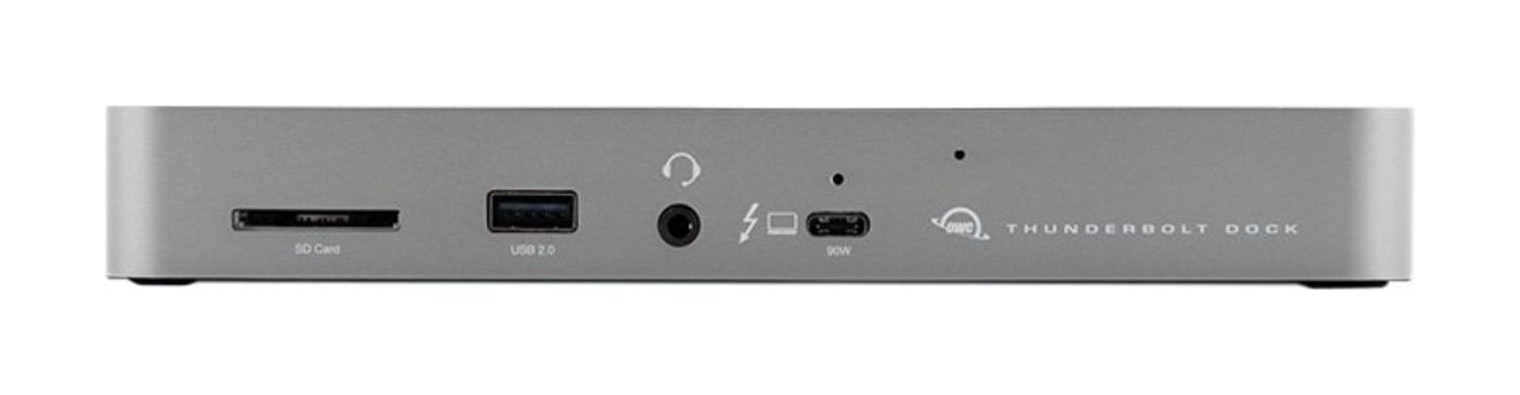
An 11-port Thunderbolt dock with three Thunderbolt 4 ports, four USB ports, Gigabit Ethernet, audio, an SD card reader and 96 W charging for the laptop.
Specifications
| Ports | 11 in total: 3 Thunderbolt 4 downstream, 4 USB, Gigabit Ethernet, audio, SD card reader (per OWC description) |
|---|---|
| Host Power | Up to 96 W to the host via Thunderbolt 4 |
| Downstream Power | Thunderbolt 4 ports up to 15 W, USB ports up to 1.5 A |
| Displays | Dual 4K at 60 Hz or one 8K at 60 Hz (host dependent) |
| SD Reader | Up to 312 MB/s |
| Cable | 0.8 m OWC Thunderbolt (USB-C) cable included |
| Compatibility | Thunderbolt 3 Mac (macOS 11.1 or later), Thunderbolt 4 PC; USB-C dock for other PCs |
The OWC 11-Port Thunderbolt Dock is the full-desk answer in OWC's range: one cable to the laptop, and behind it three more Thunderbolt 4 ports, four USB ports, Gigabit Ethernet, a headphone and microphone jack, an SD card reader and up to 96 W of charging power for the host. OWC aims it at photographers, video editors and remote workers who want a laptop to turn into a workstation the moment it is plugged in. This guide is built from OWC's own product page. That page lists no price and no per-port speed table, so we quote none, and we have not tested the dock ourselves.
What the eleven ports are
OWC's short description says the dock adds three Thunderbolt 4 ports, four USB ports, Ethernet, audio and card reader functions to a Thunderbolt 3 Mac or Thunderbolt 4 PC. Together with the Thunderbolt 4 host port that goes to your computer, that gives the total OWC calls eleven ports: one host, three downstream Thunderbolt 4, four USB, one Ethernet, one audio and one SD card. The page does not print the USB port types in the text we read, so check the Specs tab before you order if you need to know which are USB-A and which are USB-C, and which run at which speed. What the page does tell you about power is precise: the Thunderbolt 4 host port provides up to 96 W to the host computer, the downstream Thunderbolt 4 ports provide up to 15 W for devices and drives, and the USB ports provide up to 1.5 A for bus-powered drives and device charging.
96 W charging and always-on power
OWC says the 96 W keeps a notebook powered and mobile-ready while running your whole desk; check your own laptop's charger rating to be sure it fits under that ceiling. With four USB ports you can charge a phone, a tablet, headphones and accessories together. OWC adds that the dock continues to power or charge connected devices even when the computer sleeps or you are done for the day, which is handy if a phone charges at the dock overnight. If you want a broader look at how power delivery and port counts trade off, our docking station buying guide is the place to start.
Displays: dual 4K or a single 8K, with caveats
OWC says you can edit across dual 4K displays or use a single 8K screen. Its display table lists the combinations: 4K at 30 Hz and at 60 Hz, dual 4K at 60 Hz, 5K at 60 Hz for the Apple Studio Display or LG UltraFine 5K, dual 5K at 60 Hz for the Apple Studio Display, 6K at 60 Hz for the Pro Display XDR and dual 6K at 60 Hz, and 8K at 60 Hz, each dependent on the host. The table then marks which hosts manage which, from Apple silicon Macs (M1 and M2, and separate rows for the Pro, Max and Ultra chips) and Intel Macs with Thunderbolt 3, through iPads, Chromebooks and Windows PCs with Thunderbolt 4, Thunderbolt 3, USB4 or plain USB-C. The important footnote is that some refresh rates need DisplayPort 1.4 HBR3 and DSC 1.2 support from both display and host, and that not every Thunderbolt port supports DisplayPort 1.4, because some are limited to DisplayPort 1.2, which can reduce the refresh rate or resolution. OWC recommends verifying display support for your specific Mac or iPad model. In other words, the dock is capable, but your computer decides the ceiling. Our article on Thunderbolt 3, 4 and 5 compatibility explains why.
Three independent chains
As with the OWC Thunderbolt Hub, the dock creates three independent device groups, so pulling one cable does not affect the others. OWC's example is disconnecting a camera in the middle of a shoot without losing your displays or external drives. It also says you can connect several bus-powered portable drives directly to the dock at full speed, rather than choosing which one gets the fast connection: a backup SSD, a project drive and a scratch disk together. A one-click Dock Ejector utility, free from OWC, safely disconnects several drives at once, and it includes a driver so an Apple SuperDrive connected to a USB-A port can play and burn discs.
Ethernet, card reader and audio
The Gigabit Ethernet port is there for people who do not trust Wi-Fi during video calls or large uploads; OWC says the IP-based connection also helps collaboration on big team projects. The SD card reader is quoted at 312 MB/s, which OWC says turns hour-long transfers into minute-long breaks, and you can also use it like an external drive for backups. The audio jack accepts headphones or a microphone. Together they cover the kinds of ports that a Thunderbolt hub leaves out.
Compatibility and the cable
The dock works with any Mac with an available Thunderbolt 3 port running macOS 11.1 Big Sur or newer, and with any Windows PC with an available Thunderbolt 4 port. On a PC without Thunderbolt 4, OWC says it acts as a USB-C dock. It works with Thunderbolt 4, Thunderbolt 3, USB4 and USB host computers and mobile devices, and older Thunderbolt or Thunderbolt 2 Macs are supported only through a USB-A host connection; a Thunderbolt or Thunderbolt 2 host connection is not supported. Thunderbolt 2 devices can be connected with a certified adapter and cable, at up to 20 Gb/s and without notebook charging. The dock ships with a certified 0.8 m Thunderbolt cable, and OWC lists an adjustable status LED that can be dimmed for late-night editing, plus built-in security slots.
Tablet use
OWC pushes the idea of turning an iPad Pro or another tablet into a small workstation, with an external display, a keyboard, a mouse and a drive on the dock. That is convenient on paper, but tablet display support varies, so read the iPad rows of the display table for your model before you plan it.
Where the page contradicts itself
A description that begins by promising three Thunderbolt 4 ports, four USB ports, Ethernet, audio and a card reader, and a headline that calls it an 11-port dock, are consistent once you count the host port as one of the eleven. But a headline calling it "Thunderbolt-certified reliability" and a note that it works "with any Mac with Thunderbolt 3" both hide the small print that a Thunderbolt 4 dock on a Thunderbolt 3 Mac is still limited by the Mac's own port. Where the page is marketing, we have said so; where it gives figures, we have quoted them.
Who should buy it
Buy the 11-Port dock if you want a single-cable desk for a Mac or a Thunderbolt 4 PC with a wired network, an SD card reader and lots of drives. If you only need a few extra ports, the OWC Thunderbolt Hub is simpler. If you travel, the OWC Thunderbolt Go Dock has a built-in power supply. Compare with the Kensington SD5000T5 EQ and the Thunderbolt Station 4 TS4 in our catalogue, and see our page on multi-monitor setups if you plan on more than one display. All are listed in the docking station category.