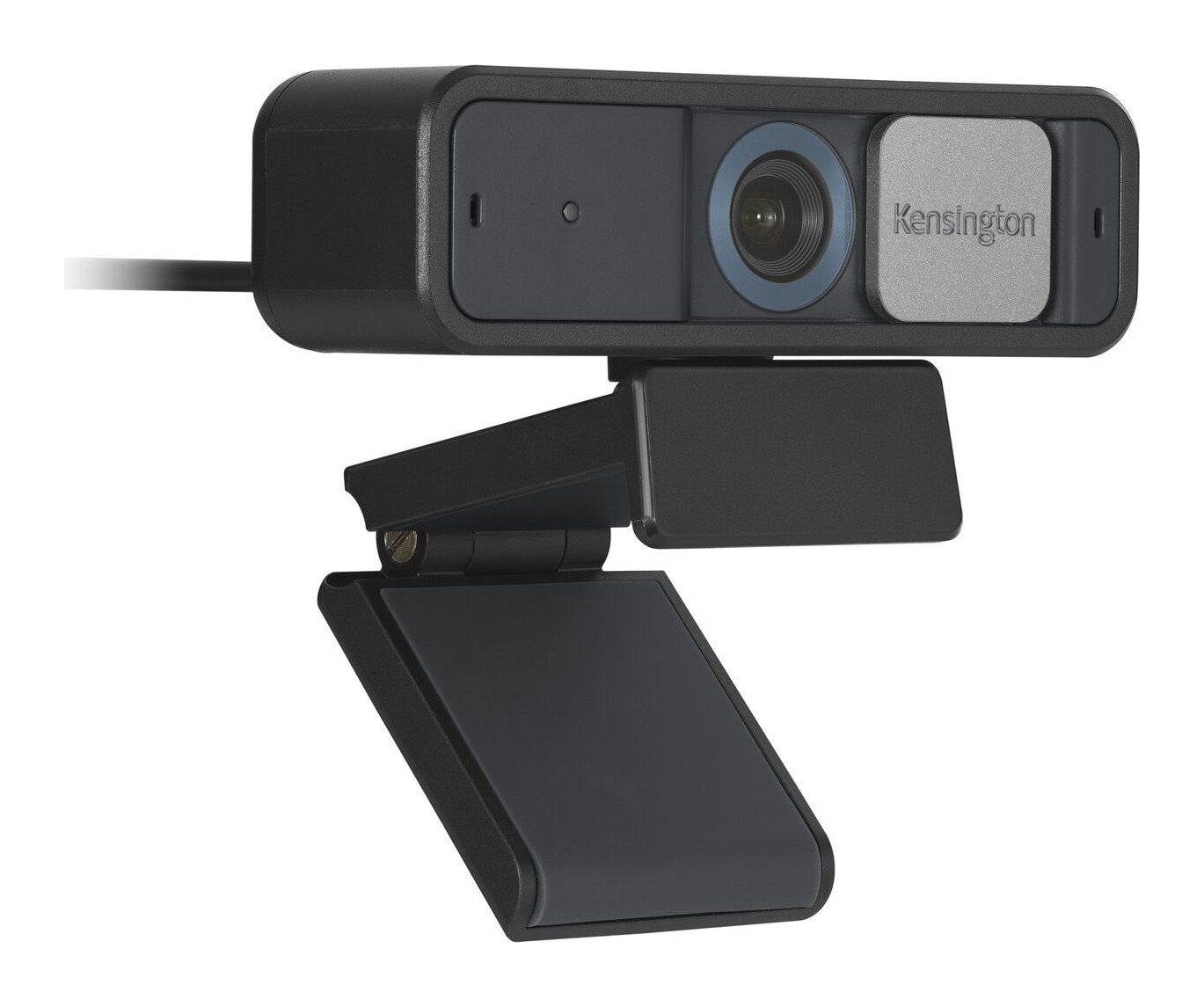
Kensington W2050 Pro 1080p Auto Focus Webcam
A wide-angle 1080p auto-focus business webcam with a 93 degree view, lens cover, two stereo microphones, electronic pan/tilt/zoom and disinfectant-resistant housing.
Specifications
| Resolution | 1080p (1920 x 1080) at 30 fps |
|---|---|
| Field of View | 93 degrees diagonal |
| Focus | Auto focus, glass lens, large sensor for low light |
| Microphones | Two omnidirectional stereo with noise reduction |
| Positioning | ePTZ with 2x zoom; manual 37 deg vertical, 360 deg horizontal |
| Privacy | Integrated lens cover |
| Connection | USB-A, USB-A to USB-C adapter included |
| Software | Kensington Konnect |
| Durability | MIL-STD-810H Method 504.3 (disinfectant contamination) |
| SKU | K81176WW |
| Warranty | 2 years |
The Kensington W2050 Pro 1080p Auto Focus Webcam is a business-oriented webcam from a company better known for locks, docks and trackballs. Kensington launched a Professional Video Conferencing range on 12 July 2022, and the W2050 is the wide-angle, auto-focus model in it, sold under the part number K81176WW. It is not a 4K camera and does not chase streaming features. Kensington's pitch is that it shows you, your team or your whiteboard clearly, keeps working with the apps people actually use for meetings and lets you cover the lens when you want privacy. We read Kensington's product page, its launch announcement and the description of its Konnect software, and we found no price, so we leave one out. This page explains what the numbers mean in a home office or meeting room and where the wide-angle model differs from the narrower W2000 in the same range.
Picture: 1080p at 30 fps with auto focus
The W2050 records 1080p (1920 x 1080) video at 30 frames per second with automatic focus. Kensington says the lens is glass and that a large sensor gives enhanced low-light performance, though it does not state a sensor size or a light sensitivity figure, so we cannot compare it with other cameras in numbers. It is helpful to know how sensor size and lighting interact in practice, and our article on webcam sensor size and low-light performance explains the general idea. The practical lesson from Kensington's description is that this webcam is meant for offices and rooms with normal lighting rather than dark bedrooms. Because the resolution is 1080p at 30 frames per second, it matches the standard for most video calls, and you can see how it sits against other cameras in our webcam buying guide.
A wide 93 degree field of view
The diagonal field of view is 93 degrees. Kensington says this is ideal for team meetings, lectures or presenting products, and that the wide frame accommodates multiple participants. It also says the wider view suits showing a whiteboard or running a product demo. A wide view has a cost: it captures more of the room behind you, so you may want to tidy the background or use the camera's electronic pan and zoom to frame yourself more tightly. The narrower sibling, the W2000, has a 75 degree diagonal field of view, which Kensington describes as a personal and private frame that suits one-to-one calls and reduces background clutter. In short, choose the W2050 if more than one person sits in front of the camera, and the W2000 if you are usually alone.
Electronic pan, tilt and zoom, plus manual adjustment
Kensington gives the camera electronic pan, tilt and 2x zoom, often abbreviated ePTZ. That means the software crops and moves the image rather than moving the lens. You can also move the camera itself by hand: it adjusts up to 37 degrees vertically and 360 degrees horizontally. Together they let you point the camera at yourself, a colleague, a product or a wall chart. According to Kensington's announcement, all of the company's webcams offer ePTZ, and in the Konnect software you can apply focus, zoom and pan/tilt controls directly.
Privacy and hygiene
An integrated lens cover lets you control when you are seen. It is a simple mechanical feature and, as Kensington points out, it puts the decision in your hands. The housing also meets MIL-STD-810H Method 504.3 (contamination by fluids) with disinfectants, and Kensington says there is no visual degradation or inability to use the camera as directed after the test. That may sound unusual for a webcam, but it is relevant if the camera sits in a shared meeting room that gets wiped down between users. Our comparison of webcams and built-in laptop cameras discusses why people use a separate camera for privacy and control.
Microphones
The W2050 has two omnidirectional stereo microphones with noise-reduction technology. Kensington says they help you sound professional in meetings and presentations. The W2000, by comparison, has a single omnidirectional microphone. Omnidirectional means the microphones pick up sound from all around rather than a narrow direction, and Kensington does not publish sensitivity or frequency figures for them. If you rely on your voice being clear in a noisy room, a headset is a different tool from a webcam microphone, and our headset advice in the webcam buying guide and elsewhere on the site covers the choice between them.
Connection and software
The camera connects by USB-A, and an included USB-A to USB-C adapter makes it work with USB-C laptops and desktops, so it can present on any device. Kensington's Konnect software, described in the 2022 announcement as version 2.0 at launch, works with Microsoft Teams, Zoom and Google Meet on macOS and Windows. It lets you create and save multiple video configurations for different rooms or lighting, apply filters that adjust warmth and contrast, and adjust brightness, contrast, saturation, low light, backlight, white balance, exposure, sharpness and gamma. You select the Kensington camera in your meeting app and the settings apply. The support page lists Kensington TrueHue for Windows and macOS as downloads as well, which we understand as related colour software, though we did not read its documentation.
The Kensington ecosystem
Kensington sells accessories designed for this camera. The A1010 Telescoping Desk Stand (K87651WW) and the A1000 Telescoping C-Clamp (K87654WW) and A1020 Boom Arm (K87652WW) provide placement options. The L1000 Bicolour Ring Light with Webcam Mount (K87653WW) delivers up to 930 lumens, is powered by a USB-A port and has bicolour LEDs with cool, natural and warm settings selected with a touch of a button. The webcams mount in the centre of the ring for even light on your face. Kensington describes the range as a cohesive ecosystem that helps you spend more time collaborating and less time troubleshooting. You can buy the camera alone and add these accessories later.
How it compares with other webcams
For a quick reference on our site, the Logitech C920s Pro HD is another 1080p business-friendly option, the Logitech Brio 500 and the Logitech MX Brio are other Logitech options. Each of those has its own advantages, so compare the specification pages side by side against the wipe-down test and the accessory range described above. If your priority is a wide field of view for a room with several people, the W2050's 93 degree frame and stereo microphones are the reasons to consider it.
Warranty and after-sales
Kensington gives the W2050 a limited two-year warranty and calls it an industry-leading warranty on the product page. The page also lists an installation guide (K81176_K81178) among its support documents, and the two-year limit applies to the range as a whole, including the fixed-focus W1050 and the narrower W2000. For a business buyer, that consistency can matter more than a single headline feature.
Who should buy it
The W2050 suits small meeting rooms, home offices where two people share a desk, teachers and presenters, and anyone who wants a straightforward, clearly documented 1080p camera with a lens cover and a good wide view. It is less suited to streaming at higher resolutions or frame rates, or to people who want built-in AI tracking. In a sea of gaming-oriented webcams, it is a sensible business tool that does what its description says, and its honest limits are easy to read on the page.