Logitech StreamCam
A compact USB-C webcam for streamers and creators: 1080p at 60 fps, a 78 degree glass lens, face-based autofocus, auto-framing and dual microphones.
Specifications
| Resolution | 1080p/60fps (MJPEG) |
|---|---|
| Lens | Premium Full HD glass, f/2.0, 3.7 mm |
| Field of View | 78 degrees diagonal |
| Focus | Autofocus 10 cm to infinity, face-based with Logitech Capture |
| Microphone | Dual omnidirectional with noise reduction |
| Connection | USB-C 3.1, 1.5 m cable |
| Weight | 150 g (222 g with monitor mount) |
| Modes | Vertical and horizontal video |
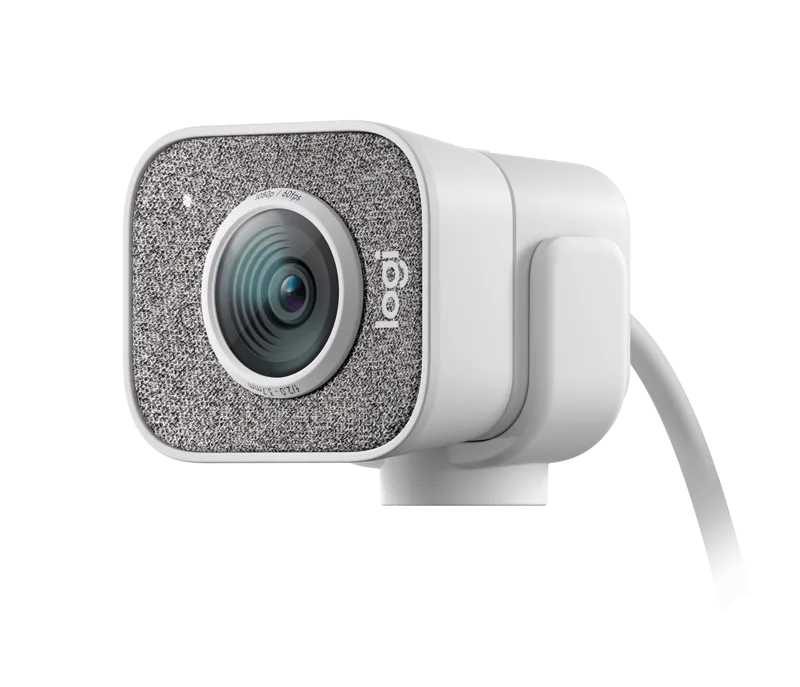
The Logitech StreamCam is a small, squarish webcam aimed at people who make content rather than just attend meetings. Logitech's own summary is short: it streams and records in full HD 1080p at 60 frames per second, "delivering stunning video content with smooth motion". The rest of the page fills in the detail with a glass lens, smart autofocus, auto-framing, intelligent exposure and a pair of microphones, all over a single USB-C cable. This guide reads the specification and feature text closely, points out where wording needs interpreting and helps you decide whether a 60 fps webcam is worth the money for your desk.
Resolution and frame rate: read the small print
The headline is 1080p at 60 frames per second, and it is a genuine differentiator: a 60 fps picture shows movement more smoothly than the 30 fps that is standard on most webcams. The specification table adds a condition. Maximum video resolution is 1080p at 60 fps in MJPEG, and the supported frame-rate list shows that MJPEG can run at 60, 30, 24, 20, 15, 10, 7.5 and 5 fps, while the YUY2 and NV12 formats top out at 30 fps. In practice the software you use to capture, stream or call probably decides which format the camera delivers, so the 60 fps figure may not appear in every app. Supported resolutions are 1920 x 1080, 1280 x 720, 960 x 540, 848 x 480, 640 x 360 and 320 x 240. If you are still comparing resolution and smoothness in general, our webcam buying guide explains how the two interact with lighting and software.
Lens, field of view and focus
The lens is a premium full HD glass design with an aperture of f/2.0 and a focal length of 3.7 mm. The diagonal field of view is 78 degrees, which Logitech says keeps you "upfront and center". Autofocus adjusts in real time so you stay in focus as you move toward or away from the camera; the specification gives the working range as 10 cm to infinity, and adds face-based autofocus when you use Logitech Capture. A 78 degree view is wide enough to include a bit of your desk and shoulders without turning into a fisheye, but it is not a narrow, head-and-shoulders crop, so think about what is visible behind you. For more on how a webcam's sensor and lens affect picture quality in dim rooms, read our news piece on webcam sensor size and low-light performance.
Auto-framing and exposure
Two automatic features get their own headings on the product page. Smart auto-framing dynamically adjusts the framing to keep you in the center of the shot even as you move left or right. Intelligent exposure adjusts aperture and ISO speed in real time to keep skin tones accurate in varying light. The wording deserves a light interpretation: the lens is listed as a fixed f/2.0 design, so "aperture" adjustments presumably refer to the camera's exposure processing rather than a physical iris. Whatever the mechanism, the intent is clear: the camera should look after exposure, so you can focus on what you are doing. As always with automatic exposure, results depend on the lighting in your room, and Logitech does not publish a sensor size or low-light figure on this page.
Logitech Capture
Logitech says the StreamCam works with the included Logitech Capture software, which it describes as unlocking powerful features that automate focus, exposure and more. The specification also ties face-based autofocus to Logitech Capture. It follows that if you plan to use the camera in an app such as a streaming tool, the software is where much of the smartness lives, and you should plan to install it. Logitech's specification page does not list system requirements in the text we could read beyond noting that the camera connects over USB-C, so confirm compatibility with your operating system before buying.
Vertical video and mounting
The page description for search and social sharing highlights vertical video and portrait orientation, along with versatile mounts. Those are worth noting if you make content for phones. The StreamCam is small: without its mount it measures 66 mm high, 58 mm wide and 48 mm deep and weighs 150 grams. With the monitor mount attached it stands 85 mm high and weighs 222 grams. The attached cable is a 1.5 metre USB-C 3.1 cable, so a desk with a laptop on a riser or a monitor mounted at a distance may need an extension or a well-placed port. If you plan a tidy setup, our desk cable management guide has practical ideas.
Microphones and status light
Built in is a dual omnidirectional microphone with a noise-reduction filter, and the specification lists stereo or dual mono channel. There is a white LED that serves as the live indicator. Two built-in microphones are convenient for calls and casual streams, though many streamers eventually move to a separate microphone. If audio matters to your work, it is worth reading our headset buying guide, which covers the alternatives.
Colors and footprint
The product page shows the StreamCam in white and graphite, with white the color selected when we read it. The page also lists a carbon footprint of 14.17 kg CO2e for the product, a figure Logitech publishes on its product pages, and we mention it only because it is on the page.
Price and how it compares
Logitech lists the StreamCam at 169.99 dollars, the same list price as the 4K Logitech Brio 4K. The choice between them is a clean one: the Brio 4K offers a higher-resolution sensor, while the StreamCam offers smoother 1080p motion at 60 fps and a compact, streaming-oriented shape. If you only need a dependable camera for meetings, the Logitech C920s Pro HD costs much less and lists 1080p at 30 fps with a 78 degree view. If you want a broader view of camera options, from built-in laptop cameras to dedicated units, our webcam versus laptop camera comparison puts it into context.
Who should buy it
The StreamCam suits streamers, video-call regulars who want smoother motion and anyone shooting vertical clips, provided they are happy to install Logitech's software. It is less suited to people who need 4K, a physical privacy shutter (the page does not mention one) or a long list of studio controls. Compared with a cheap meeting webcam it is a step up in smoothness and automation, and compared with a premium 4K camera it is a step down in resolution and price.
The short version
The StreamCam is a small, capable 1080p60 webcam with an f/2.0 glass lens, auto-framing and dual microphones. Check your software supports the 60 fps format, expect to use Logitech Capture, and it will serve a streaming desk well.