Logitech Brio 100
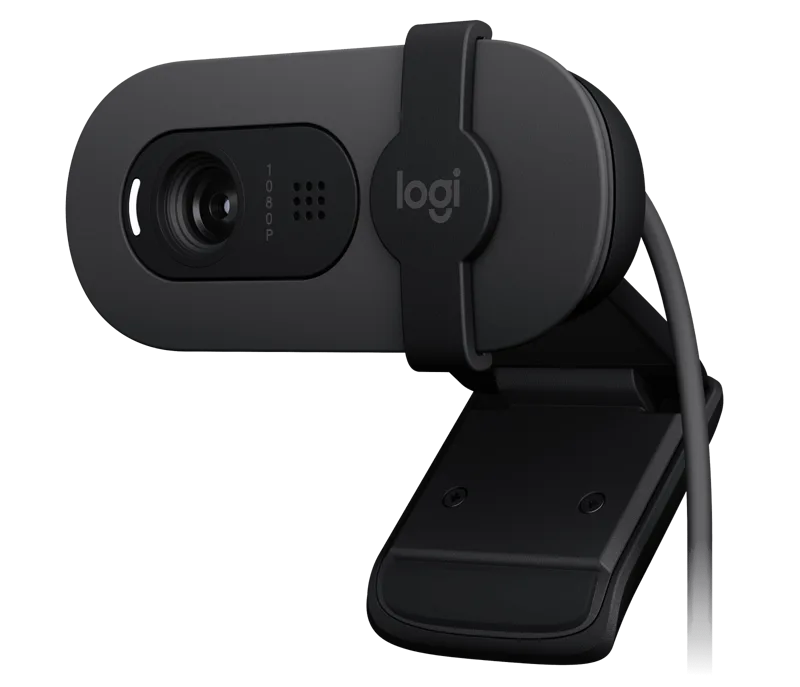
A low-priced 1080p USB-A webcam with RightLight auto-light balance, a sliding privacy shutter and a built-in omnidirectional microphone.
Specifications
| Resolution | 1080p/30fps, 720p/30fps (2MP) |
|---|---|
| Field of View | 58 degrees diagonal |
| Focus | Fixed focus |
| Lens | 4-element plastic with anti-reflective coating |
| Light Correction | RightLight 2 |
| Microphone | Omnidirectional, up to 1 m |
| Connection | USB-A plug and play, 1.5 m cable |
| Privacy | Integrated sliding shutter |
| Weight | 75 g |
The Logitech Brio 100 is the entry point of the Brio family: a small Full HD webcam with auto-light balance, an integrated privacy shutter and a built-in microphone. Logitech's summary is one line long, and the marketing headline over it is short too: "Look. Sound. Meet. Better." That fits the product. It is meant for someone whose laptop camera or old webcam looks grainy and dark, who wants a clear upgrade for meetings, and who does not want to spend much. This page walks through the specification, explains the wording of the features, notes the one clear difference from the Brio 300 and helps you decide whether the cheapest Brio is enough.
Resolution and frame rate
The Brio 100 records at 1080p (1920 x 1080) at 30 frames per second, or 720p (1280 x 720) at 30 frames per second, with a 2 megapixel camera. That is the standard for video calls, and it is a real step up from many built-in laptop cameras. Logitech gives a practical note about your computer: 2 GB of RAM or more is needed for 1080p video streaming, and about 1 GB is typically needed for 720p. Logitech does not list a sensor size or low-light figure on the page we read, so we would treat this as a camera for a reasonably lit room. For general advice on how resolution, sensor and lighting interact, our webcam buying guide is a good starting point.
Lens, focus and field of view
The lens is a custom four-element plastic lens with an anti-reflective coating and fixed focus. The diagonal field of view is 58 degrees, which is on the narrow side for a webcam. A narrow view frames you tightly, so the camera captures less of your background and less of the room, which some people prefer for privacy or tidiness and others find limiting when they want to show a whiteboard or a second person. Logitech's more expensive Brio 300 has a 70 degree view, and the C920s Pro HD offers 78 degrees, so if you want to be seen with more of the room, a wider camera might suit you better. Because focus is fixed, there is no autofocus tracking as you lean in or out; the safest approach is to sit at a normal distance and check the picture once.
RightLight: the automatic light balance
The main feature is RightLight auto-light balance. Logitech says RightLight boosts brightness by up to 50 percent, reducing shadows, so you look your best compared with previous-generation Logitech webcams. The company backs the claim with a disclosure: the Brio 100 was tested against the C270 webcam by Logitech, in a controlled environment and over the course of the day, and the weighted average improvement in the brightness of the user's face was 50 percent, with results varying with actual lighting conditions. That is a manufacturer test, and it is fair to describe it as a comparison against an older, simpler camera. Read it as an indication that the Brio 100 is meant to handle typical home-office lighting better than an old webcam, not as a promise that every room will look 50 percent brighter. The spec sheet also lists RightLight 2 for challenging lighting.
Privacy shutter
An integrated privacy shutter gives, in Logitech's words, reliable privacy: when the day is done, you slide the shutter across the lens. A shutter that covers the lens physically is easy to understand and does not rely on software. It is a useful feature in a home office where the camera stays plugged in all day. If you value that, our comparison of webcams and built-in laptop cameras discusses how the two approach privacy differently.
Microphone
The built-in microphone is omnidirectional with a listed range of up to 3 feet (1 metre). Logitech says it ensures you are heard clearly in calls without fuss. An omnidirectional microphone picks up sound from around it, so a room with echoes or noise can end up in your calls; a headset microphone is a common fix. For alternatives, browse our Logitech MX Brio page, which sits at the other end of Logitech's range for people who want a more capable camera.
Connection, size and weight
The Brio 100 connects over USB-A, plug and play, with a 1.5 metre (4.92 foot) cable. Logitech's Brio 300, by contrast, uses USB-C, so check what ports your computer has before you buy. The camera measures 31.9 mm high, 72.9 mm wide and 66.6 mm deep and weighs 75 grams. It is compact and sits on a monitor or laptop lid. It works with Microsoft Teams, Google Meet and Zoom, and with Windows, macOS and ChromeOS, according to Logitech.
Materials and footprint
The product page carries a recycled-plastic badge, though it does not give a percentage the way the Brio 300 page does. The page lists a carbon footprint of 6.29 kg CO2e, which is a number Logitech publishes for its products. We mention it only because it is on the page and because it is a lot smaller than the figure listed for the StreamCam. The graphite color is the one shown.
Setting it up
Setup follows the plug-and-play promise. Clip the camera to the top of your monitor or laptop lid, plug the USB-A cable into a free port, slide the shutter open and choose the camera in your meeting app. Pick 1080p if your computer has the 2 GB of RAM Logitech mentions, or 720p if it is an older machine. Then take a test call to check the framing, because the view is narrow and fixed.
Price and how it compares
Logitech lists the Brio 100 at 39.99 dollars. The main choices around it are simple. The Logitech Brio 300 costs more and adds USB-C, a wider view, a mono noise-reducing microphone and Logi Tune support. The Logitech C920s Pro HD costs more still and offers a 78 degree field of view with a five-element glass lens. The Brio 100 is the pick when the budget is tight and your needs are basic.
Who should buy it
The Brio 100 suits students, occasional home-office workers, and anyone replacing a dark or scratched old webcam with something clear and simple, especially if the computer only has USB-A ports. It is less suited to people who need a wide view, autofocus, a directional microphone or 60 frames per second. In short, it is a camera to solve a basic problem cheaply, and it does that clearly.
The short version
The Brio 100 is a small, low-cost 1080p webcam with a narrow 58 degree view, RightLight and a sliding privacy shutter. If USB-A is what you have and a wide view is not important, it is a sensible way to look better on calls without spending much.