Corsair XENEON 27QHD240 OLED
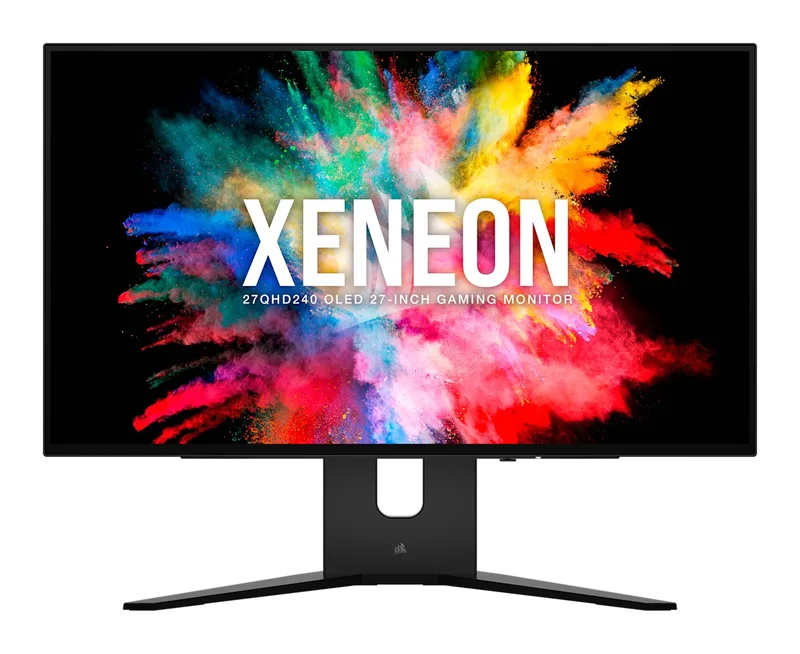
A 27-inch 2560 x 1440 OLED gaming monitor at 240 Hz with LG Display's META panel, a proximity-sensor menu, a USB hub with KVM and a Zero Burn In warranty.
Specifications
| Panel | 27-inch OLED (LG Display, META Technology with Micro Lens Array) |
|---|---|
| Resolution | 2560 x 1440 (110 ppi) |
| Refresh Rate | 240 Hz |
| Response Time | 0.03 ms GtG |
| Brightness | 450 nit peak full screen, 800 nit at 10% APL, 1000 nit at 3% APL |
| Contrast | 1,500,000:1 static |
| Color | 100% sRGB, 98.5% DCI-P3, 1.07 billion colors (10-bit) |
| Adaptive Sync | AMD FreeSync Premium, NVIDIA G-SYNC compatible |
| Ports | 2x HDMI 2.1, 1x DisplayPort 1.4, 1x USB-C DP Alt Mode, USB-C upstream, 4x USB-A hub with KVM, 3.5 mm audio out |
| Stand | Height 100 mm, tilt 22 deg, swivel 60 deg, pivot 90 deg |
| VESA | 100 x 100 mm |
| Weight | 9 kg |
| Power Adapter | 180 W |
| Warranty | 3 years, Zero Dead Pixel and Zero Burn In |
The Corsair XENEON 27QHD240 OLED was announced on 23 March 2023 at PAX East as the smaller sibling of Corsair's XENEON FLEX 45 OLED, and it was meant to bring OLED to a mainstream 27-inch size. Corsair says customers could order it from its webstore and selected partners from May 2023. It combines a 2560 x 1440 panel, a 240 Hz refresh rate and a 0.03 ms response time with a set of desk-friendly features: a USB hub with a KVM function, a full ergonomic stand and a menu that wakes when your hand approaches. This page reads Corsair's product page and its launch press release side by side, explains where the two use different wording, and helps you decide whether a QHD OLED is the right size and resolution for your setup. The structured price data on the product page listed $999.99 when we read it.
The panel: LG Display OLED with META technology
Corsair says the monitor uses a third-generation OLED panel developed with LG Display, with META Technology featuring a Micro Lens Array (MLA). According to the press release, this places a lens in front of every pixel to boost brightness beyond previous OLED generations. In an OLED every pixel is self-lit and switches on and off independently, which is why Corsair describes rich colour, true black and unparalleled contrast. The resolution is 2560 x 1440 on a 27-inch, 16:9 panel, or about 110 pixels per inch, which sits in the sweet spot of sharpness and GPU demand that many players choose. If you are comparing sizes and resolutions, our monitor size and resolution guide explains the trade-off between 27-inch QHD and 32-inch 4K.
Speed: 240 Hz and very short response times
Corsair quotes a 240 Hz refresh rate, a 0.03 ms grey-to-grey response time and a 0.01 ms pixel on/off time, and says these all but eliminate motion blur. The monitor is certified as AMD FreeSync Premium and is NVIDIA G-SYNC compatible. A separate marketing section says the OLED gives an advantage in competitive esports, including reduced eye strain, although that claim is Corsair's own. For an explanation of when 240 Hz matters and when 144 Hz or 165 Hz is enough, our refresh rate guide is worth reading before you decide.
Brightness and HDR: three different statements
This is the part of the product page that needs the most careful reading, because the same panel is described in three ways. The headline says HDR with 1000 nit peak brightness. The press release says HDR10 and up to 1,000 nits. The specification table lists the HDR certification as none and gives peak brightness as 450 nits, 800 nits at 10% average picture level (APL) and 1,000 nits at 3% APL. These fit together: 1,000 nits is only reached when a tiny part of the screen is bright, 800 nits with about a tenth of the screen lit, and 450 nits is the level for a bright full-screen image. Corsair does not say that the monitor is a certified HDR display, so treat HDR as a supported signal that benefits from OLED's black levels rather than as a badge you can rely on. There is one more note on the page: Firmware V104 is announced as increasing brightness by 33%, and the downloads section lists a newer Firmware V106. If brightness matters to you, install the latest firmware. Contrast is listed as a static 1,500,000:1, and colour coverage is 100% sRGB and 98.5% DCI-P3, with 1.07 billion colours at 10-bit. Our panel technology guide explains why these three brightness numbers behave so differently on an OLED.
Eye comfort and surface
Corsair lists three eye-comfort features: flicker-free imaging, an anti-glare matte non-reflective surface described as a QWP polarising display that can be viewed from any angle, and low blue light technology certified by TÜV Rheinland. The specification table says the display surface is non-glare.
Connections and the proximity-sensor menu
Corsair gives the monitor two HDMI 2.1 ports, one DisplayPort 1.4 and one USB Type-C port with DisplayPort Alt Mode, so up to four devices can be connected, and two can be shown at once with picture-in-picture or picture-by-picture. On the USB side there is a USB Type-C upstream port for your computer, four USB Type-A ports described as a hub with KVM, and a 3.5 mm audio output. The press release says the USB ports are USB 3.1. The KVM function lets one set of peripherals follow the input you select, which is helpful if a desktop and a laptop share your desk. Our multi-monitor and KVM guide explains how to set that up sensibly.
The on-screen menu is controlled through front buttons and an OSD joystick, and Corsair added a proximity sensor: the controls light up when your hand approaches the bottom edge, guiding you to the right button for power, input select or the menu. It is a small feature, but it solves the classic problem of feeling for hidden buttons in the dark.
Stand and ergonomics
The stand offers 100 mm of height adjustment, 22 degrees of tilt, 60 degrees of swivel and 90 degrees of rotation to either side, so portrait mode is possible. A standard VESA 100 x 100 mm mount is available, and Corsair notes compatibility with its Dual Arm Stand. The monitor weighs 9 kg, and it comes with a 180 W AC adapter. The specification table gives a product length of 604 (the unit is not stated on the page), which we read as millimetres for the panel's width. If you want to add an arm or a sit-stand desk, remember that this is a heavier OLED panel and check the arm's rating first.
Burn-in protection and the warranty
Corsair says the monitor has an array of burn-in protection techniques to keep the image clean even after long overlays, user interfaces or operating system use, the same approach as on the XENEON FLEX 45 OLED. The company backs it with a three-year Zero Dead Pixel and Zero Burn In warranty, with 24/7 support. That warranty is the reason many people consider an OLED for office and mixed use, and you can read our news article on OLED burn-in in 2026 to put the risk into perspective. It does not mean that you can leave a static window for months without thinking, but it does mean the manufacturer stands behind the panel.
Software and desk fit
The page mentions Corsair iCUE software for bringing a Corsair setup together, which is relevant if you already use the company's keyboards, mice or headsets. The monitor itself does not depend on it for basic operation. Corsair does not list built-in speakers on the specification table we read, so plan on a headset, speakers or a soundbar connected to the 3.5 mm output.
Who should buy it
Choose the XENEON 27QHD240 OLED if you want a 27-inch QHD OLED with a high refresh rate, a USB hub and KVM, a well-adjustable stand and a warranty that covers burn-in. It suits players who want OLED motion clarity without the graphics load of 4K. If you want more resolution and a bigger picture, compare it with the Alienware AW3225QF; if you prefer other 27-inch OLED options, look at the ASUS ROG Swift OLED PG27AQDM or the Samsung Odyssey OLED G6. The message of the page is consistent apart from the HDR wording: a fast OLED with modern connections, sold with a confident warranty.