EIZO EIZO ColorEdge CS2740
A 26.9-inch 4K IPS hardware-calibration monitor with 99% Adobe RGB, USB-C with 60 W power delivery, ColorNavigator 7, a digital uniformity equalizer and a five-year warranty.
Specifications
| Panel | 26.9-inch IPS, wide-gamut LED backlight, non-glare |
|---|---|
| Resolution | 3840 x 2160 (164 ppi) |
| Brightness | 350 cd/m2 typical |
| Contrast | 1000:1 typical |
| Response Time | 10 ms gray-to-gray typical |
| Color Gamut | Adobe RGB 99% typical |
| Color Depth | 1.07 billion colors from 278 trillion palette; 10-bit simultaneous display via DisplayPort or HDMI |
| Calibration | Hardware calibration with ColorNavigator 7; Digital Uniformity Equalizer |
| Inputs | USB Type-C (DisplayPort Alt Mode, 60 W power delivery), DisplayPort, HDMI |
| USB | USB-C upstream, USB-B upstream, 2x USB 3.1 Gen 1 Type-A, 2x USB 2.0 Type-A |
| Power | 36 W typical, 168 W max |
| Stand | Height 155 mm, tilt 35 up / 5 down, swivel 344 deg, pivot 90 deg, VESA 100 x 100 |
| Weight | 10.3 kg with stand (6.7 kg without) |
| Warranty | 5 years |
| Cables | USB-C (2 m) and DisplayPort (2 m) |
The EIZO ColorEdge CS2740 is a 27-inch-class 4K monitor from EIZO's ColorEdge line, built for photographers, video editors and designers who need a screen that can be calibrated at the hardware level. EIZO's own wording is the elegant 4K monitor for every creator, and it stresses that it is the first monitor in the CS series to offer 4K UHD resolution. The CS series sits below EIZO's CG reference line, which means the CS2740 aims at serious colour work without the built-in sensor and reference-grade extras of the dearer models. This guide is built from EIZO's product page and its specification table. We have not tested the monitor, so every figure is the maker's.
Panel, resolution and pixel density
The CS2740 uses a 26.9-inch IPS panel with a wide-gamut LED backlight and a non-glare finish, and a native resolution of 3840 by 2160. EIZO specifies a pixel pitch of 0.155 millimetres and a pixel density of 164 ppi, nearly twice the roughly 96 ppi of a conventional Full HD monitor of the same period, as the page itself notes. That means fine text and contours look crisp without needing to zoom in. The 27-inch screen is large enough to show Full HD content in full with room left for toolbars and palettes. Typical brightness is 350 cd/m2, typical contrast is 1000 to 1 and the response time is 10 ms grey to grey, so this is a screen for editing and not for fast gaming. If you are deciding between 27-inch 4K and other sizes, our guide on monitor size and resolution helps.
Colour: gamut, bit depth and uniformity
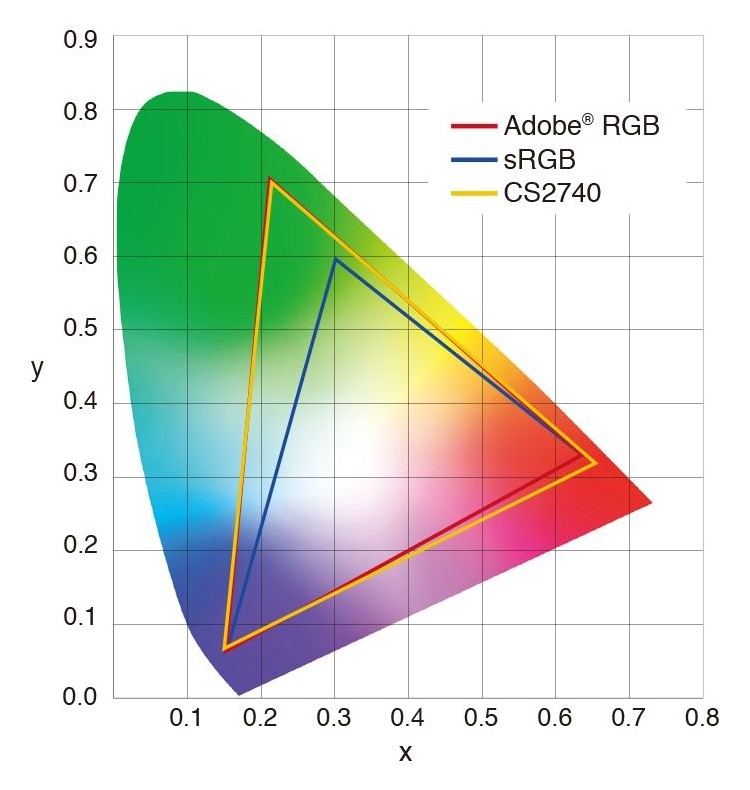
The headline colour figure is 99 percent of Adobe RGB, typical, which is a wide gamut intended to let images shot in Adobe RGB display correctly and to reproduce almost the whole of the ISO-coated and US web-coated CMYK spaces used in printing. EIZO lists 1.07 billion colours from a palette of 278 trillion and 10-bit simultaneous display from a 16-bit look-up table when you use the DisplayPort or HDMI inputs, with the footnote that a graphics board and software supporting 10-bit output are also required, and DeepColor for HDMI. The factory sets the gamma level by measuring the red, green and blue channels from 0 to 255, and EIZO's patented Digital Uniformity Equalizer corrects brightness and chromaticity deviations across the screen to keep the image stable. Optional HLG and PQ gamma curves for HDR work are available as a paid upgrade, not as standard. For the broader reasoning behind calibration, our monitor colour accuracy and calibration guide explains why a screen like this exists.
Hardware calibration and software
What sets a ColorEdge apart is calibration done inside the monitor. ColorNavigator 7 performs hardware calibration by writing directly to the monitor's look-up table for better gradation than software calibration, and it combines EIZO's earlier ColorNavigator 6 and ColorNavigator NX. The page does not mention a built-in calibration sensor (our CG2700X entry lists one), so we assume you need a compatible external sensor to calibrate it, and the page does not discuss sensors in detail. Quick Color Match is a second tool that automatically adjusts monitor, retouching-software and printer settings to ease screen-to-print matching, with drag and drop of a photo. The preset modes are User, Adobe RGB, sRGB and Calibration.
USB-C, inputs and ports
A single USB Type-C cable carries video using DisplayPort Alt Mode, USB data and up to 60 W of power delivery to a laptop. Other inputs are one DisplayPort and one HDMI. The USB hub has a Type-C and a Type-B upstream connection and two USB 3.1 Gen 1 Type-A plus two USB 2.0 Type-A downstream ports. The box includes a 2-metre USB-C cable and a 2-metre DisplayPort cable, a USB-A to USB-B cable and a power cord. Power use is 36 W typical, 168 W maximum and 1 W or less in power-save mode. The 60 W of USB-C power covers many thin laptops but not those that need more, so check your laptop's requirement.
Stand, ergonomics and care
The stand adjusts 155 millimetres in height, tilts 35 degrees up and 5 degrees down, swivels 344 degrees and pivots 90 degrees for portrait use, and it has a quick-release mechanism so the screen can be removed with one touch for a VESA 100 by 100 millimetre mount. A carrying handle on the back lets you move the monitor. The front bezel uses electrostatic switches instead of buttons. The screen is a non-glare IPS panel with flicker-reduction dimming, I/P conversion on HDMI and 178 degree viewing angles, and EIZO sells an optional magnetic light-shielding hood. The monitor measures 638 by 404 to 559 by 265 millimetres with the stand and weighs 10.3 kilograms (6.7 kilograms without the stand).
Warranty and quality policy
EIZO gives a five-year warranty that covers all components including the panel, with the note that usage time is limited to 30,000 hours, and it guarantees zero bright sub-pixels for six months from purchase. The page adds that a panel may contain a limited number of missing or flickering pixels on current LCD technology and describes a recommended practice for monitors left on continuously. Operating temperature is 0 to 35 degrees Celsius and humidity 20 to 80 percent. The certifications list includes CE, TUV and FCC, among others.
Where it sits in our database
The nearest relative is the EIZO ColorEdge CG2700X, which lists the same 26.9-inch 4K panel and 164 ppi but 500 cd/m2 brightness, 1450 to 1 contrast, a 13 ms response, 99 percent Adobe RGB and 98 percent DCI-P3, 3D LUT, a built-in calibration sensor, HLG and PQ HDR, USB-C with 94 W, a LAN port, 9.7 kg of weight and the same five-year warranty. Set against it, the CS2740 page lists no built-in sensor and gives up the higher brightness and contrast and 34 W of USB-C power (94 against 60), while keeping the panel size, resolution, Adobe RGB coverage, uniformity technology and warranty. From a different brand, the Dell UltraSharp U2723QE lists a 27-inch IPS Black 4K panel with 400 nits, 2000 to 1 contrast, DisplayHDR 400 and 90 W USB-C, which shows what a general-purpose professional monitor offers without EIZO's hardware calibration. Our U2723QE review describes it in use, and the whole monitor category is open for browsing.
What the page does not say
EIZO's page does not list a price, does not give a launch date and does not publish colour-error or uniformity test results. It does not say which external calibration sensors are supported in the text we read. Use this entry to check the facts that decide fit: 4K at 26.9 inches, 99 percent Adobe RGB, hardware calibration with ColorNavigator 7, 60 W USB-C and the five-year warranty. Then read independent testing if print-matching accuracy is critical to your work.