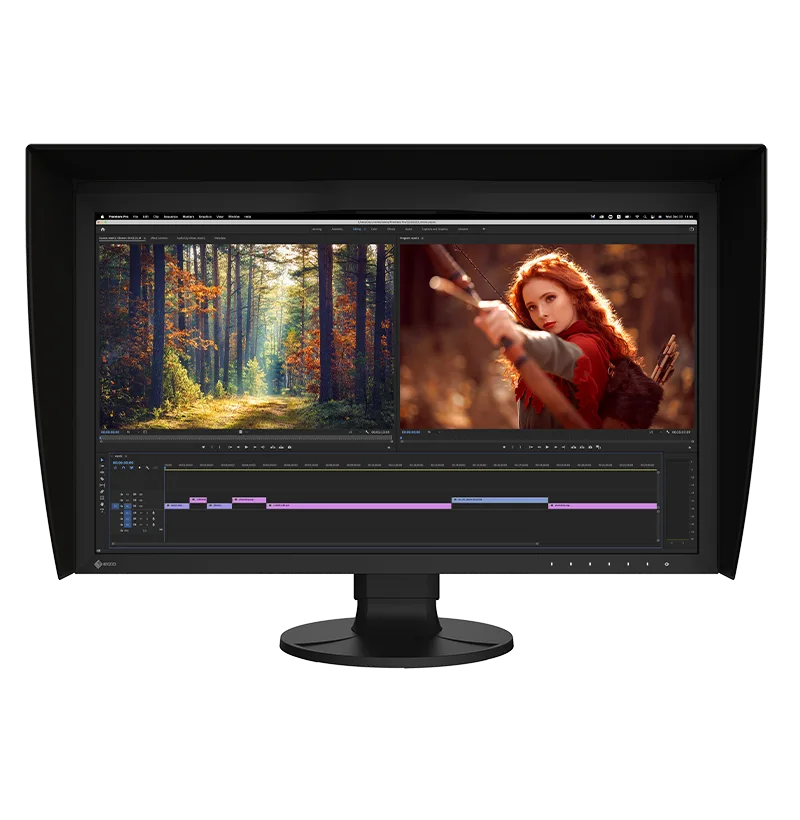
EIZO ColorEdge CG2700X
A 27-inch 4K color management monitor with a built-in calibration sensor, 99 percent Adobe RGB, USB-C with 94W power delivery and a five-year warranty.
Specifications
| Panel | 26.9-inch IPS, wide-gamut LED backlight |
|---|---|
| Resolution | 3840 x 2160 (164 ppi) |
| Brightness | 500 cd/m2 typical |
| Contrast | 1450:1 typical |
| Response | 13 ms gray-to-gray |
| Color Gamut | Adobe RGB 99%, DCI-P3 98% |
| Color | 10-bit from 16-bit LUT, 3D LUT, built-in calibration sensor |
| HDR | HLG and PQ |
| Inputs | USB-C (DisplayPort Alt Mode, 94W PD), DisplayPort, HDMI, 1000BASE-T LAN |
| USB | 2x USB 3.1 Gen 1 Type-A, 2x USB 2.0 Type-A |
| Stand | Height 155 mm, tilt 35/5 degrees, swivel 344, pivot 90, VESA 100x100 |
| Weight | 9.7 kg with stand |
| Warranty | 5 years |
The EIZO ColorEdge CG2700X is not a monitor for casual browsing, and it is not priced or built like one. It is a 27-inch color management monitor for people whose work is judged on color: photographers, video editors, colorists, game artists and print designers. EIZO calls it a flagship of the latest ColorEdge generation and lists the headline features plainly: 4K UHD resolution, 500 cd/m2 of brightness, HDR gamma support, USB-C connectivity, a built-in calibration sensor and a new cabinet design. This page walks through what those features mean at a desk, what the specification table adds, and who should look elsewhere.
Panel and picture basics
The CG2700X uses a 26.9-inch IPS panel with a wide-gamut LED backlight at 3840 x 2160 resolution, which works out to a pixel density of 164 ppi and a pixel pitch of 0.155 mm. Typical brightness is 500 cd/m2, typical contrast is 1450:1, and viewing angles are 178 degrees in both directions. The response time is 13 ms gray-to-gray, and the vertical scanning frequency tops out around 61Hz, so this is a 60Hz professional display, not a gaming panel. EIZO's own contrast footnote is worth noting: the 1450:1 figure applies when the DUE Priority setting is set to Brightness. If your work is video, this is a good time to read our guide to monitor size and resolution to see how 4K at 27 inches feels in practice.
Color: gamut, LUTs and bit depth
EIZO says the monitor reproduces 98 percent of DCI-P3, the standard used in digital cinema, supports the BT.2020 standard used in broadcasting and covers 99 percent of Adobe RGB. It also covers almost the entire ISO-coated and US web-coated CMYK spaces used in printing. Inside, a 3D look-up table adjusts colors individually on an RGB cube, and EIZO says this improves the mixing of red, green and blue, which is a key factor in neutral gray tones. Over DisplayPort or HDMI the monitor offers 10-bit simultaneous display drawn from a 16-bit look-up table, or more than a billion colors at once. As EIZO notes, you also need a graphics board and software that support 10-bit output, and for HDMI, equipment that supports Deep Color. The gamma level of each unit is adjusted at the factory by measuring the red, green and blue values from 0 to 255.
The built-in calibration sensor
ColorEdge monitors were, according to EIZO, the first in the world with a built-in calibration sensor, and the CG2700X has one. The sensor swings onto the screen, so it takes little space, and it can be set to calibrate at designated times, which removes the need for a third-party calibration device. EIZO also says you should not do color-critical work during recalibration, because colors are being adjusted. The companion software, ColorNavigator 7, lets you schedule automatic recalibration, calibrate all color modes at once and correlate with external sensors, and the calibration data is saved to the monitor instead of to the operating system, so you do not need to recalibrate when you plug into a different computer. For studios there is ColorNavigator Network, a cloud-hosted service for managing many ColorEdge monitors from a web browser. To understand why regular calibration matters, see our color accuracy and calibration guide.
Stability and uniformity
EIZO says a typical monitor takes 30 minutes or more for brightness, chromaticity and tone to settle, while the CG2700X takes about three minutes. It uses a temperature sensor and, in EIZO's words, an industry-first AI-assisted estimation algorithm to keep color and brightness steady as temperatures change. A digital uniformity equalizer corrects deviations across the screen. These are the manufacturer's claims, and we have not measured them, but they explain much of the price gap between this monitor and a consumer 4K panel.
Tools for video and HDR work
The preset list is long: User, BT.2020, BT.709, DCI-P3, PQ_DCI-P3, HLG_BT.2100, AdobeRGB, sRGB, calibration mode and a mode that follows the incoming signal. HDR gamma support covers HLG and the PQ curve, and the monitor's 500 cd/m2 brightness is what EIZO cites for HDR editing. Other helpers include a luminance warning that marks areas that cannot be shown correctly at the current brightness (with thresholds of 300, 500, 1000 and 4000 cd/m2), DCI 4K cropping for 4096 x 2160 signals, a nearest-neighbor scaling option, a 4K zoom for checking focus and a BT.709 gamut warning. These matter to colorists and editors and mean little to most other buyers.
Connections and one-cable desk life
The inputs are USB Type-C with DisplayPort Alt Mode and HDCP 2.3, DisplayPort and HDMI. Over USB-C the monitor supplies up to 94W of power, enough for a MacBook Pro or another high-end laptop according to EIZO, and it carries USB signals and wired networking through a built-in 1000BASE-T Ethernet port. The USB hub has two USB 3.1 Gen 1 Type-A ports and two USB 2.0 Type-A ports, with a Type-C and a Type-B upstream connection. For a more general look at how to build a laptop-centred desk, our cable management guide is a good companion.
Design, stand and hood
The back has a punched-metal design that lets air move without a noisy fan and a carrying handle. The stand offers 155 mm of height adjustment, 35 degrees of upward tilt and 5 degrees of downward tilt, 344 degrees of swivel and 90-degree pivot, with a quick release, and the VESA hole spacing is 100 x 100 mm, which suits third-party arms. Our guide to monitor arms and standing desks covers what to look for. The monitor measures 638 x 415.9 to 570.9 x 245 mm with the stand and weighs 9.7 kg, or 6.7 kg without it. A light-shielding hood is bundled and attaches magnetically; with the hood the weight is 10.4 kg.
In the box, warranty and price
EIZO lists a 2-metre USB-C cable, a 2-metre HDMI cable, a 2-metre USB Type-A to Type-B cable, a power cord, a setup guide, an adjustment certificate, the hood and a warranty card, and notes that contents may vary by country. There is no DisplayPort cable in that list, so buy one if you need it. The warranty is five years on all components including the panel, with a usage limit of 30,000 hours, and EIZO also guarantees zero bright sub-pixels for six months and warrants brightness and color for up to 10,000 hours. The page we read did not list a price, so we do not quote one. It is normal to expect this class of monitor to cost far more than a consumer display, so confirm the current price with a retailer.
Where it fits among other color monitors
If you want a professional-looking alternative from a different maker, the ASUS ProArt Display PA279CRV and the BenQ PD2725U both also target color-focused work, so they are natural comparisons. EIZO's advantage is the built-in sensor, the stability claims and the length of the warranty, and the trade-off is cost.
The short version
Choose the CG2700X if color accuracy is part of how you earn your living and you want a monitor that calibrates itself and keeps its settings when you change computers. If you edit photos as a hobby, watch films or game, a cheaper panel will please you just as much.