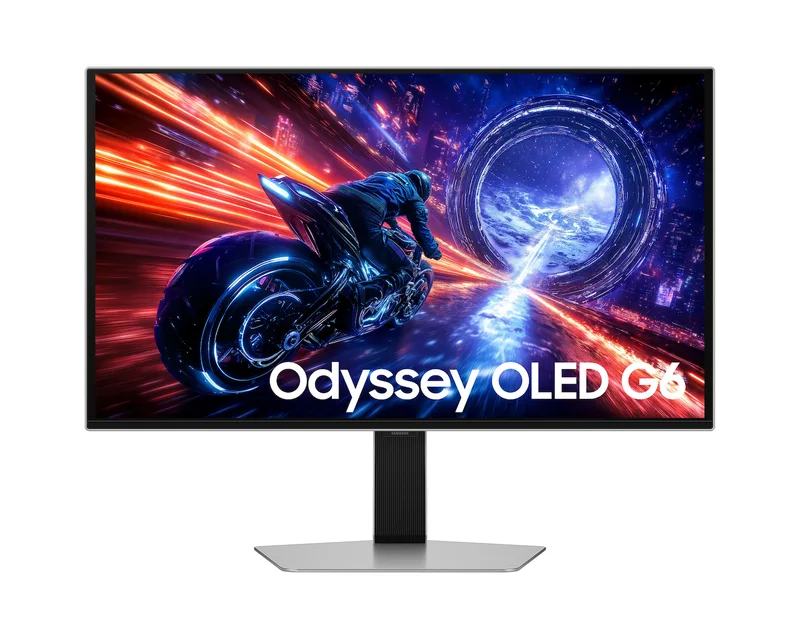
Samsung Odyssey OLED G6 (G60SF)
A 27-inch QHD QD-OLED gaming monitor billed as the first 500 Hz OLED, with 0.03 ms response, DisplayHDR True Black 500 and a Glare Free screen.
Specifications
| Panel | QD-OLED |
|---|---|
| Screen Size | 27" |
| Resolution | 2560x1440 (QHD) |
| Refresh Rate | 500Hz |
| Response Time | 0.03ms GtG |
| Brightness | 300 nits typical, 1000 nits peak (typical) |
| HDR | VESA DisplayHDR True Black 500, HDR10+ Gaming |
| Color Gamut | 99% DCI-P3 |
| Contrast | 1,000,000:1 static |
| Adaptive Sync | NVIDIA G-SYNC Compatible, AMD FreeSync Premium Pro |
| Ports | DisplayPort 1.4, 2x HDMI 2.1, 2x USB-A 3.2 Gen1 down + 1 USB-B up, headphone jack |
| Screen | Glare Free (UL verified), OLED Safeguard+ |
| Stand | Height 120mm, tilt, swivel, pivot, VESA 100x100 |
| Weight | 6.9 kg with stand |
The Samsung Odyssey OLED G6 (G60SF) is a 27-inch QD-OLED gaming monitor with a QHD (2560 x 1440) resolution and a 500 Hz refresh rate. Samsung launched it in May 2025 as the world's first 500 Hz OLED gaming monitor, starting in Singapore, Thailand, Vietnam and Malaysia before a phased rollout to other markets. It is aimed at competitive players who want the fastest motion on the market, but it also has a silver metal design and a set of eye-comfort and screen-protection features that make it a good desktop screen for people who value picture quality. This guide explains the details in plain language and what to think about before buying.
QD-OLED, QHD and why it matters
The panel uses Samsung's QD-OLED technology, which combines self-lit OLED pixels with a quantum dot colour layer. In everyday terms, each pixel makes its own light, so a black pixel can be completely off and the contrast is very high. Samsung lists a static contrast ratio of 1,000,000:1 and a colour gamut of 99% DCI-P3 (CIE 1976), with up to one billion colours. The resolution is QHD, a comfortable match for a 27-inch gaming monitor: it is sharper than Full HD but far easier to run at high frame rates than 4K. For a wider explanation of how OLED compares with IPS and VA, see our panel technology guide.
Brightness deserves careful reading. Samsung lists typical brightness as 300 nits and a minimum of 200 nits for normal use. For HDR, the monitor is certified VESA DisplayHDR True Black 500, and Samsung says typical peak brightness is 1,000 nits, with a minimum of 800 nits measured at a 3% average picture level with HDR enabled and the peak brightness setting set to High. Note that the certification itself is based on a 10% average picture level, so peak numbers apply to small bright areas rather than the whole screen. That is normal behaviour for OLED and is useful to know when you compare it with an LED monitor that can hold high brightness over the whole picture.
500 Hz and 0.03 ms
The headline specifications are a maximum refresh rate of 500 Hz and a response time of 0.03 ms grey-to-grey. The refresh rate is how many times per second the picture updates; the response time is how quickly a pixel can change its shade. Samsung's own footnote warns that the refresh rate may vary based on the performance of the input source and that the response time is measured under internal test conditions, so real-world results depend on content and settings. In games, you will only see the full 500 Hz if your system can render that many frames per second, which is realistic mainly in fast esports titles at moderate settings on a powerful PC. For more on where extra refresh rate stops being noticeable, read our refresh rate explainer.
The monitor is G-Sync Compatible and supports AMD FreeSync Premium Pro, which synchronises the monitor to your graphics card to reduce tearing and stutter. It has one DisplayPort 1.4 input and two HDMI 2.1 inputs (with HDCP 2.2), a headphone jack, one USB-B upstream port and two USB-A 3.2 Gen 1 downstream ports. There is no USB-C input and no built-in speakers, so this is a monitor for a desktop PC or console rather than for one-cable laptop docking. A DisplayPort 1.4, HDMI 2.1 and USB 3.0 cable are provided in the box.
Protection for an OLED screen
Burn-in is the main concern with any OLED, and Samsung approaches it with a set of features under the name OLED Safeguard+. A Thermal Modulation System uses algorithms to control brightness automatically to prevent overheating, and the brightness of static elements such as logos and taskbars is reduced automatically. The screen also dims itself after ten minutes of inactivity and returns to normal brightness with any input. Samsung's specification sheet adds a useful statement: burn-in at normal usage is covered within the warranty, but not for commercial use, abuse or misuse. Read the terms for your region before you buy, since warranty terms differ by market. Our article on OLED burn-in facts and fears gives practical habits that help any OLED last longer.
Glare Free and colour accuracy
Samsung's Glare Free film is described as 54% less glossy than conventional anti-reflection film, and the screen is verified as Glare Free by UL. The aim is to keep the screen clear of reflections in daylight and normal indoor lighting, which is a real advantage for QD-OLED because glossy panels can look washed out when the room is bright. The monitor is also Pantone Validated, which Samsung says means it can accurately reproduce over 2,100 Pantone colours and more than 110 Pantone SkinTone shades. Additional features include Eye Saver Mode and Flicker Free operation, HDR10+ Gaming support, Black Equalizer for seeing detail in dark scenes, a Virtual AIM Point crosshair and Auto Source Switch+.
CoreSync and CoreLighting+ turn the rear of the monitor into an ambient light: CoreSync projects on-screen colours into the room using 16.7 million colours. If you dislike lighting effects, they can simply be left off.
Design, stand and dimensions
The G60SF has a slim metal design in silver. The stand adjusts for height by 120 mm (plus or minus 5 mm), tilt from about -2 to 25 degrees, swivel of 30 degrees either way and pivot of about 92 degrees in each direction, so portrait use is possible. It supports 100 x 100 mm VESA wall mounts. With the stand the monitor measures 611.7 x 554.2 x 263.5 mm and weighs 6.9 kg; without it, 611.7 x 353.8 x 49.2 mm and 3.8 kg. Power consumption is listed at 41.4 W typical and 140 W maximum, with 0.5 W in DPMS mode and 0.3 W when off, and the monitor uses an external power adapter with a 1.5 m cable. The energy efficiency class is G, which is typical for a bright, fast OLED gaming display. The annual consumption is quoted at 60 kWh.
Price and who it suits
On the Samsung US page we checked, the list price was 999.99 USD. Prices vary by country and time, so use that as an orientation. The G60SF makes sense for players with a powerful PC who want the fastest, smoothest image and are willing to look after an OLED sensibly, and for people who enjoy dark-room gaming, since its contrast and colour are far above a typical IPS gaming screen. It is less sensible if you mostly do office work with static windows, if you need USB-C docking, or if you play only casual games that never approach very high frame rates. For a look at the same category, browse the monitors category, and compare it with the 480 Hz LG UltraGear 27GX790A and the ASUS ROG Swift OLED PG27AQDM, which both use a different OLED panel type.