Dell Alienware 32 4K QD-OLED Gaming Monitor AW3225QF
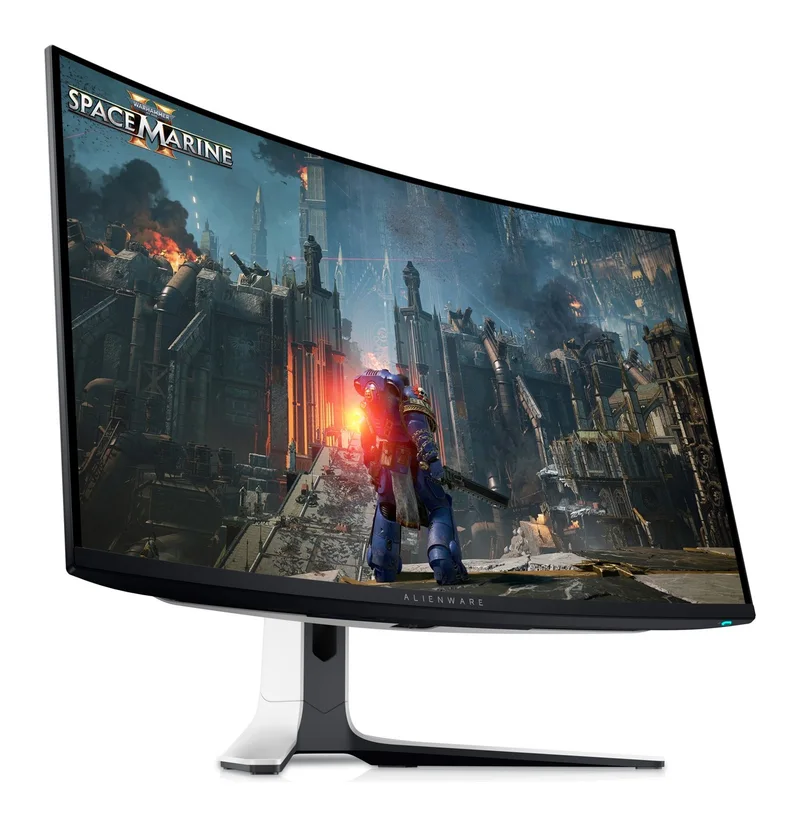
A curved 32-inch 4K QD-OLED gaming monitor at 240 Hz with 0.03 ms response, two HDMI 2.1 ports and a three-year warranty that explicitly covers OLED burn-in.
Specifications
| Panel | 31.6-inch curved (1700R) QD-OLED |
|---|---|
| Resolution | 3840 x 2160 (140 ppi) |
| Refresh Rate | 240 Hz |
| Response Time | 0.03 ms GtG |
| Brightness | 1000 nit (peak, per spec table) |
| Contrast | 1,000,000:1 dynamic; marketing says infinite |
| Color | 99% DCI-P3, 1.07 billion colors, Delta E < 2 |
| HDR | VESA DisplayHDR True Black 400, Dolby Vision |
| Adaptive Sync | NVIDIA G-SYNC Compatible, VESA AdaptiveSync |
| Ports | 2x HDMI 2.1 (one with eARC), 1x DisplayPort 1.4, USB 3.2 Gen 1 upstream + 3 Type-A + 1 Type-C downstream |
| Speakers | None |
| Stand | Height 110 mm, tilt -5 to 21 deg, swivel +/-20 deg |
| VESA | 100 x 100 mm |
| Weight | 9.35 kg with stand |
| Warranty | 3 years incl. burn-in, Advanced Exchange |
The Alienware 32 4K QD-OLED Gaming Monitor (AW3225QF) is Dell's flagship gaming display in its Alienware line: a curved 31.6-inch panel with 3840 x 2160 pixels, a 240 Hz refresh rate and a quoted 0.03 ms response time. Dell's own page calls it the world's first 4K QD-OLED gaming monitor, with an asterisk that we cannot verify, so we treat it as marketing rather than fact. What we can do is read Dell's specification table line by line, point out where the wording does not quite agree with itself, and help you decide whether a monitor at this price and with this feature set belongs on your desk. All figures below come from Dell's product page as we read it, where the price was listed at $999.99.
Panel, size and resolution
Dell lists the panel as Quantum Dot OLED, with a viewable size of 31.6 inches (sold as a 32-inch class monitor), 4K UHD resolution and a 16:9 aspect ratio. The pixel pitch is 0.1814 mm and the pixel density is 140 ppi, which is a comfortable figure for text at this size when you sit at a normal desk distance. The active display area is 27.54 by 15.54 inches. The screen is curved with a 1700R curvature, and Dell explains the curve as a way of capturing more of your peripheral vision and giving a more natural viewing experience in games. Viewing angles are quoted as 178 degrees horizontally and vertically. If you are unsure whether 32 inches at 4K is the right size for your desk, our monitor size and resolution guide compares 27-inch QHD with 32-inch 4K and explains what each choice does to text size and GPU load.
QD-OLED, contrast and brightness: reading the numbers carefully
Dell's marketing text says that QD-OLED brings remarkable clarity, high colour purity, well-rendered dark scenes and no haloing around lights. It also says the panel offers an infinite contrast ratio, Dolby Vision and VESA DisplayHDR True Black 400. The technical table, however, lists a dynamic contrast ratio of 1,000,000:1 and a brightness of 1000 nit. These do not contradict each other as long as you read them as separate statements: "infinite" is a description of what a pixel that can switch fully off implies, while 1,000,000:1 is a number Dell chose to print in the table. The 1000 nit figure is given without any measurement conditions, and it sits beside a certification whose name carries the number 400. Our reading is that the 1000 nit value is a peak specification, Dell does not say how much of the screen it applies to, and you should not expect a full white screen to hold that level. If HDR is important to you, our panel technology guide explains how OLED, IPS and VA differ in the way they handle dark and bright content.
Colour accuracy
The colour figures are consistent across the page. The spec table lists 99% DCI-P3 coverage, the feature text says 99.0% DCI-P3, and the display supports 1.07 billion colours. Dell also says colour accuracy reaches Delta E below 2, which the page describes as capturing life-like nuances. The company adds that the monitor suits people who edit video and images as well as those who play or develop games. That is a fair reading for hobby work, but the page does not mention factory calibration reports or hardware calibration, so for professional colour-critical jobs we would look at dedicated creator monitors instead. Our guide to monitor colour accuracy and calibration explains what to check.
Speed: 240 Hz, 0.03 ms and adaptive sync
At 4K the panel runs at up to 240 Hz, and Dell says it keeps motion clear in fast scenes. The stated response time is 0.03 ms grey to grey. The page pairs this with NVIDIA G-SYNC Compatible and VESA AdaptiveSync certification for tear-free play. To reach 3840 x 2160 at 240 Hz you need a graphics card and cable that can carry it: the DisplayPort 1.4 input supports that resolution at 240 Hz using DSC and HDR, and the HDMI 2.1 ports support it using FRL, HDR and VRR. We explain why refresh rate matters, and where it stops mattering, in our refresh rate guide. A practical point: most games will not run at 240 frames per second in 4K on modest hardware, so the panel's headroom is something you grow into.
Ports and console use
The port list is short and clear. There are two HDMI 2.1 ports, one of which supports eARC so Dolby Atmos signals can pass through to speakers or a soundbar, and one DisplayPort 1.4 port. For data there is a USB 3.2 Gen 1 (5 Gbps) Type-B upstream port and downstream ports for your peripherals, including one Type-C downstream port with BC1.2 charging. There is a discrepancy inside Dell's page here: the itemised list shows two Type-A downstream ports plus one more Type-A port and one Type-C port, while the counting section says five USB ports in total and two USB 3.2 downstream ports. Reading the itemised list and the rear-view diagram together, we would plan on one upstream port and four downstream ports (three Type-A, one Type-C), and we would check the count in the user manual before buying a dock or hub that depends on it.
Two things are not on the list. First, there is no USB-C video input, so a laptop that only has USB-C will need a USB-C to DisplayPort or HDMI cable rather than a single-cable connection. Second, the monitor has no built-in speakers and no audio line-out. Dell says this openly on the page. For consoles, the included HDMI 2.1 FRL cable is meant to deliver 4K at 120 Hz with variable refresh rate and auto low latency mode on compatible next-generation consoles.
Stand, ergonomics and size on the desk
The stand offers height, tilt and swivel adjustment. The maximum height adjustment is 4.33 inches, tilt runs from -5 to 21 degrees and swivel from -20 to 20 degrees. The page does not list pivot, so this is not a monitor for portrait use. With the stand, the monitor measures 28.17 inches wide, 12.04 inches deep and between 18.61 and 22.94 inches high. It weighs 20.61 pounds (9.35 kg) with the stand and 13.23 pounds (6.0 kg) without. The panel alone is 4.19 inches deep. A VESA 100 x 100 mm interface is available if you prefer an arm, and our monitor arm and standing desk guide covers how to choose one. Dell also mentions integrated ventilation between the panel and the back housing, cable management inside the stand riser and a removable panel, and a 3-zone AlienFX lighting effect if you like RGB.
Burn-in and the warranty
OLED burn-in is the question everyone asks, and the most useful thing on Dell's page is not a feature but a promise. The monitor comes with a three-year limited warranty with Advanced Exchange Service and Premium Panel Exchange, and Dell states that this includes coverage for OLED burn-in. Premium Panel Exchange is described as a free panel replacement during the warranty period even if only one bright pixel is found. Advanced Exchange means that, after remote diagnosis, a replacement is shipped the next business day. That is real reassurance, but it does not change how you should use the monitor. Our news article on OLED burn-in in 2026 explains sensible habits such as varying static content. Dell also lists ComfortView Plus, a hardware low-blue-light approach, along with flicker-free and anti-reflective properties.
Power and what is in the box
Operating power consumption is listed at 42.5 W, maximum consumption at 190 W and standby at 500 mW, with a 100 to 240 V supply. The box contains the monitor, the stand riser and base, a power cable, an HDMI 2.1 FRL cable, a DisplayPort 1.4 cable, a USB 3.2 Gen 1 upstream cable, a microfibre cloth and a quick setup guide. Dell also lists sustainability facts: the monitor uses 83% post-consumer recycled plastic, 100% recycled aluminium and 10% recycled steel, and it ships in a box made with renewable content.
Who should buy it
Choose this monitor if you want an OLED with a sharp 4K image, you play with a graphics card strong enough to feed it, and the burn-in coverage gives you peace of mind. It also suits players who use both a PC and a console because of the two HDMI 2.1 ports. Consider alternatives if you want a flat panel, a pivot stand, built-in speakers or a USB-C single-cable dock. If a lower resolution and a smaller panel are enough, our page for the ASUS ROG Swift OLED PG27AQDM shows a 27-inch QHD OLED alternative, and the Corsair XENEON 27QHD240 OLED is another.
Bottom line
The AW3225QF pairs a large curved 4K QD-OLED panel and a fast 240 Hz refresh rate with a warranty that goes further than most monitor makers do. The specification table is not perfectly tidy, since the contrast, brightness and USB counts need careful reading, but the essentials are clear: two HDMI 2.1 ports, one DisplayPort 1.4, no speakers and no USB-C video input. Read it as a gaming display with a strong safety net and you will not be disappointed.