Keychron Keychron V1 Max
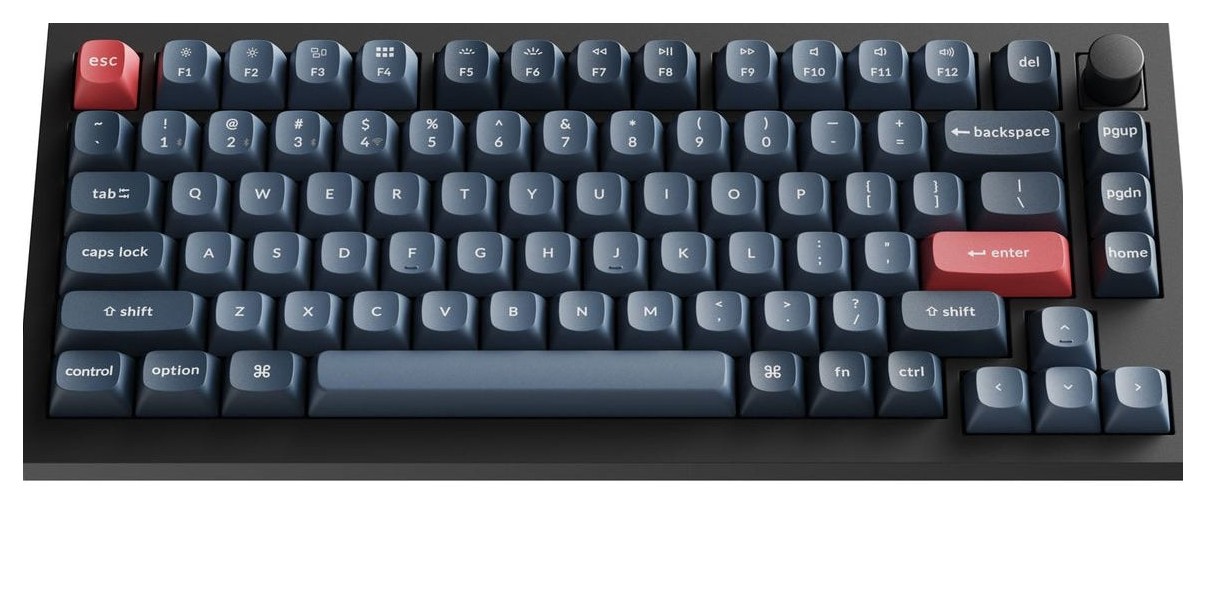
A 75 percent gasket-mount wireless mechanical keyboard with a knob, hot-swap sockets, Gateron Jupiter switches, QMK firmware and up to 190 hours of battery life.
Specifications
| Layout | 75% ANSI with knob |
|---|---|
| Connectivity | 2.4 GHz, Bluetooth 5.1 (3 devices), USB-C; 1000 Hz (2.4 GHz and wired), 90 Hz (Bluetooth) |
| Switches | Hot-swappable, Gateron Jupiter Red / Brown / Banana (fully assembled) |
| Build | ABS case, PC plate, gasket mount, screw-in PCB stabilizers |
| Keycaps | Double-shot OSA PBT |
| Battery | 4000 mAh, up to 190 h (backlight off), up to 100 h (RGB, lowest brightness) |
| Software | QMK firmware, Keychron Launcher |
| Weight | 770 g +/- 10 g |
| Dimensions | 328.5 x 148.7 mm |
The Keychron V1 Max is the wireless version of one of Keychron's most popular compact boards. It has a 75 percent layout with a volume knob, a gasket-mounted polycarbonate plate, hot-swappable switches, 2.4 GHz and Bluetooth connections and firmware you can reprogram through a web page. Keychron lists it at 114.99 US dollars for the fully assembled version, and the page notes a newer generation, the V1 8K and V1 Ultra 8K, so this guide also explains where the Max sits. Everything below comes from Keychron's product page and specification table; we have not typed on this board ourselves, and we point out the places where the page is marketing.
Layout and size
The layout is 75 percent ANSI with a knob. That means the arrow keys, a column of navigation keys and the function row are all present, in a footprint of about 328.5 mm by 148.7 mm. The front height is 21.5 mm and the back height 29.4 mm, both without keycaps, with feet adding 2 mm and three typing angles of 3.5, 7.1 and 9.5 degrees. It weighs 770 g, plus or minus 10 g, for the fully assembled version. If you have used a full-size keyboard, our guide to mechanical versus membrane keyboards is a good place to start understanding what you gain and lose with a compact mechanical board. For ISO layouts, Keychron has a separate V1 ISO collection with UK, German, Nordic, Swiss, French and Spanish versions.
Wireless: what the connection numbers really mean
The V1 Max supports 2.4 GHz wireless and Bluetooth 5.1, plus a USB-C cable. Keychron gives polling rates by mode: 1000 Hz on 2.4 GHz and on the cable, and 90 Hz over Bluetooth. That difference is worth remembering. The 2.4 GHz receiver is the mode for games and fast typing, and Bluetooth is for switching between a computer, phone and tablet, since the board can pair with three devices. N-key rollover works in both wireless and wired modes. There is also a system toggle for macOS and Windows, with an additional set of keycaps for each, and you can save two different layouts on the keyboard, one for each system.
Battery
A 4000 mAh rechargeable lithium-polymer battery powers it. Keychron says up to 190 hours with the backlight off, and up to 100 hours with the RGB backlight at its lowest brightness, both from lab tests that vary in actual use. Charging takes around five hours. These are long runtimes because a 75 percent board without a big power draw can idle for a long time, but the backlight is the variable to watch: leaving it on will cut days off the gap between charges.
Build: gasket mount, foam and plate
The case is ABS plastic, and the plate is polycarbonate (PC). Keychron uses a gasket-mount design, in which the plate and switches are held on soft gaskets instead of being screwed directly to the case, along with sound-absorbing foam. The company says this reduces acoustic resonance, giving a softer, quieter and more flexible typing feel. Screw-in PCB stabilizers keep the big keys such as the space bar, shift, enter and delete less wobbly, and the board also supports third-party screw-in stabilizers. All of that is marketing language, but the components named are real, and they explain why a board in this price range feels different from a budget keyboard.
Switches and keycaps
The fully assembled version uses Gateron Jupiter switches in Red (linear), Brown (tactile) or Banana. Keychron says the Jupiter switch has a three-pin design, comes pre-lubed and is rated for up to 80 million keystrokes, with an LED diffuser that gives a softer backlight. The Banana has an early tactile bump at the top and a smooth feel like the popular Panda-style switches. Because the sockets are hot-swappable, you can replace the switches without soldering, and the PCB accepts both three-pin and five-pin MX-style switches from makers such as Gateron, Cherry and Kailh. Our guides on hot-swap keyboards and custom keycaps and on linear, tactile and clicky switches will help you choose. Keycaps are double-shot PBT in an OSA profile, which Keychron says is close in height to OEM with an SA-like shape. Because the legends are not shine-through, the south-facing RGB LEDs illuminate the keys from the typist's angle, and they do not interfere with alternative OEM or Cherry-profile keycaps. There is a barebone version, which does not include keycaps or switches.
Software: QMK and the Keychron Launcher
The keyboard runs open-source QMK firmware on an ARM Cortex-M4 STM32F402 with 256 KB of flash. You remap keys and record macros in the Keychron Launcher, a web app that works in the latest Chrome, Edge or Opera on any operating system, provided you connect the keyboard in wired mode. Keychron argues that open-source firmware lets the community review the code, which it presents as a security benefit. Nothing is installed on your computer, and Keychron says the tool is always up to date. If you want to see how the V1 Max compares with Keychron's newer boards in our catalogue, read about the Keychron Q1 HE 8K and the Keychron K2 Ultra 8K.
What the price and the page tell you
The page shows the V1 Max at 114.99 US dollars, with an extra 10 dollar coupon that applies at checkout, and it lists the selected variant as backordered at the time we read it. It also carries an upgrade panel pointing to the V1 8K at 74.99 dollars, described as best for gaming with 8K polling, and the V1 Ultra 8K at 114.99 dollars, described as the flagship with 8K polling, 2.4 GHz and Bluetooth, open-source ZMK firmware and 660 hours of battery life. In other words, the V1 Max is now the previous generation, and the same money buys a newer board with a far higher polling rate. Choose the Max if you specifically want the QMK Launcher workflow and 1000 Hz wireless at a normal price, and look at the newer models if you want 8K polling. The page also shows 18 customer ratings, with 13 five-star and 3 one-star; that is a small sample, so read it as a hint rather than a verdict.
Cable, box and operating range
The charging port is USB Type-C, and the box has a Type-C cable plus a Type-A to Type-C adapter. The fully assembled version contains the ABS housing, the PCB with screw-in stabilizers and the PC plate, double-shot OSA PBT keycaps including Mac and Windows sets and the Gateron Jupiter switches. The stated operating environment is minus 10 to 50 degrees Celsius. The board works with Windows, macOS and Linux.
Who should buy it
Buy the V1 Max if you want a compact wireless board that you can tune and reprogram without a fuss, with a knob, real battery life and a quiet gasket feel. Look at newer models if raw polling rate matters most. Explore more options in our keyboard category.