Logitech Logitech MX Keys Mini
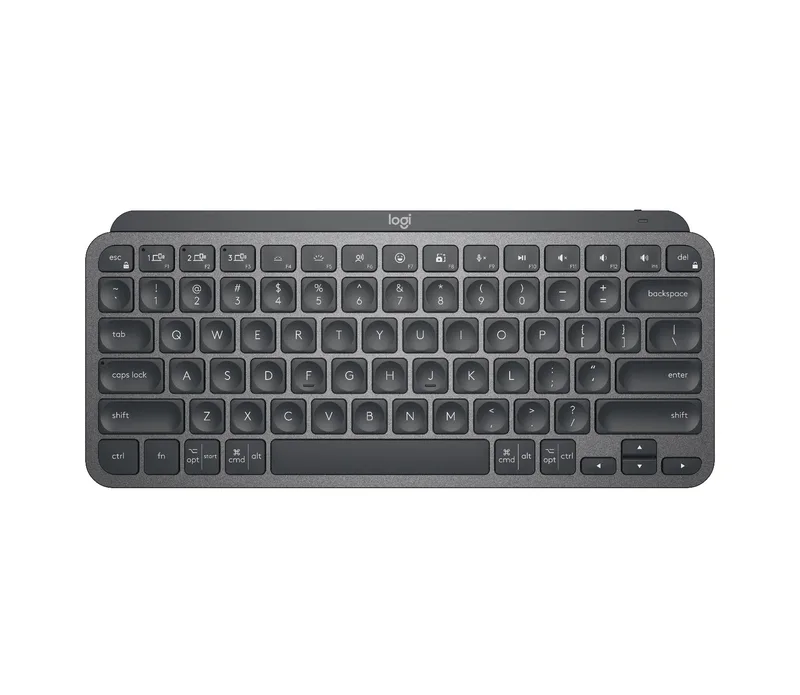
A compact wireless keyboard without a numeric keypad, with spherically dished keys, proximity-sensing backlight, USB-C charging, three-device Easy-Switch over Bluetooth Low Energy and up to five months of battery with the backlight off.
Specifications
| Layout | Compact (minimalist form factor, no numeric keypad) |
|---|---|
| Connectivity | Bluetooth Low Energy; Logi Bolt USB receiver compatible (receiver not included) |
| Multi-Device | Easy-Switch, up to 3 devices |
| Range | 10 m (33 ft) |
| Battery | Rechargeable 1500 mAh Li-Po, up to 10 days with backlight or up to 5 months with backlight off |
| Charging | USB-C |
| Backlight | Hand-proximity sensor and ambient light sensor |
| Keys | Spherically dished keys, Fn keys for emoji, dictation and mic mute |
| Software | Logi Options+ (Windows, macOS); Flow-compatible with supported Logitech mice |
| Indicators | Caps Lock and battery lights |
| Dimensions | 295.99 x 131.95 x 20.97 mm |
| Weight | 506.4 g |
| Warranty | 1-year limited hardware |
| Part Number | 920-010388 (graphite) |
The Logitech MX Keys Mini is the compact version of Logitech's MX Keys family: a wireless, illuminated keyboard that drops the numeric keypad to save space. Logitech's own words for it are a minimalist keyboard made for creators, with the same high-performance engineering as the full-size model, and the page adds that the smaller form factor aligns your shoulders and lets you place a mouse closer to the keyboard for less hand reaching and better posture. This guide is built from Logitech's product page and its specification data. We have not tested the keyboard, so every figure is the manufacturer's, and where the page is silent we say so.
Typing feel and layout
Logitech describes spherically dished keys shaped for the fingertips, which it says minimise the chances of a mistype, with increased key stability that reduces noise. The page does not name the key mechanism or give key travel, so we cannot say whether the action is closer to a laptop or a desktop board, and we avoid guessing. The layout is compact, without a numeric keypad, and the page notes that a full-size version with an integrated numpad also exists. If you type numbers all day, that is the main reason to look at the larger model, and our MX Keys S entry covers it. For readers new to the mechanical-versus-other distinction, our mechanical versus membrane keyboard guide explains why a keyboard like this feels different from an enthusiast board.
Function keys and smart backlight
The function row has what Logitech calls smarter Fn keys: dedicated keys to send emoji, to activate dictation and to mute and unmute your microphone. The backlight is the other signature feature. Keys light up when your hands approach the keyboard, thanks to a hand-proximity sensor, and an ambient light sensor automatically brightens or fades the lighting to suit the room. Caps Lock and battery indicator lights show state. More backlight customisation is available in the Logi Options+ app. The practical meaning is that you do not have to turn lighting on and off by hand, and the keyboard does not waste battery lighting keys when you are away.
Battery and charging
The keyboard has a rechargeable lithium-polymer battery of 1500 mAh. Logitech lists up to 10 days on a full charge with backlighting on, or up to 5 months with backlighting off, with the caveat that battery life varies with user and computing conditions. It charges over USB-C with the included cable, and you can keep working while it charges. The two numbers show how much the backlight costs: with it permanently on, ten days is a short week and a half, which is the main trade-off of an illuminated wireless keyboard. A power switch is on the unit.
Connectivity and multi-device use
The keyboard connects over Bluetooth Low Energy, with a stated range of 10 metres (33 feet). Easy-Switch lets you pair up to three devices and move between them, and the page lists operating-system support for Windows 10, 11 or later, macOS 10.15 or later, iOS 14 or later, iPadOS 14 or later, Linux, ChromeOS and Android 8.0 or later, with basic functions working without software on systems other than Windows and macOS. It is also engineered for Intel Evo laptops. The Logi Bolt USB receiver is supported but not included, and the page warns that Bolt products will not pair with other Logitech receivers. A FileVault note explains that on Macs with that encryption enabled, a Bluetooth keyboard may not connect before login, in which case Logitech advises buying the Bolt receiver.
Software and mouse pairing
The optional Logi Options+ app on Windows and macOS lets you change Fn key functions, customise backlighting, assign app-specific profiles and create Smart Actions shortcuts. The page says the keyboard follows a Flow-enabled MX Anywhere 3S or MX Master 3S, so you can move a cursor and copy text across computers. Our MX Master 3S entry and the MX Master 3S review describe the mouse side of that pairing. Internet access is needed only to download the app, and the keyboard works without it.
Size, weight and sustainability
The keyboard measures 295.99 millimetres wide, 131.95 millimetres deep and 20.97 millimetres high, and weighs 506.4 grams, which is heavy enough to stay put on a desk. Logitech states that the product is made with recycled plastic and quotes a carbon footprint of 10.78 kg CO2e on the product page. The warranty is a one-year limited hardware warranty, and the part number for the graphite model is 920-010388.
Where it sits in our database
The nearest relative is the Logitech MX Keys S, which lists a full-size layout with a numeric keypad, Bluetooth Low Energy plus the Bolt receiver, Easy-Switch for three devices, 10 metres of range, a 1500 mAh Li-Po battery with up to 10 days (backlight on) or 5 months (backlight off), USB-C charging and proximity-sensing backlight. In other words, the Mini matches the S on connectivity, battery and lighting, and drops the numeric block. That makes the choice mainly about desk space and numbers: the Mini gives more room for the mouse and a smaller footprint, while the S suits spreadsheets and accounting. For a different philosophy, the mechanical keyboards in 2026 article shows where enthusiast boards are heading, and the keyboard category lists the alternatives.
What the page does not say
Logitech's page does not give key travel, the key mechanism, the keycap material, the lighting colour options, the polling rate or the Bluetooth version. It also shows a price in the shop widget that we do not reproduce. Use this entry to check the facts that decide fit: the compact layout, the Bluetooth-only connection unless you add a Bolt receiver, the battery with and without lighting and the three-device limit. Then read independent reviews if typing feel decides the purchase.
Practical selection notes
Before buying any compact wireless keyboard, it is worth checking three things. First, how often you use a numeric keypad: if it is rarely, the Mini frees up desk space, and if it is daily, the missing block will annoy you. Second, how you will connect it: Bluetooth works on most laptops and tablets, but a desktop without Bluetooth needs a receiver or a Bluetooth adapter. Third, how you prefer to manage lighting and charging: a keyboard that you charge every week or so is a different habit from one that sits on a cable. These notes are general buying advice and add no technical claims about the product.