ZSA ZSA Voyager
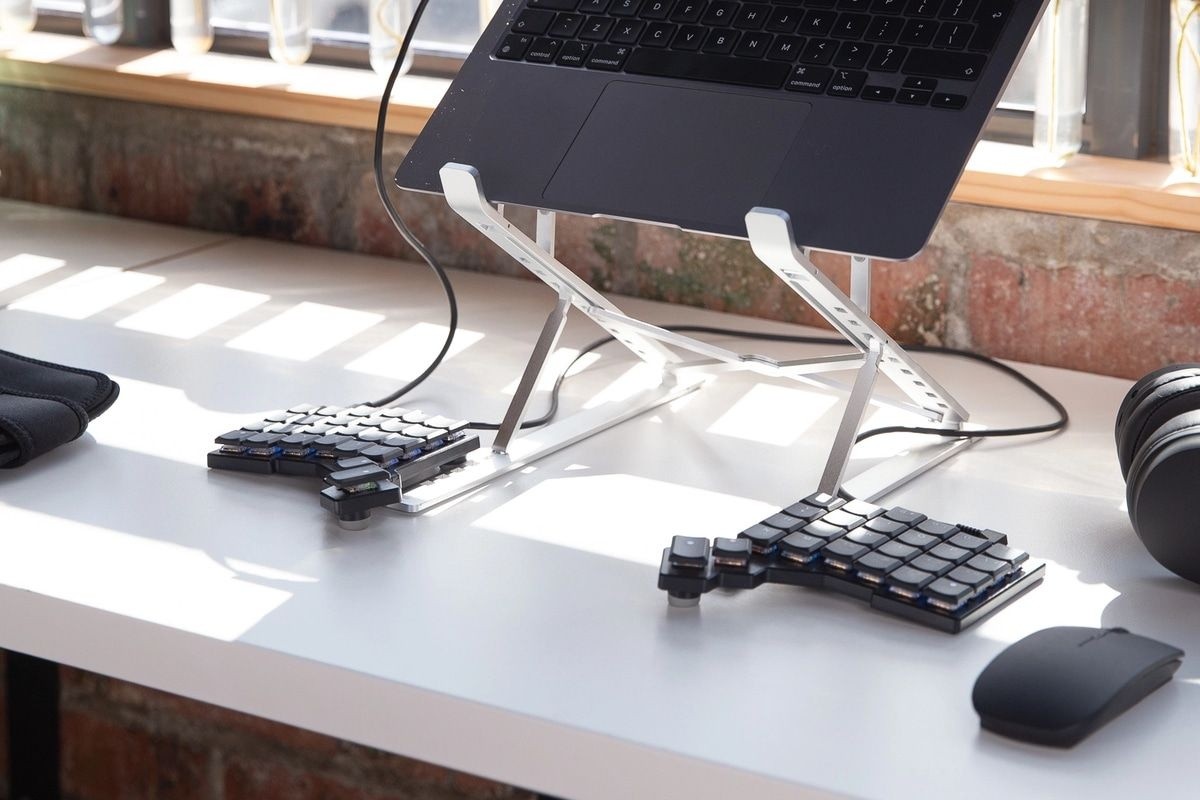
A thin, wired, split and columnar keyboard with 52 hot-swappable low-profile Kailh Choc switches, per-key LEDs, open-source QMK firmware, magnetic tenting legs, a carrying case and a two-year warranty.
Specifications
| Layout | Split, columnar, 52 keys |
|---|---|
| Switches | Low-profile Kailh Choc, hot-swappable, four switch types offered |
| Backlight | Per-key LED with animations |
| Connectivity | Wired USB-C; halves joined by TRRS cable (no wireless) |
| Firmware | Open-source QMK, up to 32 layers |
| Software | Oryx web configurator, Keymapp, typ.ing |
| Dimensions | 14 cm wide x 14.5 cm deep x 1.6 cm high per half (keycaps included) |
| Weight | 217 g per half; 678 g total including cables, legs, leg holder and carrying case |
| Base | Steel bottom plate (magnetic) with four magnetic tenting legs |
| In the Box | Carrying case, key puller, three USB-C cables (30, 50 and 210 cm), TRRS cable (90 cm), USB C-to-A dongle, 34 extra keycaps and 2 extra thumb keys |
| Accessories | Optional magnetic tripod mount, Navigator trackball and trackpad modules |
| Compatibility | macOS, Windows, Linux; no drivers required |
| Warranty | 2 years |
The ZSA Voyager is a low-profile split ergonomic keyboard built to travel. ZSA, the company behind the ErgoDox EZ and the Moonlander, describes it as a powerful, low-profile, split ergonomic keyboard and calls it the thinnest board it has made. The idea is simple: two small halves that you place as far apart or as close together as you like, a columnar layout that follows the natural movement of your fingers, and enough programmability to put everything you need within reach of a 52-key surface. This guide is written from ZSA's own product page and specification list. We have not typed on the keyboard, so every figure is the maker's, and where the page gives no number we say so.
Split, columnar and compact
The Voyager has 52 keys divided between two halves. The layout is columnar, which means the keys sit in straight vertical columns instead of the staggered rows of a traditional board. ZSA's argument is that when you extend a finger, it does not go sideways, so reaching above and below the home row takes less stretching. The compact count of 52 keys is a conscious trade-off: a board this small cannot keep every key of a full keyboard on one surface, so ZSA relies on layers (up to 32) to reach the rest. ZSA offers a downloadable, life-size printable PDF so you can try the footprint on your desk before buying. For anyone coming from a standard keyboard, the learning curve is real, and ZSA says as much by supplying tools such as a typing trainer to practise the custom layout.
Low-profile switches and hot-swapping
The keyswitches are low-profile Choc switches made by Kailh, which are the reason the board is so thin. The page says four low-profile switch types are offered, though it does not name them in the text we read, so we cannot list them. The board is hot-swappable: you can pull a keyswitch out and press a new one in, which lets you customise the feel over time or replace a single faulty switch. Our guide to hot-swap switches and custom keycaps explains what that means in practice, and the explainer on linear, tactile and clicky switches helps you choose a type. Under every key sits a bright, colourful LED, and the included animations can run across the surface, highlight specific keys or be dimmed or turned off entirely.
Keycaps and homing bumps
ZSA created three keycap sets for the Voyager: one for US English, one that is locale-neutral and a third with blank circle-glow keycaps for a minimal look. The box includes a large assortment of extra keycaps, 34 in total plus two extra thumb keys, so you can arrange keys to suit your own layout, which also helps while you learn it. Most keyboards include tactile bumps for the QWERTY home keys, and the Voyager includes those, plus bumps for a couple of layouts that ZSA considers better than QWERTY.
Firmware and software
The firmware is open-source QMK, with up to 32 layers. You can remap any key, make one key do several things (tap for A, hold for Ctrl), send one-touch shortcuts and set up system-wide hotkeys such as Hyper and Meh. All of this lives on the keyboard itself, so no software or drivers are needed on the computer, and the board works with macOS, Windows and Linux. ZSA supplies free tools. Oryx is a browser-based layout editor you can try before buying. Keymapp is a native app that shows your layout on screen, updates it as you switch layers and includes a heatmap of which keys you use most; ZSA stresses it is optional and that your layout is saved to the keyboard. A typing trainer helps you practise. Smart Layers can switch the active layer automatically when you change applications. If you like the ideas behind a programmable board, our overview of mechanical keyboards in 2026 shows how common they have become.
Connection, build and tenting
The Voyager is wired. It connects to your computer by USB-C, and the two halves are joined by a TRRS cable, so there is no wireless option; ZSA has an FAQ for that question. The bottom plate is steel and magnetic, which makes the thin board feel solid and lets accessories click on using magnets and orientation pins. Each Voyager comes with four magnetic tenting legs that snap onto the board, designed so you can reuse the magnets in your own accessories. An optional magnetic tripod mount adds a standard tripod thread, and ZSA says its Navigator trackball and trackpad modules are available to add pointing to the board. Community 3D-printable accessories, such as docks and wrist rests, are also available.
What is in the box
The box holds the keyboard, a carrying case with a metal dock for the legs, a key puller, three USB-C cables (30 centimetres, 50 centimetres and 210 centimetres), a 90-centimetre TRRS cable, a USB C-to-A dongle, the tenting kit and the 34 extra keycaps with two extra thumb keys. Each unit also includes a licence for the typing game Nanotale. A set of cables this varied is deliberate: ZSA wants you to place the halves where they suit your desk, laptop or lap. Each half measures 14 centimetres wide by 14.5 centimetres deep by 1.6 centimetres high including keycaps and weighs 217 grams, and the full kit with cables, legs, leg holder and case weighs 678 grams. The warranty is two years with parts available for repair.
Where it sits in our database
The nearest relative is the ZSA Moonlander, ZSA's larger split board with an articulating thumb cluster. The Moonlander lists hot-swappable MX-style switches with ten options, double-shot PBT keycaps, per-key RGB, an ARM Cortex-M4 processor, QMK with up to 32 layers, a detachable USB-C cable, a carrying case, an optional wrist rest and a two-year warranty. Set against it, the Voyager is thinner and lighter, uses low-profile Choc switches instead of full-height MX-style switches and drops the large thumb cluster for a compact 52-key layout, while sharing the firmware, the layer count, the software and the warranty. For a completely different kind of programmable board, the Wooting 60HE+ uses Hall-effect switches and adjustable actuation, aimed at gaming. You can browse the whole keyboard category for more.
What the page does not say
ZSA's page shows a price of 365 US dollars with shipping included and a note that it ships in two weeks; we do not list the price because it can change. It does not name the four switch types, does not give key travel or actuation force and does not describe latency. Use this entry to check the facts that decide fit: wired only, low-profile Choc switches, 52 keys, the per-half size and the weight. Then try the free Oryx editor before you buy, since the layout is the part you will live with.