ZSA ZSA Moonlander
A split, columnar, hot-swappable ergonomic mechanical keyboard with articulating thumb clusters, per-key RGB, open-source QMK firmware and a two-year warranty.
Specifications
| Type | Split, columnar, ergonomic mechanical keyboard with articulating thumb cluster |
|---|---|
| Switches | Hot-swappable MX-style, ten switch options |
| Keycaps | Double-shot PBT, printed or blank |
| Backlight | Per-key RGB |
| Processor | ARM Cortex-M4 |
| Firmware | QMK (open source), up to 32 layers |
| Software | Oryx web configurator, Keymapp |
| Cable | Detachable USB Type-C, C-to-A dongle in box |
| Extras | Carrying case, detachable wrist rest (Wing), optional Platform tenting system |
| Warranty | 2 years |
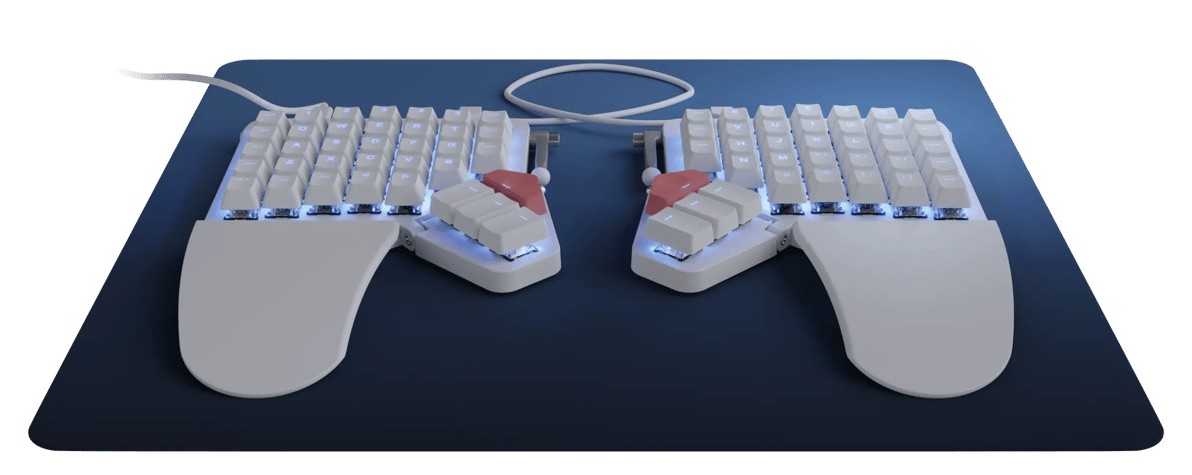
The ZSA Moonlander is not a keyboard you drop in place of your old one and forget. It is a split keyboard in two halves, with keys arranged in straight columns instead of staggered rows, a tiltable thumb cluster on each side, a detachable wrist rest and a firmware you can rewrite from a web page. ZSA, which says it has made high-end keyboards since 2015, sells it as a way to work comfortably for years. This guide is built from ZSA's own Moonlander page. That page prints no price, weight or exact dimensions, so we quote none, and the testimonials on it are the company's selection, so we do not repeat them as evidence. What follows is what the maker says and what that means at a desk.
Two halves, placed where you need them
The main idea is the split. You place each half exactly where you want it, and ZSA's argument is that typing at shoulder width keeps your chest open and stops you hunching over one central block of keys. Each half has a thumb module and a wrist support, called the Wing, and the halves can be tented, meaning raised in the middle so your hands rotate slightly outward. The company says that alone feels much more comfortable to many people. If you have ever felt your forearms twist inwards on a normal keyboard, this is the problem it is aimed at.
Columnar layout
Like ZSA's ErgoDox EZ, the Moonlander uses a columnar layout. ZSA's reasoning is that when you extend a finger it does not move sideways, so straight columns make it easier to reach above and below the home row and you stretch less. It does mean relearning where some keys are. ZSA offers a free typing trainer, typ.ing, with modes for text, numbers and symbols, programming syntax and unlabelled keys within layers, and every Moonlander comes with a free licence for the typing game Epistory. Budget a few weeks of slower typing before you decide whether it suits you.
Thumb cluster and wrist support that adjust
The thumb module tilts up and down. For small hands you tilt it up to pull the keys closer, and for large hands you tilt it down so your hand can spread out while the Wing supports it. The Wing follows the tenting and tilt automatically, and you can detach it without tools if you prefer to type without wrist support. Each thumb cluster carries keys ZSA calls the Launch and Any keys, meant for actions you repeat many times a day, such as switching input language or opening a password manager, and three piano keys with a vertical profile and their own backlight slot. ZSA also offers optional accessories: a Zip Kit to shrink the board, a Tripod Kit to mount it at any angle, The Platform tenting system and 3D-printable Community Creations.
Mechanical, hot-swappable and made to be changed
You choose between ten different switch types when you configure the keyboard, and every switch is hot-swappable, so you can change any of them at any time without soldering and without voiding the warranty; a free tool for it ships with each unit. The Moonlander uses MX-style switches, so a large world of third-party keycaps also fits. The keycaps that come with it are double-shot PBT, available printed, all in one profile so you can rearrange them for other layouts, or blank, where each row is sculpted with its own profile. ZSA advises the printed set if in doubt. Our guides on mechanical switch types and hot-swap sockets and custom keycaps help you pick switches before you order. If you want to see how mechanical boards differ from membrane ones, read mechanical versus membrane keyboards.
Firmware you can shape
Here the Moonlander earns its reputation. The firmware is QMK, which is open source, and ZSA's Oryx is a free web editor where you point and click rather than write code. You can remap any key, make one key do different things when tapped or held (tap for A, hold for Control), send a shortcut such as Command plus S with a single key, and build up to 32 layers, for example one for a game and one for an application. ZSA also describes the Hyper (Ctrl, Shift, Alt and the Windows or Command key) and Meh (Ctrl, Shift, Alt) modifiers as ways to get system-wide shortcuts that no sane application uses. Smart Layers switch layers automatically when you change programs; ZSA's example is a Photoshop layer that turns on when Photoshop is in front and a game layer that turns on for a game. The keyboard works with Mac, Linux and Windows, and all the logic lives on the board, so no drivers or background software are required. Layouts are saved to the keyboard itself, so you can carry it to another computer with your customisations intact. The optional Keymapp app shows your active layout on screen and has a local heatmap of which keys you use most.
Backlighting, indicators and build
The Moonlander is fully backlit with a programmable RGB LED under each key, which you can use to light up the active keys of the current layer or to remember shortcuts, and it offers many LED animations. There are three status LEDs on each side and a buzzer for audio feedback. An ARM Cortex-M4 processor drives the animations and firmware features. The keycaps float above the board for an exposed, slim look, which ZSA says makes it one of the thinnest mechanical keyboards. The colour comes in two options. The board has a detachable USB Type-C cable, with a C-to-A dongle in the box, and the USB port is on the left half. ZSA calls the left side active: unplug the right half for gaming and the left half works alone as a macro pad, leaving your mouse room to roam.
Travel
A carrying case is included, and the Wing folds under the keyboard, clicking magnetically into its stowed position. The optional Platform latches quickly and stows flat in the case with the keyboard. That makes the Moonlander less awkward to move between desks than most ergonomic boards. Note that ZSA's menu includes a page titled "It's Not Wireless?", and the cable described above tells you the keyboard is wired; we did not open that page, so check it if wireless matters to you.
Warranty and repair
ZSA states a two-year warranty with no fine print and says it supports the right to repair, offering parts for all its keyboards. The page shows stock as "In Stock. Ships in two weeks." at the time we read it.
Sales figures: a discrepancy
The page celebrates 58,000 Moonlanders sold at the top, while a card in its family overview says over 40,000 units sold. The larger figure is the headline, and the smaller one looks like an older card that was not updated. Neither number affects how the keyboard types, so treat both as approximate.
Who should buy it
Choose the Moonlander if you type for hours, want to fit the keyboard to your hands, and enjoy tinkering with layers. Skip it if you share your keyboard, need it to be wireless, or would rather not relearn your layout. For a familiar layout with productivity features, see the Logitech MX Keys S, and to see what else is changing in the field, read mechanical keyboards in 2026. Everything we cover is on the keyboards category page.