Corsair Corsair K70 CORE RGB
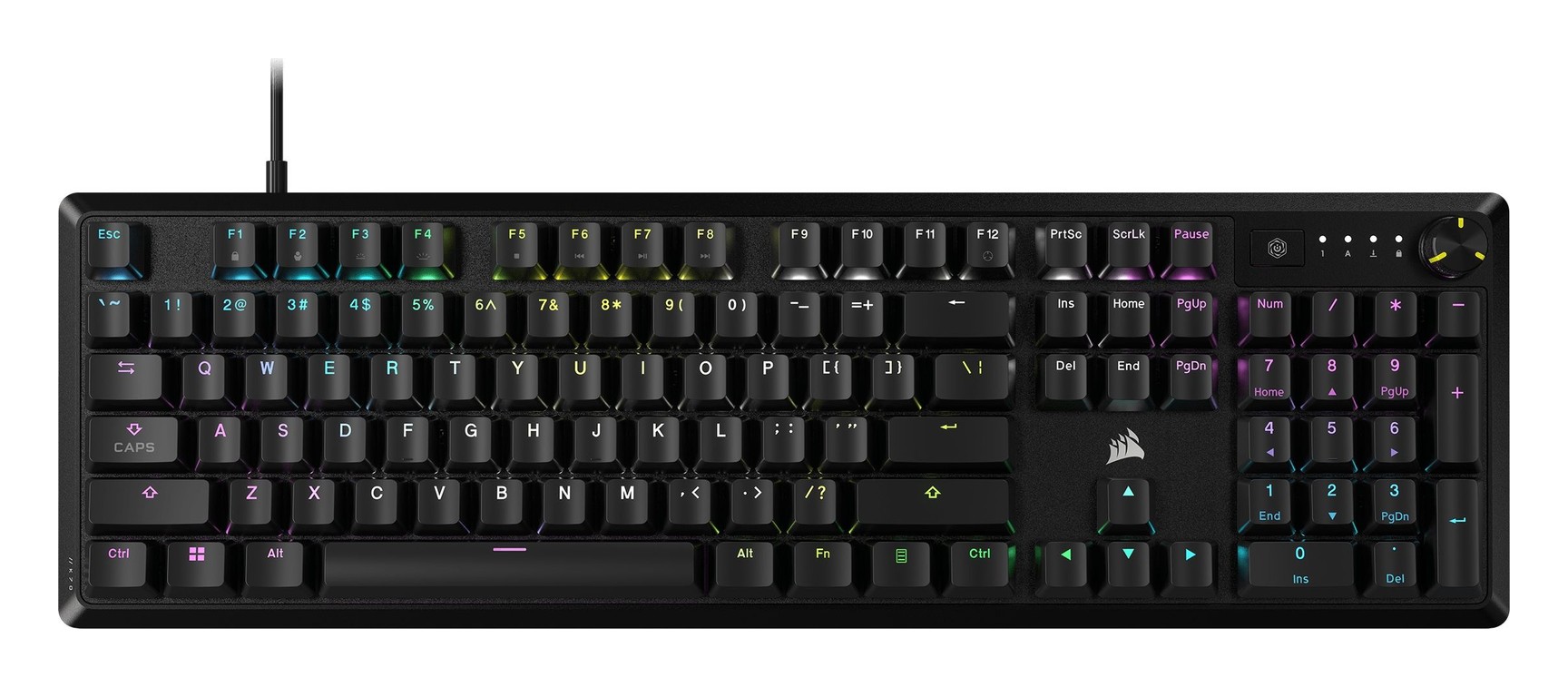
A full-size wired Corsair keyboard with pre-lubricated MLX Red linear switches, two layers of dampening foam, an aluminum top plate, a media dial and FlashTap for competitive play.
Specifications
| Size | Full size, 104 keys |
|---|---|
| Switches | Corsair MLX Red v2 linear, pre-lubricated |
| Plate | Aluminum top plate |
| Keycaps | Double-shot ABS |
| Sound Damping | Two foam layers |
| Backlight | Per-key RGB via iCUE |
| Controls | Multi-function rotary dial, media and volume keys |
| Onboard Profiles | Up to 5 |
| Report Rate | 1,000 Hz, full N-key rollover |
| Connection | Wired USB Type-A, rubber cable |
| Extra | FlashTap SOCD handling (enable with FN + Right Shift) |
| Palm Rest | Listed as not included for the SKU read; variants with palm rest exist |
| Warranty | 2 years |
| Page Price | US$69.99 (US$99.99 list) |
The Corsair K70 CORE RGB is the value end of Corsair's K70 range: a full-size wired mechanical keyboard with linear switches, per-key RGB and a multi-function dial. Corsair's page lists it at 69.99 US dollars, marked down from 99.99, in Black, Steel Gray or White, and describes it as a keyboard that makes gaming and typing amazing. This guide is based on that page, its tech-specs table and the list of guides linked from it. We have not typed on the keyboard, so we report what Corsair says and point out where the page is unclear or contradicts itself.
Layout and size
The specifications list the size as full size, with 104 keys in the matrix, and a wired USB Type-A connection with a tangle-free rubber cable. There is a numpad, an arrow cluster and the full function row, so this is not a compact board. The table lists the height as adjustable. Weight is listed as 0.934, but the unit is not written, which suggests kilograms, so treat it as roughly a kilogram and confirm with a retailer. Corsair sells the K70 line in several sizes: the table's keyboard size row reads Full, TKL and Full Size, and Corsair separately sells a K70 CORE TKL, so make sure you are looking at the full-size page. If you are unsure whether you need a numpad at all, our overview of what has changed in mechanical keyboards in 2026 explains the trends behind layout choices.
Switches: MLX Red v2
The switches are Corsair MLX Red v2 linear switches, which Corsair says are pre-lubricated for smooth and responsive keystrokes. The specifications list them as MLX Red. Corsair has its own article on the switch, which it calls its smoothest yet, but the page does not give an actuation force, actuation point or travel distance, so we cannot put numbers on the feel. Linear switches have no tactile bump and no click. If you are unsure whether that is your kind of switch, our guide to mechanical keyboard switches, linear, tactile and clicky walks through the differences. Note that the page does not describe the switches as hot-swappable, so you should not assume you can change them.
Sound and build
Corsair says two layers of sound-dampening foam soften keystroke noise for pitch-perfect typing acoustics. The plate is described as a premium aluminum top plate that adds durability and stylish stability, and the keycaps are double-shot ABS that Corsair says will not crack under pressure. One eco detail needs care: the page says a bottom case made with 85 percent post-consumer recycled plastic is available on the K70 CORE SE only, so it does not apply to the standard model.
The palm rest question
The page has a contradiction that affects what you pay for. The overview describes a detachable magnetic soft-touch palm rest and the page offers colour options with palm rest and without. The specification table for the version we read, however, says a wrist rest is not included. The likely explanation is that the black SKU we read, CH-910971E-NA, is the version without a rest and that the palm rest comes with a separate variant; Corsair lists a K70 CORE SE with palm rest in white under a different SKU. Check the variant and the box contents before you buy, because a palm rest is worth having on a full-size keyboard with a shallow front edge.
The dial and media controls
A multi-function rotary dial adjusts volume, RGB brightness, zoom, scroll and more, and dedicated media and volume controls are listed as present. Function-key shortcuts handle a Windows lock and other media keys. For a desk that alternates between games, calls and long documents, a dial that can also scroll or zoom is a genuinely useful control, and it saves reaching for the mouse.
Software, profiles and RGB
Corsair iCUE handles per-key RGB backlighting, macros and key remapping. The keyboard stores up to five profiles of settings and lighting on board, so it keeps your setup when you plug it into another computer. The report rate is 1,000 Hz and the keyboard supports full N-key rollover. iCUE requires an internet connection to download, and the compatibility line lists a PC or Mac with a USB 3.0 or 3.1 Type-A port, Windows 10 and macOS 10.15 or later.
FlashTap for competitive play
FlashTap is Corsair's name for a handling of opposing movement keys, known in games as SOCD behaviour. When two opposite movement keys are pressed together, you can prioritise the first, the last or neither input. The page names counter-strafing and jiggle peeking as the use cases. It is disabled by default and can be enabled with a shortcut, FN plus Right Shift; when switched on, the default settings are the A and D keys with last-input priority. You need the latest firmware through iCUE for it to work. Some competitive games and tournaments restrict such features, so check the rules of the game you play before relying on it.
Limited bundles and price
Corsair also lists limited-edition keycap and mouse pad bundles in Steel Crimson, Cherry Blossom and Steel Azure, North American layout only, and a Corsair RGB Collection that pairs the keyboard with a wired mouse and mouse pad at 209.97 dollars. The 69.99 dollar price on the page is a sale price against 99.99 dollars, so check what the keyboard costs when you buy. Corsair gives a two-year warranty and 60 days of risk-free returns on the page.
Who it suits
- You want a full-size wired keyboard with a known linear switch at a modest price.
- You like a quiet-ish, foam-damped sound and a metal top plate.
- You want a dial for volume and scroll, and onboard profiles.
- You are curious about FlashTap for shooters.
It is less ideal if you want wireless, hot-swappable switches or a compact layout. In that case compare it with the Corsair K65 Plus Wireless, a 75 percent wireless board, or step up to the K70 MAX RGB in our catalogue. To see how wired mechanical boards compare with membrane ones, our mechanical versus membrane guide is a good primer. In short, the K70 CORE RGB is a sensible, feature-rich entry to Corsair mechanical keyboards, with two open questions to resolve before you buy: the palm rest and the exact size you are looking at.