Corsair K65 PLUS WIRELESS 75% RGB Mechanical Keyboard
Corsair's first 75% keyboard: hot-swappable pre-lubed MLX Red switches, tri-mode wireless with a 266-hour battery claim, a multi-function dial and a screw-together case.
Specifications
| Form Factor | 75% (compact) |
|---|---|
| Switches | Hot-swappable (5-pin) CORSAIR MLX Red linear, 45 g, 1.9 mm actuation, 4 mm travel, 70 million keystrokes |
| Keycaps | Dye-sub single-shot PBT, dual Windows/Mac legends |
| Connectivity | 2.4 GHz, Bluetooth (up to 3 devices), USB-C wired |
| Battery | 4200 mAh Li-ion, up to 266 hours with lighting off |
| Polling Rate | Up to 1,000 Hz |
| Onboard Profiles | 4 |
| Extras | Rotary dial, Windows/Mac/PlayStation modes, foam and silicone dampening |
| Dimensions | 320 x 136 x 35 mm |
| Weight | 0.918 kg |
| Warranty | 2 years |
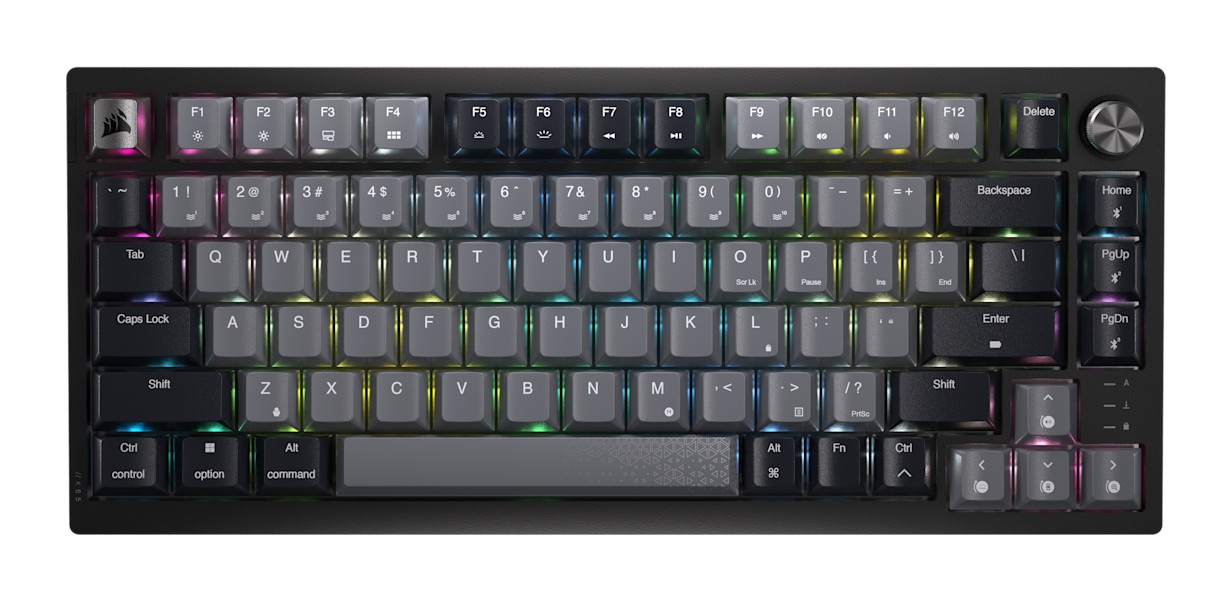
The Corsair K65 PLUS WIRELESS is, in Corsair's own words, the sum of the keyboard progress the company had made up to that point. It is the first Corsair keyboard in a 75% layout, it uses the company's own pre-lubed MLX Red linear switches on a 5-pin hot-swap board, and it connects three ways: a 2.4 GHz dongle, Bluetooth and a USB-C cable. The product page listed it at $129.99, reduced from $159.99, when we read it, and a Corsair explainer article last updated in November 2025 gave the full specification. This page combines both sources, points out the places where they disagree, and explains what the numbers mean for someone deciding between a compact keyboard and a full-size one.
What 75% actually gives you
Corsair describes a 75% keyboard as a full-size layout that has shed the number pad. Since the number pad lives on the right, dropping it gives right-handed users about five inches of extra mouse space, according to the explainer. The company also says a 75% layout is functionally the same as a tenkeyless board, but the remaining keys are condensed so there is less empty space. It compares the shape with its other compact sizes: a 60% board has no arrow keys, and a 65% board has no function row, which matters if you have ever tried to move around a BIOS screen without Delete, F12 or arrows. The K65 PLUS WIRELESS keeps both. One practical note from Corsair: the number of keys differs between ANSI and ISO versions, so check that before you buy third-party keycaps. The dimensions are 320 x 136 x 35 mm and the weight is 0.918 kg, which is a solid but not heavy keyboard. If you are new to the terminology, our mechanical versus membrane keyboard guide explains why people choose one over the other.
Switches: MLX Red, lubed at the factory
The keyboard ships with Corsair's MLX Red switches, which Corsair introduced on the K70 CORE RGB in 2023, the company's first own-brand mechanical switch. The specification lists hot-swappable Corsair Red linear switches with a 45 g actuation force, a 1.9 mm actuation distance, 4 mm of total travel and a guaranteed life of 70 million keystrokes. A note on wording: the specification sheet in the explainer says "CORSAIR Red", while the product page's tech specs and text say "MLX Red". We read these as the same switch, since the article itself calls them pre-lubed MLX Red switches. Linear means the key moves straight down without a bump, which suits fast, repeated presses. Our guide to linear, tactile and clicky switches explains the differences, and Corsair notes a tactile version of this keyboard exists as a separate listing.
Hot-swap and a case you can open with eight screws
Corsair's timeline is worth noting because it explains the design: the K70 PRO MINI WIRELESS in 2022 was the first hot-swappable Corsair keyboard, the K70 CORE RGB in 2023 brought the MLX switches without hot-swap, and the K65 PLUS WIRELESS combines the two. The switches are 5-pin compatible, so you can swap in other 5-pin switches, and Corsair includes a cap puller and switch puller. To open the keyboard you remove eight screws from the underside, then unplug the battery and the power button from the PCB. Corsair points out that neither cable is soldered in, and the layers are not glued together, so you can change the sound-dampening silicone pad, the switch plate or the foam between the plate and the PCB. Corsair calls it the best keyboard it has made in terms of customisability, and says it can also be ordered pre-customised through its configurator, with your choice of frame, switches and keycaps. For a broader view of swapping switches and caps, see our hot-swap and custom keycaps guide.
Case construction and sound: a small contradiction
The chassis line in the specification reads "Sound absorbing foam, PC+, Steel plate, Top mount, High density foam and silicone pad", and the product page highlights a top-mount design and two layers of sound dampening. The explainer, however, refers to a polycarbonate switch plate when it describes changing the layers. These two statements do not sit comfortably together, since a steel plate and a polycarbonate plate are different things. We cannot tell from the pages which is fitted to which production run, so if plate material matters to you, treat this as a question to check on the box or with Corsair support before buying. What both sources agree on is the two damping layers, the foam and the silicone pad, and the top-mount design.
Keycaps and lighting
The keycaps are dye-sublimated PBT, listed as single-shot. Keys that do something different on a Mac carry both the Windows and the Mac legend, so you can see the right function on either system. Lighting is RGB and individually addressable, per key, and you can set up profiles: the keyboard stores four onboard profiles. The keyboard reports at up to 1,000 Hz, offers full key rollover with 100% anti-ghosting, and gives you brightness and media control through function-key shortcuts as well as the dial.
Three ways to connect and how long the battery lasts
For wireless use there is the 2.4 GHz dongle, which Corsair says lives in a slot on the top edge, and Bluetooth, where you can save up to three devices and cycle through them with a shortcut printed under the volume knob. A switch beside the dongle slot changes between Windows and Mac mode, and you can put the keyboard into a dedicated PlayStation mode through iCUE; the specification lists compatibility with Xbox One, Xbox Series X and S, PlayStation 4 and PlayStation 5. For wired use there is a 1.8 m detachable USB-C to USB-A cable. Cable material is another small inconsistency: the specification sheet says tangle-free rubber, while the product page's tech specs say braided. Battery life is stated as up to 266 hours with the backlight off. The battery is a 4200 mAh polymer lithium-ion cell (3.7 V, 15.54 Wh, weighing 69.4 g) and charges over USB in five to six hours depending on drain. Corsair does not give a figure with lighting on, so expect a lower runtime once you enable RGB. Our article on how mechanical keyboards changed in 2026 discusses why tri-mode wireless has become common.
The multi-function dial and software
A rotary dial sits in the corner of the keyboard. Corsair calls it more than a volume knob: in iCUE it can be programmed to adjust RGB brightness, zoom, scroll and more. The keyboard works with Corsair iCUE, which handles lighting, remapping and the PlayStation mode, and Corsair adds that the keyboard is plug and play, so basic use does not need software. The Windows lock key is a function-key shortcut, and there is adjustable height with the usual flip-out feet. No palm rest is included.
How it compares with other Corsair keyboards
The K65 PLUS WIRELESS is compact and wireless. If you want a full-size Corsair board with a dedicated macro column, the K100 RGB is a very different animal, while the Corsair K70 MAX RGB sits between them. For a different take on a hot-swap wireless board, our page for the Keychron K2 Ultra 8K is a useful comparison.
Who should buy it
This keyboard suits people who want a compact board without giving up arrows and function keys, who like the idea of owning a keyboard they can open without prying clips, and who want to move between a desktop, a laptop and perhaps a console without cables. It is less suited to anyone who needs a number pad or media keys dedicated to a specific job, and it is worth checking the plate question above if you are picky about typing sound. At the price we saw, it is a well-specified entry into custom-style boards from a brand that clearly wrote its own explainer with enthusiasts in mind.