Keychron K2 Ultra 8K
A compact 75% keyboard with 2.4 GHz, Bluetooth and wired modes, hot-swap switches and a battery rated for up to 760 hours.
Specifications
| Layout | 75% |
|---|---|
| Connectivity | 2.4 GHz, Bluetooth, wired |
| Polling Rate | 8000Hz (2.4 GHz wireless) |
| Switches | Keychron Apex Red / Brown / Banana, hot-swappable |
| Build | CNC aluminum + ABS, steel plate |
| Keycaps | OSA double-shot PBT |
| Battery | 4000 mAh, up to 760 hours (wireless 8K mode) |
| Firmware | ZMK |
| Backlight | South-facing RGB |
| Software | Keychron Launcher (macOS, Windows, Linux) |
| Weight | 1084g +/- 10g |
| Dimensions | 311.50 x 121.54 mm |
| N-key Rollover | Yes (wireless and wired) |
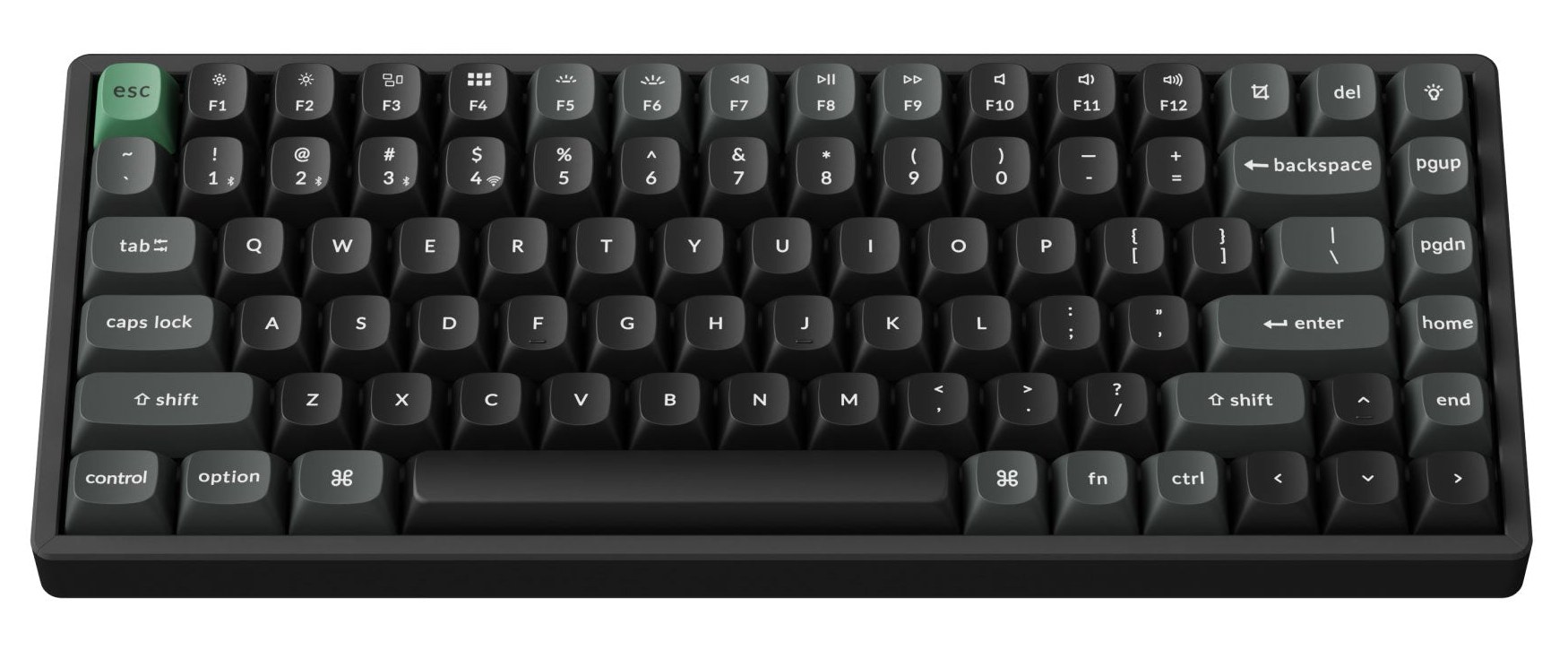
The Keychron K2 Ultra 8K is a compact wireless mechanical keyboard in a 75% layout. It is aimed at people who want a small, sturdy board that can move between a desk, a laptop bag and a second computer without fuss. Below we go through the layout, the three connection modes, the switches and battery, and the situations where it makes the most sense.
A 75% layout that keeps the useful keys
A 75% keyboard removes the number pad and shrinks the gaps between key groups, but it keeps the function row, a full set of arrow keys and a small column of navigation keys. For most people that is the sweet spot. You can still tap an arrow key without thinking, you still have your F-keys for shortcuts, and the whole board is only 311.5 mm wide and 121.54 mm deep. That leaves a good amount of desk to the right of the keyboard for a mouse, a notebook or a drink. If you work with numbers all day, a separate number pad is the usual workaround; if you do not, you will barely miss it.
Keychron includes both Windows and macOS keycaps for the modifier keys, so the legends match your system rather than making you translate between "Alt" and "Option". The keycaps themselves are double-shot PBT in OSA profile, which means the legends are moulded through the plastic and will not rub off, and the plastic tends to keep a matte finish for longer than cheaper alternatives.
Three ways to connect
The keyboard supports 2.4 GHz wireless, Bluetooth and a wired USB connection. Each has a reason to exist. Wired is the simplest: plug in, and it also gives you a way to charge. Bluetooth is convenient for a laptop, tablet or phone and lets you pair several devices and switch between them. The 2.4 GHz mode uses a small receiver and is the one to pick when you care about response time, because it is the mode in which the keyboard reaches its 8,000 Hz polling rate. The polling rate is how often the keyboard reports to the computer; a typical board reports 1,000 times per second. Keychron states the 8K rate is available in 2.4 GHz wireless mode, and the keyboard is built on ZMK firmware, an open-source wireless-focused keyboard firmware.
Being honest about the numbers: for typing, documents and browsing, you will not perceive the difference between 1,000 and 8,000 Hz. It is headroom that may matter to fast-paced games. For everyone else, the practical advantage of the K2 Ultra is not the polling rate but the flexibility of having three connection options in one small keyboard. Our look at 2.4 GHz versus Bluetooth latency explains why a dedicated receiver usually feels more immediate than Bluetooth, and the same reasoning applies to keyboards.
Battery: what 760 hours really tells you
The keyboard has a 4,000 mAh battery, and Keychron rates it at up to 760 hours in wireless 8K mode. That is a manufacturer's figure produced under specific test conditions, so your own result will depend on backlight brightness, how much you type and which connection you use. It is still a useful indicator: the design is built for long stretches between charges, and with sensible backlight settings many people will charge it only occasionally. A practical habit is to plug it in whenever you sit down at a wired desk, and let the battery act as a reserve for trips and moves between rooms.
The switches and the feel
The board uses Keychron Apex switches, offered in Red, Brown and Banana variants. The Red is a linear switch with a smooth, uninterrupted press. The Brown is tactile, with a small bump you can feel when the key registers. Keychron describes the Banana as a further option in the range; if you want to know exactly how it feels, check the current product page for its description, since we do not want to guess. The switches are described as having a POM stem and a nylon base and as being pre-lubricated, which generally means a smoother, quieter keystroke straight out of the box. If you are unsure which family suits you, our guide to linear, tactile and clicky switches is a good starting point.
Because the switches are hot-swappable, your first choice is not final. You can pull them and fit others that use the same kind of socket, without soldering. Our hot-swap and custom keycaps guide shows what to look out for, such as bent pins and the correct pulling tool.
Build quality
The case is CNC-machined aluminum combined with ABS plastic, and there is a steel plate inside. The whole keyboard weighs about 1,084 g. That is noticeably lighter than a fully aluminum board of larger size, so it is easy to carry, but it is still heavy enough to stay in place on a desk. The backlight is RGB, with the LEDs facing south, and the keyboard supports full N-key rollover in both wireless and wired modes, meaning that all the keys you press at the same time are registered.
Software and customisation
Key remapping and macros are handled in the Keychron Launcher, a web-based tool that works with macOS, Windows and Linux. You do not install a heavy program; you open the page, connect the keyboard and change what each key does. That is helpful in a shared or locked-down work computer where installing software is not allowed. It also means you can move a keyboard between machines and keep the same layout.
Who should consider it
The K2 Ultra 8K makes sense if you need one keyboard for several devices, if you carry a keyboard between home and the office, or if you simply want a compact board with modern wireless options and a strong build. It is a good candidate for a home office where the desk is shared with a laptop and you want to keep the cable clutter down. If you never use wireless and prefer maximum adjustability of switch behaviour, look at the wired Keychron Q1 HE 8K, which trades wireless freedom for adjustable magnetic switches.
The listed price for the fully assembled version is 119.99 USD, which is moderate for a wireless aluminum-and-steel board with hot-swap sockets. To place it among other choices, browse the keyboards category, or read our mechanical versus membrane guide if you are coming from a standard office keyboard.
Practical tips before you buy
Decide on your layout first: the K2 Ultra is a 75% board, so check that you can live without a number pad. Decide on your switch feel second; if you type a lot and share a room, a tactile or linear switch with a softer sound may suit you better than the loudest option. Third, consider how you will pair it. If you use one computer, the 2.4 GHz receiver is enough. If you use several, set up your Bluetooth slots once and learn the shortcut to switch between them. Finally, if you use the keyboard heavily for gaming, remember that the higher polling rate is only offered in the 2.4 GHz wireless mode, so make that your default for play.
In short, this is a compact, flexible and well-built wireless keyboard whose strengths are its connection options, its battery rating and its hot-swap switch sockets. It will suit anyone who values a tidy desk and a keyboard that follows them from place to place.