Keychron Q1 HE 8K
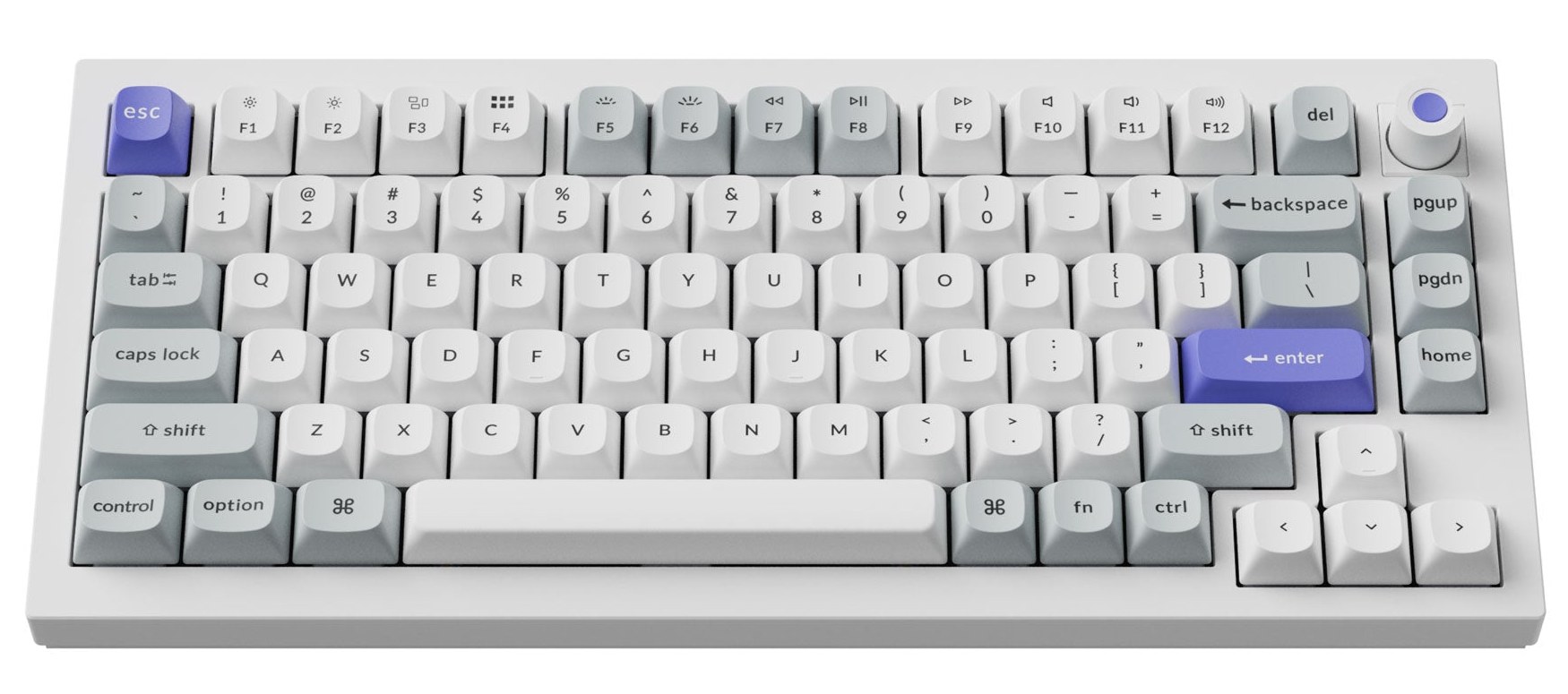
A compact 75% wired keyboard with adjustable magnetic switches, an aluminum gasket-mount body and an 8,000 Hz polling rate.
Specifications
| Layout | 75%, ANSI |
|---|---|
| Connectivity | Wired USB |
| Polling Rate | 8000Hz |
| Switches | Keychron Ultra-fast Lime Magnetic, hot-swappable |
| Actuation | Adjustable 0.1-3.35mm, Rapid Trigger |
| Scan Rate | 256KHz single-key |
| Build | Aluminum, gasket mount |
| Keycaps | OSA double-shot PBT |
| Backlight | South-facing RGB |
| Software | Keychron Launcher (macOS, Windows, Linux) |
| Weight | 1860g +/- 10g |
| Dimensions | 327.53 x 145 mm |
The Keychron Q1 HE 8K is a 75% wired keyboard built around magnetic switches instead of the usual contact-based ones. That single design choice changes how the keyboard behaves, how you can tune it, and who it is really for. This page walks through what the board offers, how those features play out on an actual desk, and what to think about before you buy.
What "HE" and magnetic switches actually mean
In a conventional mechanical switch, a metal leaf touches a contact when you press down, and that is the moment the keystroke registers. It happens at a fixed depth, and you cannot change it. A magnetic switch works differently: a small magnet inside the stem moves closer to a sensor as you press, and the keyboard measures how far the key has travelled. Because the position is measured continuously, the firmware can decide for itself where a keystroke begins and ends.
On the Q1 HE 8K this shows up as an adjustable actuation point ranging from 0.1 mm to 3.35 mm. Set it shallow and the lightest touch registers; set it deep and you get a more deliberate key that forgives resting fingers. Keychron also lists Rapid Trigger, a mode in which the key resets the moment you start releasing it rather than at a fixed point on the way back up. In fast games and in rhythm-style play, that shortens the gap between two presses of the same key. For plain typing it is optional, but being able to choose is the appeal.
Speed figures, explained in plain terms
The "8K" in the name refers to the 8,000 Hz polling rate: the keyboard can report its state to the computer 8,000 times per second, compared with 1,000 for a typical board. Keychron also quotes a 256 kHz single-key scanning rate and a press sensitivity of 0.01 mm on its product artwork. These numbers are impressive on paper, and it is worth being honest about what they mean in practice. Most people will not feel the difference between 1,000 and 8,000 Hz while typing an email. Competitive players who already use a fast monitor and a low-latency mouse may notice slightly more consistent input. Treat it as headroom, not as a reason to buy on its own. If you want the background on how polling works for pointing devices, our guide on mouse DPI, sensors and polling rate covers the same ideas.
The connection is wired only. That is a deliberate trade: a cable keeps latency predictable and lets the high polling rate run without a battery in the picture. If you move your keyboard between rooms every day, look elsewhere; if it lives on one desk, a cable is one less thing to charge.
Layout and build
The 75% layout keeps the function row and the arrow keys, drops the number pad, and squeezes the navigation keys into a narrow column at the right. It is a popular size because it leaves more room for your mouse while still giving you the keys most people would miss. The layout is ANSI, which matters if you are used to the tall, narrow Enter key of ISO boards. The physical size is 327.53 mm by 145 mm.
The case is aluminum, with a gasket-mount structure. In a gasket mount, the plate that holds the switches floats on soft strips rather than being screwed rigidly to the case. The result is usually a slightly softer, less harsh feel at the bottom of each keystroke. Keychron adds acoustic foam inside to keep the sound rounded. The complete keyboard weighs about 1,860 g, which is heavy in the best sense: it stays put and does not creep on the desk when you type fast. There is also a rotary knob at the top right that can be assigned through software, commonly used for volume.
The keycaps are OSA-profile double-shot PBT. Double-shot means the legends are moulded through the cap rather than printed on it, so they will not wear off. PBT plastic is generally more resistant to the shiny, greasy look that some cheaper plastics develop over time. The board includes caps for both Mac and Windows layouts of the modifier keys, which is handy if you switch platforms.
Hot-swap switches and software
The switches are hot-swappable. That means you can pull them out and push new ones in without a soldering iron. Keychron notes support for its own Lime magnetic switches and for Gateron Jade magnetic switches, and the switch type is set in the Keychron Launcher. This is a genuine long-term advantage: if you decide you prefer a lighter or heavier press, you change the switches and keep the rest of the keyboard. Our guide on hot-swap switches and custom keycaps explains the practical steps and pitfalls.
Remapping and macros are handled through the Keychron Launcher, a web app, so there is nothing heavy to install. It works with macOS, Windows and Linux. Because settings are stored on the keyboard itself, they follow it from one computer to another. The backlight is RGB, with the LEDs sitting on the south side of each switch, which helps legends on the keycaps light up evenly.
Who it suits
This is a good fit if you play games where timing matters and want to experiment with actuation depth, or if you simply like tinkering with a keyboard and enjoy the feel of a heavy, well-damped board. It also suits people who type a lot and want to try a shallower or deeper actuation than the default. It is a less obvious choice for someone who wants a wireless board to carry around, or for someone who never intends to open the settings; in that case a simpler keyboard costs less and does the same job.
The listed price for the fully assembled version is 229.99 USD, so this is not an entry-level purchase. You are paying for the magnetic sensing, the aluminum body and the customisation. If you are still deciding what type of keyboard you need at all, start with our mechanical versus membrane guide, then read what has changed in mechanical keyboards in 2026 to see where magnetic switches fit into the wider picture.
Setting it up well
A few habits will help. First, start with the default actuation and use the keyboard for a few days before changing anything. It is easy to set the point too shallow, which makes accidental keystrokes more likely when your fingers rest on the keys. Second, if you turn Rapid Trigger on, try it in one game or one application first, and give yourself time to adjust; the reset behaviour feels different from what your muscle memory expects. Third, keep the keyboard on a stable, flat surface. A gasket-mount board rewards a solid desk, and a thin desk mat underneath will keep the sound even softer.
If you want to compare it with other boards on this site, browse the keyboards category, where you will find a wired full-size option like the Razer BlackWidow V4 Pro, and the compact wireless Keychron K2 Ultra 8K for people who prefer no cable.
The short version
The Q1 HE 8K is a serious, adjustable, wired 75% keyboard. Its strengths are the tunable magnetic switches, the sturdy aluminum build and the hot-swap flexibility; its limits are the cable and the price. If those trade-offs fit how you work, it is a keyboard you can grow with rather than replace.