Kensington SD5700T Thunderbolt 4 Dual 4K Docking Station with 90W PD
Kensington's first Thunderbolt 4 dock: 11 ports, 90 W charging, dual 4K at 60 Hz, a UHS-II SD reader, DMA protection and a three-year warranty.
Specifications
| Host Connection | Thunderbolt 4 upstream (front), up to 90W Power Delivery |
|---|---|
| Ports | 11: 4x Thunderbolt 4 (1 host + 3 downstream), 4x USB-A (1x 5V/1.5A front, 3x 10 Gbps rear), Gigabit Ethernet, 3.5 mm combo audio, UHS-II SD 4.0 |
| Displays | Dual 4K 60 Hz, or single 8K (30 Hz; 60 Hz with DSC) |
| Data | 40 Gbps |
| Security | Intel VT-d DMA protection, cable lock slots |
| Dimensions | 195 x 75 x 30 mm |
| Weight | 0.435 kg |
| Compatibility | Thunderbolt 4 Windows 10+, Thunderbolt 3 MacBooks macOS 11+, Chrome OS listed |
| Cable | 0.8 m Thunderbolt 4 |
| Warranty | 3 years |
The Kensington SD5700T Thunderbolt 4 Dual 4K Docking Station with 90W PD was announced on 16 November 2020 as the first of Kensington's Thunderbolt 4 docks, and in October 2023 it became the first Kensington dock certified in Google's Works with Chromebook programme. It is a compact aluminium box that turns a single Thunderbolt cable into charging, two monitors, network, card reading and a handful of USB ports. We read Kensington's product page, its 2020 launch announcement, its 2023 Chromebook announcement and its product sheet. We found no price on the sources we read, so we leave it out. What follows is a plain-language guide to the specification, including a few points where the marketing and the technical sheet count things differently.
The eleven ports, counted honestly
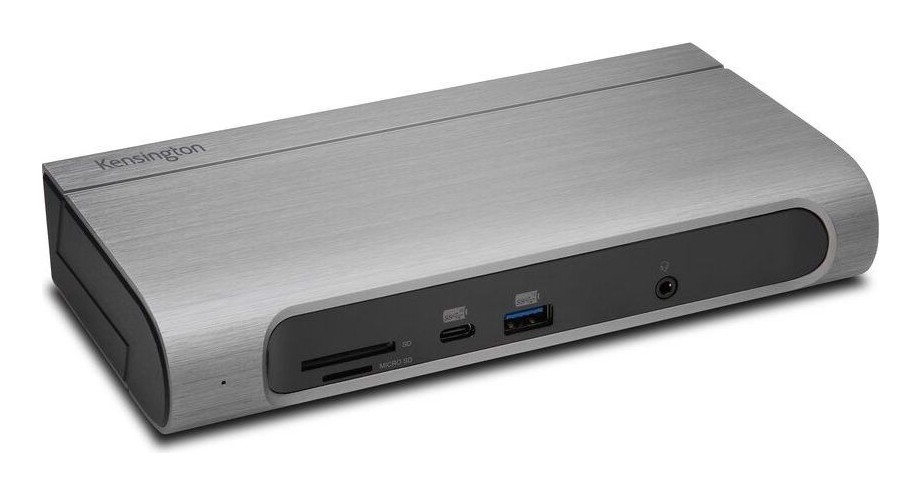
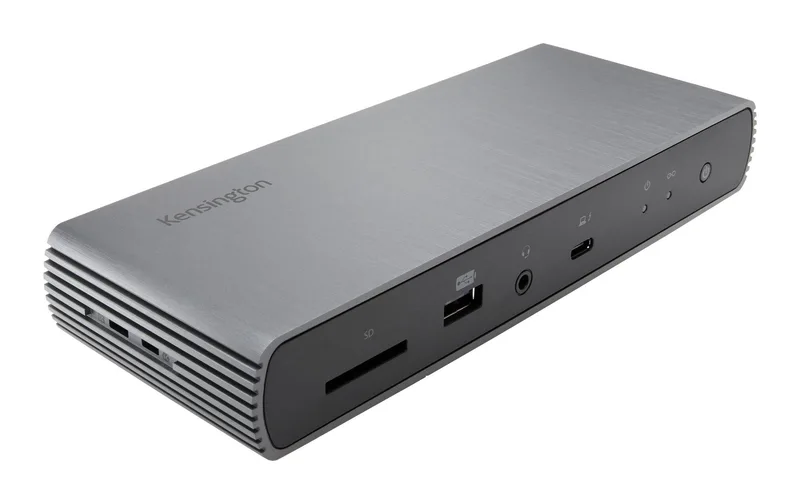
Kensington's headline says 11 ports: four Thunderbolt 4 ports, four USB-A ports, one Gigabit Ethernet port, one audio combo jack and one UHS-II SD 4.0 card reader. That adds up to eleven, but one of the four Thunderbolt 4 ports is the connection to your laptop. The technical sheet lists the front panel as one USB-A 2.0 port (5 V, 1.5 A, BC1.2 charging), one Thunderbolt 4 host port that can charge up to 90 W, the 3.5 mm audio combo jack and the SD card reader. The back panel has three Thunderbolt 4 downstream ports, three USB-A 3.2 Gen 2 ports (up to 10 Gbps, 5 V, 0.9 A charging) and the Ethernet port. So the usable ports are three Thunderbolt 4 downstream ports, four USB-A ports, Ethernet, audio and SD. That is still a generous list, but it matters when you plan how many monitors and fast drives you can connect. Our docking station buying guide explains how to count ports for your own desk.
How many Thunderbolt devices can you chain
There is a small inconsistency here between Kensington's documents. The 2020 announcement says the dock can connect up to three additional Thunderbolt devices directly, "up to five additional in total", while the product sheet and the 2023 announcement say up to three additional Thunderbolt devices directly, "up to five in total". The second wording is the more sensible one, since the three downstream ports account for the three direct connections and any further devices would daisy-chain from them. All four Thunderbolt 4 ports are capable of data, video and audio. If you are not sure how Thunderbolt versions differ, our news article on Thunderbolt 3, 4 and 5 docking compatibility explains the generations.
Video: dual 4K at 60 Hz or one 8K
With a Thunderbolt 4 host, the SD5700T supports a single 8K monitor or two 4K monitors at 60 Hz. The sheet spells out the 8K detail: 8K at 60 Hz needs DSC (Display Stream Compression) to be enabled, and without DSC it is 8K at 30 Hz. The marketing summary mentions only 8K at 30 Hz, which is the conservative figure. With a Thunderbolt 3 host, the sheet lists a single monitor up to 5K at 60 Hz or two 4K monitors at 60 Hz. The video ports are the Thunderbolt 4 ports, so you connect monitors with USB-C, Thunderbolt or adapter cables, and there are no dedicated HDMI or DisplayPort sockets on the dock. Check your monitors for USB-C or DisplayPort inputs and plan cables accordingly, or read our multi-monitor guide for ideas.
Power delivery: 90 W to the laptop
The dock provides up to 90 W of power to the host, using USB Power Delivery profiles of 5 V, 9 V and 15 V at 3 A and 20 V at 4.5 A. Kensington makes an unusual claim in its 2020 announcement: it says the SD5700T is the first Thunderbolt 4 dock to provide full power delivery regardless of how many devices are connected. That is Kensington's own statement about its market position at the time, and we cannot check it, but the practical point is worth noting: a 90 W charge is enough for a good many laptops, though a large laptop that asks for more will charge more slowly under load. Check the power adapter rating of your laptop against 90 W before you assume a single-cable desk works for you.
Compatibility: what the title says and what the sheet says
The product title reads "Windows/macOS/Chrome", and the page says the dock works with Thunderbolt 4 laptops running Windows 10 or later and is backward compatible with Thunderbolt 3, USB4 and USB-C devices on Windows 10 or later or macOS 11 or later. The product sheet is more careful. It says the dock is compatible with Windows 10 laptops that have Thunderbolt 4 and with Thunderbolt 3 MacBooks running macOS 11 (Big Sur) or later, and it directs owners of Thunderbolt 3-based Windows 10 laptops to Kensington's Thunderbolt 3 docks. On Windows, you need to enable Intel Thunderbolt software, and the system requirements are an Intel Core i5 sixth generation or newer, 8 GB of memory or more and Intel HD Graphics 620 or newer. Chromebooks are covered through the Works with Chromebook certification and by the dock's testing in the Engineered for Intel Evo laptop accessory programme. The takeaway is simple: use it with a Thunderbolt 4 laptop or a Thunderbolt 3 MacBook, and check the requirements if your computer is older.
Security and management features
The SD5700T includes Intel VT-d based DMA protection, which Kensington says blocks peripheral devices from unauthorised access to system memory. Two security cable lock slots let you fasten the dock with a Kensington cable lock, sold separately. The free DockWorks software adds Wi-Fi Auto-Switch, MAC address pass-through and reset, and device connection monitoring, which are features aimed at IT managers who need to track devices on a network. For a home user these are mostly bonuses. For an office, they may be the reason to pick a Kensington dock. Kensington also mentions a ProConcierge programme that lets IT buyers try a dock before committing.
Size, weight and mounting
The dock measures 195 mm wide, 75 mm deep and 30 mm high and weighs 0.435 kg, with a desktop footprint of 146.25 square centimetres. The enclosure is aluminium with PC+ABS parts, in a cool grey finish, and the top has a fine brushed anodised look. A zero-footprint mounting bracket (K34050WW) is sold separately if you want the dock under a desk or on a wall. The dock has a power LED and a link LED. The cable supplied is a 0.8 m Thunderbolt 4 cable, so consider whether that length reaches your laptop; a longer certified cable would be a separate purchase.
Data and network speeds
Thunderbolt 4 provides 40 Gbps of bandwidth. The rear USB-A ports run at up to 10 Gbps, and the front USB-A port is a USB 2.0 charging port at 5 V and 1.5 A, so it suits charging a phone or a headset case more than moving files. The Ethernet port is a Gigabit RJ45 port. The SD card reader is UHS-II SD 4.0, which Kensington says lets you transfer files at ultra-fast speeds, but the sheet does not state a number. The audio combo jack handles stereo headphones with a microphone.
How it compares
Kensington has other docks, and our page for the Kensington SD5000T5 EQ shows a more recent design, with a comparison to the Anker 575 in our article Anker 575 versus Kensington SD5000T5 EQ. For another Thunderbolt 4 dock from a different maker, look at the CalDigit Thunderbolt Station 4 and the Belkin Connect Pro Thunderbolt 4 Dock.
Who should buy it
The SD5700T suits people with a Thunderbolt 4 Windows laptop, a Thunderbolt 3 MacBook or a certified Chromebook who want one cable to a desk with two 4K monitors, Ethernet and several USB devices, and who value DMA protection and IT-friendly software. It is less suited to anyone who needs several HDMI or DisplayPort sockets directly on the dock, or to owners of older Thunderbolt 3 Windows laptops. It launched in 2020, so newer docks add faster standards, but the specification remains a well-documented and practical base.