CalDigit Thunderbolt Station 4 (TS4)
An 18-port Thunderbolt 4 desk dock with 98W sustained laptop charging, 2.5GbE, two card readers and a rear-facing host port for tidy cabling.
Specifications
| Host Connection | Thunderbolt 4 (rear-facing), 98W sustained laptop charging |
|---|---|
| Ports | 18: 3x Thunderbolt 4 (40Gbps), 3x USB-C (10Gbps), 5x USB-A (10Gbps), DisplayPort 1.4, SD 4.0 UHS-II, microSD 4.0 UHS-II, 2.5GbE, 3x 3.5mm audio |
| Displays | Single 8K 30Hz, dual up to 6K 60Hz on supported Macs (DSC 1.2 + DP 1.4 HBR3), dual 4K 60Hz on other systems |
| Downstream Power | Thunderbolt ports 15W each, front USB-C 20W, other USB-C and USB-A 7.5W |
| Power Supply | 230W |
| Dimensions | 141 x 42 x 113 mm |
| Weight | 0.64 kg |
| Compatibility | macOS 11.4+, Windows 10 (20H2)+, Thunderbolt 3/4/5, USB4, USB-C |
| Warranty | 2 years |
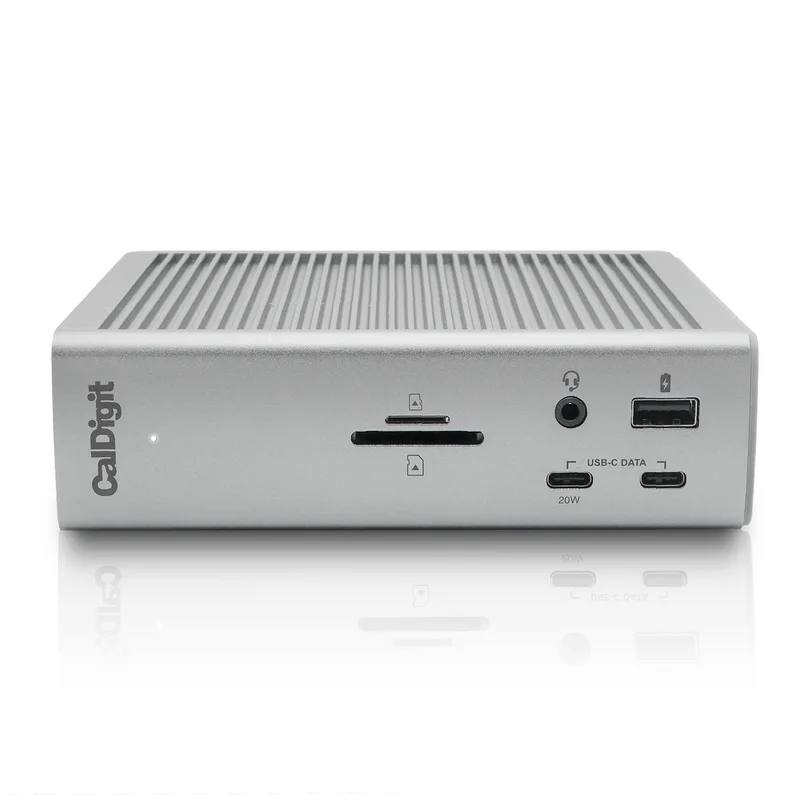
The CalDigit Thunderbolt Station 4, better known as the TS4, is the dock people mention when the question is simply "which one has everything?" CalDigit's own page counts eighteen ports, a 98W charging budget that does not sag when you add accessories, a 2.5 Gigabit Ethernet jack, two UHS-II card slots and a full set of audio connectors. It is a desk dock through and through, a small aluminium box with its own 230W power supply that stays where it is while a single Thunderbolt cable travels to your laptop. If your desk has grown into a tangle of chargers, adapters and USB hubs, this page explains what the TS4 actually gives you, where the fine print matters, and who should spend the money.
The eighteen ports, one by one
CalDigit's count is worth breaking down, because a big number can hide small ones. The TS4 has three Thunderbolt 4 ports at 40Gbps, but one of them is the host connection to your computer, so two are free for downstream devices such as a monitor, a fast external SSD or another hub. There are eight USB ports in total, a mix of USB-C and USB-A, and CalDigit states that every one of them runs at 10Gbps. There is a DisplayPort 1.4 output, an SD 4.0 UHS-II slot and a microSD 4.0 UHS-II slot, a 2.5 Gigabit Ethernet port, and three audio connectors: a front combo jack for a headset plus a rear line-in and line-out. Add up the ports and you reach eighteen, with the DC input for the power brick not counted. The point of a dock like this is that you should never have to unplug one thing to plug in another, and with this line-up that is easy to achieve for most desks.
Charging: 98W that stays at 98W
CalDigit makes a specific argument about power. Many Thunderbolt 4 docks advertise a charging figure of 96W or more but ship with a smaller power supply, so the wattage available to your laptop shrinks as other devices draw current. The TS4 includes a 230W supply and states that the host port provides up to 98W sustained, whatever else is connected. For laptops that need less, the dock only supplies what the laptop asks for. There is one honest caveat on CalDigit's own page: the 16-inch MacBook Pro with a Max chip ships with a 140W charger, and the TS4 will normally keep it powered but, under heavy CPU and GPU load with power-hungry bus-powered drives on the spare Thunderbolt ports, CalDigit recommends connecting the original charger. For a typical thin-and-light laptop that charges at 65W to 96W, the 98W ceiling is simply more than enough.
The downstream ports have their own budgets. The two free Thunderbolt ports supply 15W each, the front USB-C port supplies 20W (enough for something like a MagSafe charger), and the other USB-C and USB-A ports supply 7.5W. CalDigit also lists offline charging on several ports, meaning phones and accessories can keep charging when the laptop is disconnected, as long as the dock is plugged into the wall.
Displays: what the headline really means
The marketing line is a single 8K display or dual 6K 60Hz displays, and the detail is where you should slow down. CalDigit lists a single display up to 8K at 30Hz, with higher refresh rates possible when both the monitor and the computer's graphics support Display Stream Compression 1.2 and DisplayPort 1.4 HBR3. For two displays, the results depend on the computer. Windows PCs with Thunderbolt 3 or Thunderbolt 4 can drive two displays, and CalDigit says Macs with M4 or M5 base chips, any Pro, Max or Ultra Apple chip, and Intel-based Macs can drive dual displays too. The catch is on the other side of that list: base M1, M2 and M3 Macs do not support two external monitors through their Thunderbolt ports, and USB-C-only MacBooks cannot either. For dual 5K or 6K at 60Hz, both monitors and the host GPU need DSC 1.2 and DP 1.4 HBR3. A single monitor connects to the DisplayPort output or to a spare Thunderbolt port, and HDMI monitors work through an active DisplayPort-to-HDMI adapter or a USB-C-to-HDMI adapter. Because the dock adapts to what your computer offers, check your own laptop before you count on two screens; our guide to Thunderbolt and USB-C docking compatibility walks through how to read a laptop's port labels.
Compatibility and the Thunderbolt 5 question
The TS4 works with Thunderbolt 3, 4 and 5 computers, USB4 computers and plain USB-C computers, including iPads, Chromebooks and Windows tablets, though on those the features depend on what the host supports. Minimum software is macOS 11.4 (Big Sur) or Windows 10 (20H2). It is a Thunderbolt 4 product, so when you plug it into a Thunderbolt 5 laptop the link runs at Thunderbolt 4 speeds of 40Gbps. For most desks that is plenty; if you need Thunderbolt 5 bandwidth for multi-monitor high-refresh setups, you would look at a newer dock instead. There is also support for the Apple SuperDrive with a driver, and a free macOS Docking Station Utility.
Design and practicalities
The TS4 measures 141 x 42 x 113 mm and weighs 0.64 kg, so it is small enough to sit beside a monitor or stand vertically to save desk area, and CalDigit notes it works in either orientation. The host port faces the rear, which keeps the laptop cable out of sight, and there is a Kensington security slot for shared spaces. The box holds the dock, a 0.8 m Thunderbolt 4 cable, rubber feet strips, a power cord and the 230W power supply. CalDigit provides a two-year warranty. A quick tip: keep the power brick somewhere ventilated and use the cable-tidying ideas in our cable management guide so that the many ports do not turn into a spaghetti problem.
Who it suits
If you are a photographer or video editor who moves card contents to fast drives, the two UHS-II readers and ten-gigabit USB ports keep everything in one box. If you work at a desk with a headset, a microphone, a wired network, a monitor and several drives, the audio jacks and the Ethernet port save you from buying extra adapters. If you connect a MacBook Pro with a Pro, Max or Ultra chip, dual monitors are supported. If you simply need to plug in one monitor and a keyboard, the TS4 is more dock than you need, and a smaller unit such as the Anker 555 USB-C Hub would cost far less. If you want a Thunderbolt 5 dock to compare against, read about the Kensington SD5000T5 EQ and see how bandwidth and port counts differ.
Price
The CalDigit product page we read does not list a price, so we do not quote one here. Docks in this class have commonly been sold at premium prices, and it is worth checking a current listing in your region before you decide. Because the price is high relative to a hub, the buying question is not "is it good?" but "will I use enough of the ports and the charging headroom?"
Final thoughts
The TS4 is easy to recommend on paper: a large, consistent set of ports, real sustained charging and clear rules about displays. The things to check are your laptop's display support, whether you need Thunderbolt 5 bandwidth and whether you will really use the extra ports. Read the docking station buying guide to count what you use, then browse the full docking stations category to compare alternatives at other price points.