Anker 575 vs. Kensington SD5000T5 EQ: Which Docking Station Should You Buy?
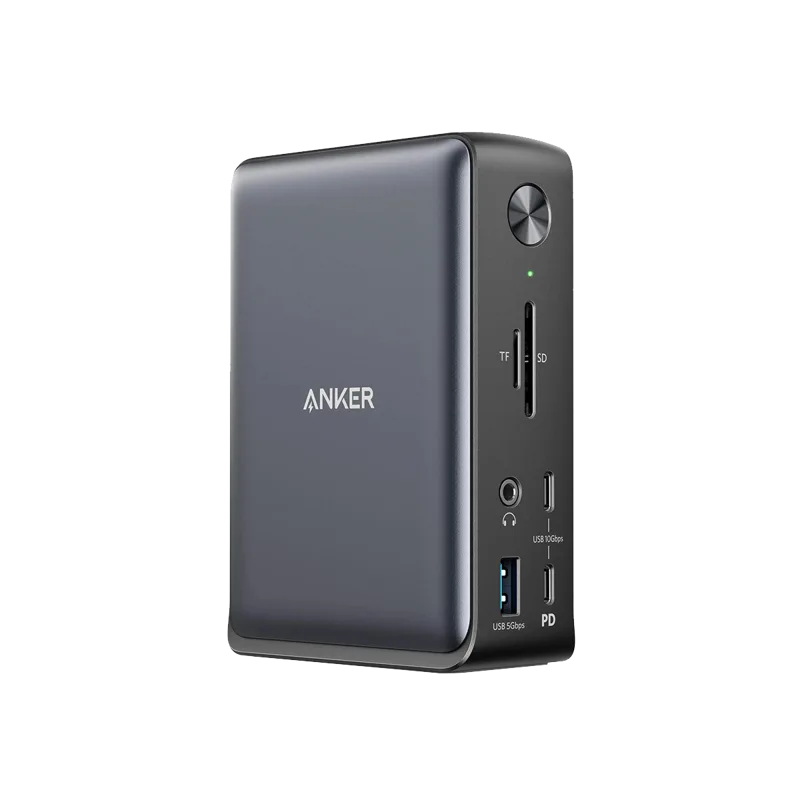
The Anker 575 and the Kensington SD5000T5 EQ sit at opposite ends of the docking station market, and the $100 price gap between them ($200 vs. $300) roughly tracks the gap in what each one is actually built to do. Neither is objectively better — they're built for different desks entirely, and picking the wrong one means either overpaying for bandwidth you'll never use or bottlenecking a setup that genuinely needs more.
The core difference: USB-C vs. Thunderbolt
The Anker 575 is a USB-C 3.1 Gen 2 dock topping out at 10Gbps of data transfer, while the SD5000T5 EQ is built around Thunderbolt 5, delivering up to 80Gbps of data bandwidth and up to 120Gbps when prioritizing video output. That's not a small gap — it's roughly an eight-to-twelve-times difference in raw throughput, and it's the single spec that determines which desk each dock actually belongs on.
Display support: one monitor vs. three
The Anker 575 drives a single 4K display at 60Hz, or two displays if you're willing to drop one to 30Hz — workable for a one-monitor desk, awkward for anyone running dual displays at full refresh. The Kensington dock supports up to three 4K displays at 144Hz, or two 8K displays at 60Hz, which is an entirely different category of multi-monitor setup that only a Thunderbolt-class dock can realistically deliver without compromise.
Port selection and everyday connectivity
The Anker 575 packs 13 ports into its layout: two HDMI, one DisplayPort, four USB-A, two USB-C, Ethernet, an SD/microSD combo reader, and a 3.5mm audio jack — a broad spread aimed at covering nearly any peripheral without needing adapters. The Kensington dock takes a more focused approach built around its Thunderbolt 5 host and three downstream Thunderbolt 5 ports, plus three USB-A 3.2 Gen 2 ports, an SD/microSD reader, 2.5Gbps Ethernet, and an audio jack — fewer total ports, but each one considerably faster than its Anker counterpart.
Power delivery: both charge your laptop, differently
The Anker 575 delivers 85W of laptop charging through its included 135W adapter, enough for the overwhelming majority of ultrabooks and mid-range laptops. The SD5000T5 EQ pushes single-cable power delivery up to 140W, which matters specifically for larger workstation-class or creator laptops that draw more power under sustained load — a distinction most buyers won't need, but one that matters enormously to the minority who do.
Who the Anker 575 is actually for
If your desk runs one monitor, maybe two at a reduced refresh rate, and your peripherals are a normal mix of USB-A and USB-C devices, the Anker 575 delivers everything that matters at roughly two-thirds the price of the Kensington dock. It's the more sensible purchase for the majority of home office and hybrid work desks, where Thunderbolt-class bandwidth would simply sit unused.
Who the Kensington SD5000T5 EQ is actually for
Buyers running three or more high-resolution displays, editing large video files from an external Thunderbolt SSD, or already owning a Thunderbolt 5-capable laptop and planning a demanding multi-monitor build should look at the SD5000T5 EQ instead. The bandwidth headroom isn't marketing — it's the difference between three 4K monitors running smoothly at high refresh and the same setup fighting over limited USB-C bandwidth on a cheaper dock.
Build quality and desk footprint
The Anker 575 uses a compact rectangular housing designed to sit flat on a desk or be mounted underneath it, weighing 370g, light enough that cable tension alone can shift it around unless it's anchored. The Kensington dock leans into a more substantial, workstation-oriented chassis that feels distinctly more premium in hand, consistent with its higher price and its positioning toward professional desks where the dock is a permanent fixture rather than something that travels between a laptop bag and a desk. Neither dock is loud or generates meaningful heat under normal use, since both are fully passive with no internal fan, but the Kensington's larger body does dissipate the higher power loads it handles slightly better over long sessions.
Setting expectations on driver support and reliability
Both docks work largely plug-and-play on modern Windows and macOS systems without requiring dedicated driver installation for core functionality like video output, USB passthrough, or Ethernet. Thunderbolt-based docks like the SD5000T5 EQ do occasionally require a firmware update through the host laptop's Thunderbolt control software after a fresh setup, which is a five-minute one-time step rather than an ongoing hassle. The Anker 575's simpler USB-C architecture generally means fewer edge cases to troubleshoot, which is a real advantage for buyers who want to plug in once and never think about the dock again.
A note on future-proofing
It's tempting to buy the Thunderbolt dock now "to be safe," but Thunderbolt 5's full bandwidth only activates when connected to a Thunderbolt 5-capable laptop port, and those remain a minority of laptops on the market today. Buying ahead of your hardware means paying a real premium for capability you can't use yet. Our docking station buying guide walks through how to count your actual port and bandwidth needs before deciding, and our Thunderbolt compatibility explainer covers exactly which laptop ports unlock which dock's full performance.
The verdict
For the large majority of home office desks running one or two monitors with a normal peripheral mix, the Anker 575 is the better buy — it covers everything that matters at a meaningfully lower price. For multi-monitor professional or creative setups, or anyone already committed to a Thunderbolt 5 laptop, the Kensington SD5000T5 EQ's extra bandwidth and display support justify its higher price without hesitation. The decision genuinely comes down to display count and laptop compatibility rather than one dock simply being "better" than the other.
Frequently asked
Can the Kensington dock work with a laptop that only has USB-C, not Thunderbolt? Yes, it will function, but it negotiates down to USB-C speeds and loses nearly all of its bandwidth advantage, making the Anker 575 the more cost-effective choice in that scenario. Does the Anker 575 support any 4K resolution at all? Yes — a single 4K display runs at a full 60Hz, and it's only pushing a second 4K display simultaneously that requires dropping to 30Hz. Which dock has better long-term value? Both are well-built for their respective tiers, but the SD5000T5 EQ's Thunderbolt 5 bandwidth gives it more headroom to stay relevant as monitors and laptops continue moving toward higher resolutions and refresh rates.