Elgato Elgato Facecam Neo
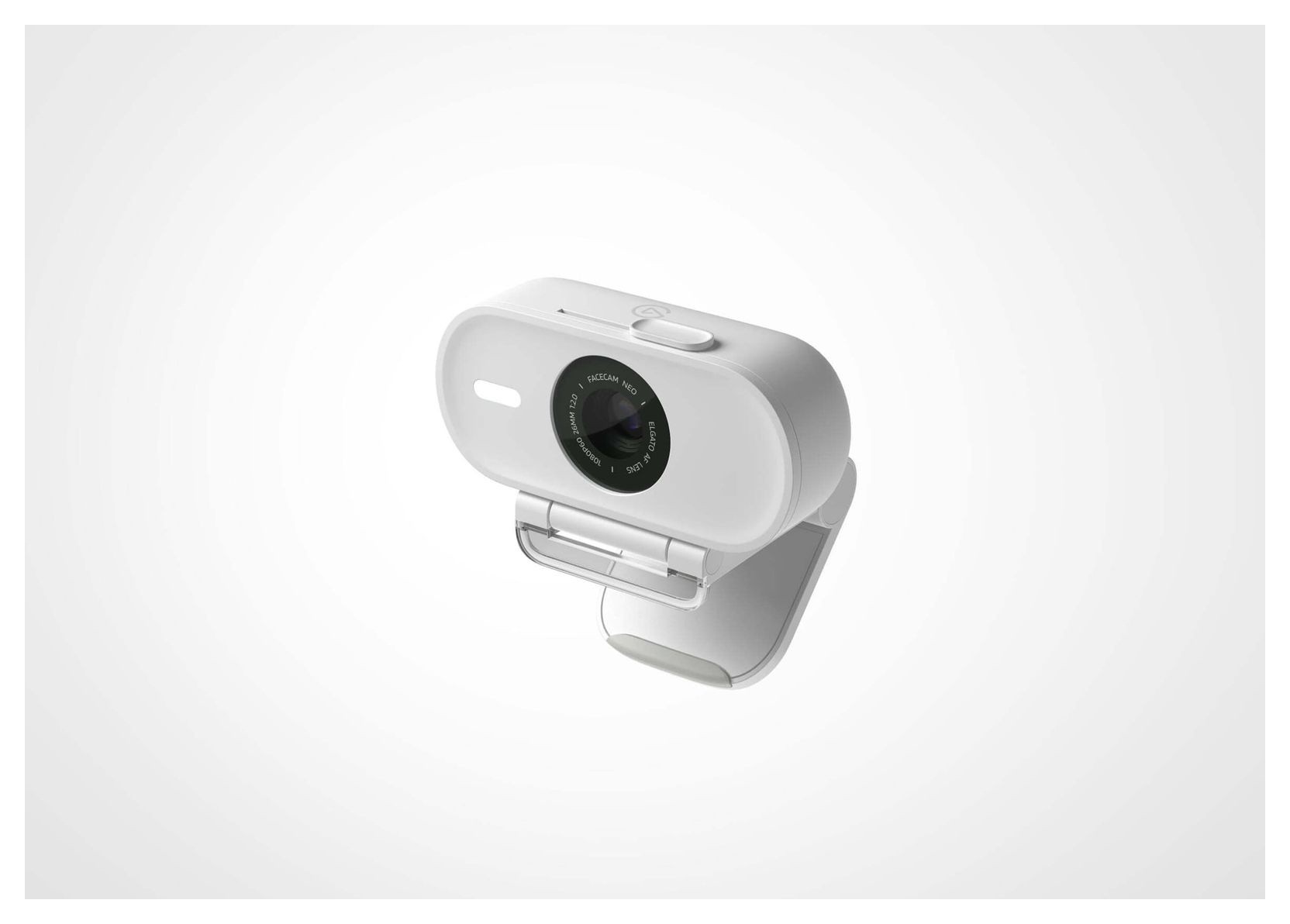
A compact, plug-and-play 1080p60 USB webcam with autofocus, a 77 degree field of view, HDR, a sliding privacy shutter and a fixed braided USB-C cable.
Specifications
| Resolution | 1080p60 (MJPG: 1080p60/30, 720p60/30, 540p60/30); HDR at 1080p30 |
|---|---|
| Sensor | 1/2.9-inch CMOS |
| Lens | Autofocus, f/2.0, 26 mm full-frame equivalent, 77 deg field of view |
| Focus Range | 30 cm to infinity |
| Connection | USB-C, fixed braided cable 140 cm, UVC 1.5 |
| Dimensions | 88 x 32 x 40 mm (without mount) |
| Weight | 80 g (110 g with mount) |
| Microphone | None |
| Software | Camera Hub (optional, free) |
| Warranty | Two-year limited |
| SKU | 10WAE9901 |
The Elgato Facecam Neo is the most approachable camera in Elgato's webcam line. It is a small white USB webcam that records 1080p at 60 frames per second, focuses by itself, covers its own lens with a slide, and asks you to install nothing. Elgato pitches it to people who want to look better on Teams, Twitch and YouTube without learning camera settings, and to anyone whose laptop camera leaves them grainy. This guide is built from Elgato's own product page, specification table and FAQ. Elgato does not print a price we could verify on the page, so we leave one out, and we describe what the company says rather than presenting test results of our own.
1080p at 60 frames per second
Neo records in full HD, 1080p, at up to 60 fps. Elgato lists the supported resolutions over MJPG as 1080p at 60 and 30 fps, 720p at 60 and 30 fps, and 540p at 60 and 30 fps. The company makes a straightforward argument about why this matters: most built-in laptop cameras are limited to 720p and most webcams, built-in or external, to 30 fps, which gives grainy, stuttering video, whereas 60 fps looks smoother and more lifelike. There is no 4K on this model. If you want that, Elgato sells other cameras, and you can compare them on our pages for the Facecam 4K and the Facecam MK.2. For a plain explanation of what resolution and frame rate change on a call, see our webcam buying guide.
Lens, sensor and field of view
The lens is an Elgato autofocus design with an f/2.0 aperture and a 26 mm full-frame-equivalent focal length. Focus works from 30 cm (12 in) to infinity. The sensor is a 1/2.9-inch CMOS type, which is a compact sensor size, and Elgato's card for it says only that you will be seen clearly in ultra-bright or low-light conditions, without any lux or sensitivity figure. We cannot compare it to other cameras in numbers, and a small sensor still shows more noise as the light drops; Elgato's own support reply to a customer makes the same point and suggests pairing the camera with a light and using the exposure and gain controls. For a general explanation, read our article on webcam sensor size and low-light performance.
The field of view is 77 degrees, which Elgato describes as putting your face in focus rather than your background. That is a moderate frame: enough for you and a little of the room, not a wide conference-room view. Autofocus is there so that you stay sharp when you lean or move.
HDR, and the price you pay in frame rate
Neo has an HDR mode that helps in high-contrast rooms, for example when you sit in front of a bright office window or in a dark room lit by LED accents. Elgato is refreshingly open about the trade-off: HDR reduces the frame rate, and Neo runs HDR at 1080p30. That means you choose between smooth 60 fps in ordinary light and 30 fps with better balance when the lighting is hard. Elgato adds that you can choose based on your situation, and that the better image is worth it in tricky light.
Plug in and go, or fine-tune in Camera Hub
Elgato says you can be set up in seconds: plug in, choose Facecam Neo as your camera in the app, done. It is tuned out of the box, so there is no need to touch image settings. If you do want control, the optional Camera Hub app, free for PC and Mac, lets you frame the shot and adjust settings such as exposure, in the manner of a DSLR. Elgato also publishes short guides for Camera Hub's Dynamic Range control, its Noise Reduction and its Low Light Mode, which is useful reading if you find your image dull or grainy. The camera is Zoom certified, and Elgato says it works with Teams, Twitch and YouTube recording. It also works with Stream Deck Neo, so a key press can zoom in or change exposure, and Elgato suggests adding its Key Light Neo for better lighting.
Privacy shutter, mount and cable
A built-in privacy shutter protects the lens with a simple slide, so you can see at a glance that the camera is covered. The included monitor mount is designed to sit low-profile for better eye contact, and the camera has a 1/4-inch thread, so you can use a tripod, stand or arm instead. The USB-C cable is nylon-braided, 140 cm long, and fixed into the camera. That last point deserves attention. Elgato says plainly that the cable cannot be detached. A fixed cable is neat and cannot go missing, but if it is ever damaged you cannot swap it, so handle the plug carefully and leave slack when you route it. A few reviewers on the product page mention connector wear, and Elgato says it is looking into such cases; we mention it only as a reminder to route the cable without strain. Our comparison of webcams and built-in laptop cameras covers other practical differences.
What it does not have
There is no built-in microphone, and Elgato says this is deliberate, because webcam mics sit far from your mouth and generally sound poor. It recommends a dedicated microphone or a headset positioned 3 to 8 cm from your mouth. Neo also does not support Windows Hello face login. Both points are honest and useful: if you need either, look elsewhere.
Compatibility and size
You need a USB 2.0 or later Type-C port, or a Type-A port with an adapter that is not included. Elgato's specification table lists macOS 13.3 Ventura or newer, iPadOS 17 or newer and Windows 11 (64-bit). The FAQ, in contrast, says Neo works on almost any PC with Windows 10 or later and any Mac with macOS 12 or later. We read this as the FAQ describing the basic plug-and-play camera and the table listing what Elgato tests with Camera Hub, so if you run an older system, check Elgato's support page first. The camera is 88 x 32 x 40 mm and weighs 80 g without the mount (110 g with it), it uses UVC 1.5, and the SKU is 10WAE9901. It comes with a two-year limited warranty when bought new in its original packaging; in the United States, Elgato says that warranty is only valid if you buy from Elgato.com or an authorised reseller. Elgato adds that Neo is made from more than 60 percent recycled plastic and packaged in plastic-free, recyclable materials.
Who should buy it
Buy the Facecam Neo if you want a clear, smooth, low-fuss camera for meetings and streams and you already have a decent microphone or headset. Look elsewhere if you need 4K, a built-in microphone, Windows Hello or a detachable cable. Browse the rest of our webcam category to compare.