SteelSeries Aerox 5 Wireless
A 74 g honeycomb-shell wireless gaming mouse with nine buttons, 2.4 GHz and Bluetooth, an IP54 AquaBarrier and fast charging.
Specifications
| Weight | 74g |
|---|---|
| Sensor | SteelSeries TrueMove Air (optical) |
| Sensitivity | 100-18,000 CPI |
| Max Speed | 400 IPS |
| Acceleration | 40G |
| Polling Rate | 1000Hz |
| Buttons | 9 programmable |
| Switches | SteelSeries mechanical, 80M clicks |
| Connectivity | 2.4GHz (Quantum 2.0) + Bluetooth 5.0, detachable USB-C cable |
| Battery Life | Up to 80h (2.4GHz), up to 180h (Bluetooth) |
| Protection | IP54 AquaBarrier |
| Dimensions | 128.8 x 62.8-68.2 mm |
| Software | SteelSeries GG |
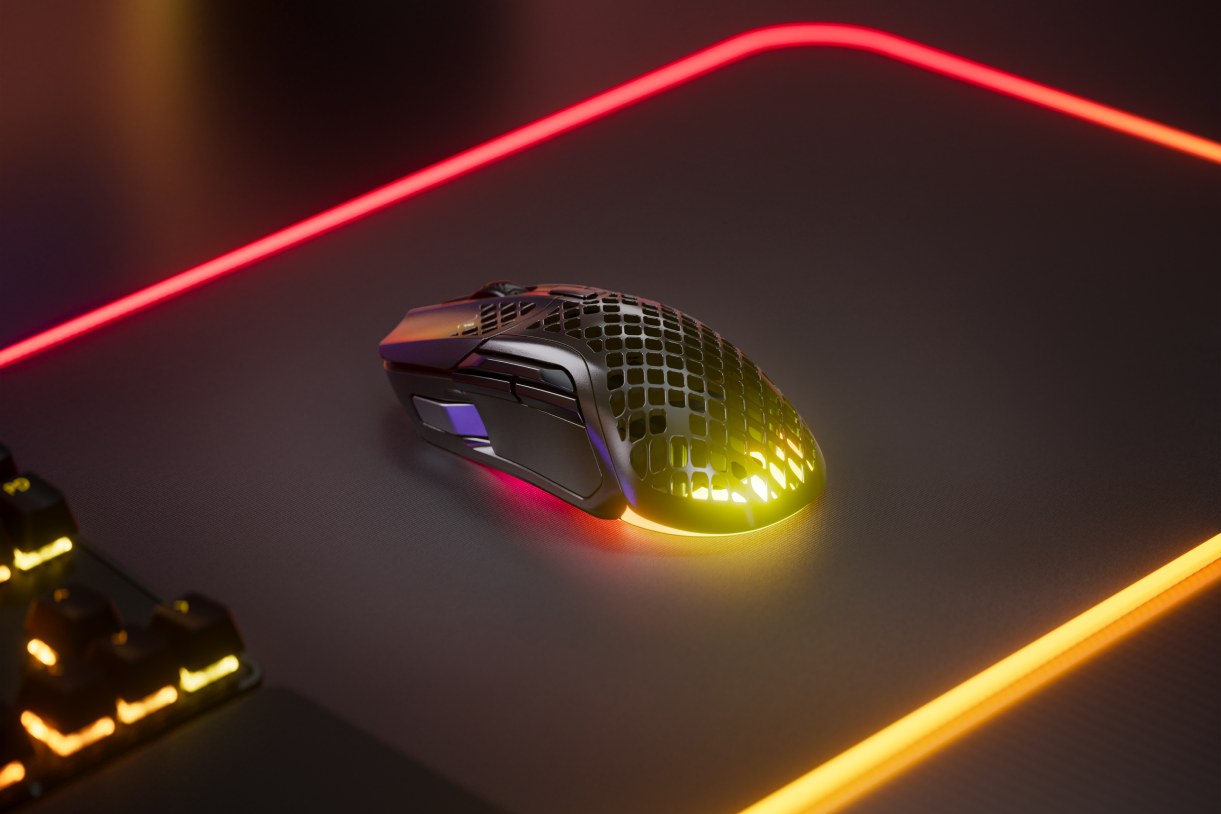
The SteelSeries Aerox 5 Wireless is a lightweight gaming mouse with a perforated, honeycomb-style shell and a design meant for players who use many buttons: nine programmable controls, including a five-button side panel. It connects by 2.4 GHz wireless or Bluetooth 5.0, charges through a detachable USB-C cable and carries an IP54 protection rating that SteelSeries markets as AquaBarrier. It is the kind of mouse that suits multi-genre players: someone who plays a shooter one night and an online role-playing game the next. This page explains the specifications, clears up two figures that look inconsistent on the manufacturer's page, and helps you decide whether it suits your hand and your games.
Weight: 74 grams, not 66
The first thing to clear up is weight. SteelSeries' marketing text for the mouse talks about an ultralight 66 g build, but the specification table for the wireless model lists 74 g, and the short product description also says 74 g. The lower figure looks like it comes from text shared with the wired Aerox 5, so we use 74 g for the Aerox 5 Wireless. That is still light for a wireless mouse with nine buttons. SteelSeries credits three things: the honeycomb shell, which it says reduces weight by up to 20 g while keeping strength; a 6 g battery, which it says is 14 g lighter than those in other multi-genre mice; and a circuit board that is 50% slimmer. The shell material is ABS plastic with a black matte finish on the back cover. The mouse is 128.8 mm long, 62.8 mm wide at the front and 68.2 mm at the back, and 26.7 mm high at the front and 42.1 mm at the back. It is a right-handed ergonomic shape designed for palm or claw grip.
The open shell means dust, oil and debris could reach the electronics, which is why SteelSeries stresses its AquaBarrier system: an IP54 rating for dust and splash protection that shields the interior circuitry. IP54 means protected against limited dust ingress and splashing water; it does not mean the mouse is waterproof, and it should not be submerged. Wipe it with a dry or slightly damp cloth, not under a tap.
Sensor: TrueMove Air
The sensor is the SteelSeries TrueMove Air, an optical sensor co-developed with PixArt. SteelSeries lists a range of 100 to 18,000 CPI in 100 CPI steps, 400 inches per second on SteelSeries QcK surfaces, 40 G acceleration and no hardware acceleration, and describes tilt tracking and one-to-one tracking. For most players, the practical meaning is that the pointer follows your hand accurately without jumping or smoothing. CPI and DPI mean the same thing here. If you want to learn why most players end up between 400 and 1600 and why the top numbers are mostly headroom, read our DPI, sensor and polling rate guide. The polling rate is 1000 Hz (1 ms), the standard for gaming mice, so this model does not chase the 4,000 or 8,000 Hz figures of the most extreme mice.
Wireless: Quantum 2.0, 2.4 GHz and Bluetooth
SteelSeries uses Quantum 2.0 Wireless for the 2.4 GHz connection with the included USB-C dongle, which it describes as faster and more efficient than earlier versions, and adds Bluetooth 5.0 so you can pair without a dongle. As a rule, the dongle is the better choice for gaming because a dedicated receiver usually gives the quickest response; Bluetooth is convenient for a laptop or tablet. Our news piece on 2.4 GHz versus Bluetooth mouse latency explains why. The box includes the dongle, an extension adapter and a USB-C to USB-A super mesh cable, and the mouse works with Windows, macOS, ChromeOS, Xbox and Linux, with a USB port needed.
Battery life: two different numbers
The other figure that looks inconsistent is battery life. The marketing headline promises up to 180 hours, while the specification table says up to 80 hours in 2.4 GHz mode and up to 180 hours on Bluetooth. The specification table is the more precise source: 180 hours refers to Bluetooth use, and if you use the 2.4 GHz dongle, which most gamers will, plan for up to 80 hours. Both figures are best-case results and depend on lighting settings and use. SteelSeries also says 15 minutes of charging provides over 40 hours of gameplay, which is a useful quick-charge feature if you forget to plug in. The RGB lighting will use battery, so turning down the effects is an easy way to gain more hours.
Buttons, switches and lighting
The mouse has nine programmable buttons. A five-button side panel includes a custom-built up/down flick switch, and SteelSeries shows example layouts for games such as Call of Duty, Fortnite, World of Warcraft, Counter-Strike 2 and League of Legends. The main switches are SteelSeries mechanical switches rated for 80 million clicks. Button assignments, CPI, lighting and per-game profiles are handled by SteelSeries GG (formerly Engine), which works on Windows 8.1 or newer and macOS 10.13 or newer. The mouse has three RGB zones with PrismSync lighting that synchronises with other SteelSeries products. The skates are 100% virgin-grade PTFE for smooth glide, and the cable is a lightweight detachable USB-C super mesh cable.
Setup and care
A few practical habits will help this mouse last. Install SteelSeries GG first and update the firmware, then assign the side buttons to the actions you use most and save a profile per game, so that switching titles does not mean re-learning your layout. Because the shell is perforated, brush or blow away dust from time to time and avoid eating over the mouse, even though the IP54 rating gives a margin of safety. Choose a clean, smooth mouse pad, since the PTFE skates glide best on a dust-free surface. If you use the mouse on a laptop while travelling, switch to Bluetooth to save the dongle and stretch the battery. When it is charging by cable, remember that the detachable USB-C cable turns it into a wired mouse, which is a useful fallback if the battery runs low in the middle of a session.
Who should buy it
The Aerox 5 Wireless suits players who want a light mouse but do not want to give up side buttons, for example players of MMO and MOBA games or shooters that use many binds. It is also a decent everyday mouse for someone who wants a lightweight, wireless model with two connection modes. It is a less obvious choice for people who prefer the very lowest weight, a fully symmetrical shape or a big, supportive palm rest. You should also think about how a perforated shell feels in the hand and about cleaning: the holes are a design feature and a small maintenance task.
We did not find a fixed price on the SteelSeries page, so we do not quote one. To compare with other mice on the site, browse the mice category, and also look at the ultra-light Razer Viper V3 Pro, the Keychron G3 Ultra Light and the wired Razer DeathAdder V3, which give you alternatives at different weights and prices.