Keychron G3 Ultra Light
A 44 g wireless mouse with a 30,000 DPI sensor, up to 8,000 Hz polling in 2.4 GHz mode and a battery rated for up to 160 hours.
Specifications
| Sensor | PixArt 3950 |
|---|---|
| DPI | Up to 30,000 |
| Polling Rate | Up to 8000Hz (2.4 GHz mode) |
| Connectivity | 2.4 GHz (tri-mode connection per manufacturer description) |
| Weight | 44g |
| Battery Life | Up to 160 hours (500 mAh) |
| Compatibility | macOS, Windows, Linux |
The Keychron G3 Ultra Light is a very light wireless mouse aimed at people who want fast, low-effort pointing for both work and play. At just 44 g, it belongs to the ultralight family, and it pairs that low weight with a modern sensor and an unusually high polling rate. This page explains what those numbers mean, where they help, and where they do not.
Why weight matters
Every time you move a mouse, you accelerate and stop its mass. A lighter mouse asks less of your hand and wrist, which can make long sessions feel easier and quick corrections feel effortless. At 44 g the G3 is far lighter than many mainstream office mice, which often weigh well over a hundred grams. People who switch from a heavy mouse to a light one commonly report that the pointer feels more responsive at first and slightly harder to stop precisely; it takes a few days to recalibrate your movements. If you have never used an ultralight mouse, treat the first week as a trial period.
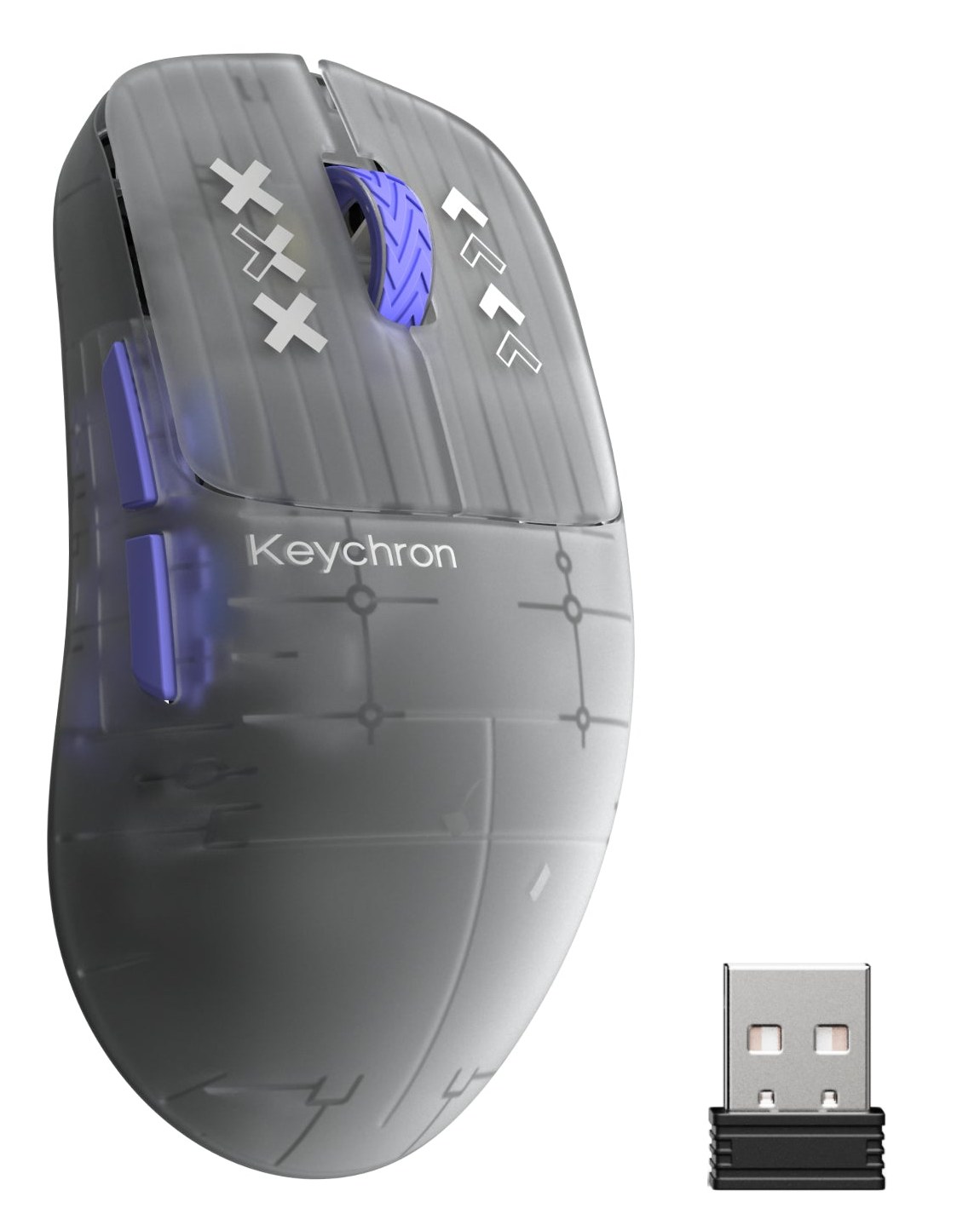
Lightness has a trade-off. Very light shells tend to use less material, so the mouse can feel less solid in the hand than a heavier one. Keychron addresses the design with a shell described as ultra-lightweight and ergonomic, and the artwork shows a translucent frosted body and a carbon-fibre-textured variant. If you have large hands, check the physical dimensions on the product page and think about your grip style before you commit, because the shape is a bigger factor in comfort than weight alone.
Sensor and DPI
The G3 uses the PixArt 3950 sensor, with a maximum sensitivity of 30,000 DPI. DPI, or dots per inch, describes how far the pointer moves on screen relative to how far you move the mouse. A higher number means the cursor travels more for the same hand movement. Very few people use anything near 30,000; most everyday work happens between roughly 800 and 3,200 DPI, and many competitive players stay below 2,000. The headline figure matters less than the fact that the sensor tracks accurately across the range and lets you dial in your preferred speed. If you want a deeper explanation of the terms, our guide to mouse DPI, sensors and polling rate covers them from the ground up.
8,000 Hz polling, in context
Polling rate is how often the mouse reports its position to the computer. A typical wireless mouse reports 1,000 times per second, or every millisecond. The G3 can reach 8,000 Hz, which is an interval of 0.125 ms, in 2.4 GHz wireless mode with the receiver. In practice, the benefit is smoother, more frequent cursor updates, which can help on high-refresh-rate displays and in fast games. The cost is that the computer processes more data, and the mouse uses more battery when it reports so often. You can lower the rate in the software if you want to save power or if an older system struggles.
It is worth being realistic. On a standard 60 Hz monitor doing office work, you will not see any difference from 8,000 Hz. On a fast display with a game that runs at high frame rates, the extra reports can make motion feel slightly more fluid. Consider it a bonus that you may or may not use, not the main reason to buy. For a wider view of wireless response, our news piece on 2.4 GHz versus Bluetooth mouse latency explains why the receiver mode is usually the one to pick for speed.
Connection and battery
The 8K rate is delivered in 2.4 GHz mode, using the small USB receiver. Keychron's description also refers to tri-mode connectivity for multi-device switching, which usually means 2.4 GHz, Bluetooth and a wired option; the spec list simply names 2.4 GHz, so check the current listing to confirm which modes ship on your chosen variant. The battery is 500 mAh, and Keychron rates the mouse at up to 160 hours of use. That is a manufacturer's figure, and running the mouse at the highest polling rate will usually reduce it. A helpful habit is to leave it on the charging cable overnight when the indicator shows low, rather than waiting until it dies mid-task.
The mouse works with macOS, Windows and Linux, and its buttons and settings can be customised online, so you do not need to install heavy software. As with Keychron's keyboards, that makes it easy to move the mouse between machines.
Colours and price
There are two options in the listing. The Frosted Gray variant is priced at 84.99 USD, and the Black carbon-fibre variant at 109.99 USD. Both use the same PixArt 3950 sensor with 8K polling. The difference is the shell finish, so choose based on look and how the surface feels under your fingers. The frosted, translucent shell is the one shown in our picture. A textured or matte surface can help grip if your hands tend to sweat, while a smooth shell is easier to keep clean.
Who should consider it
The G3 Ultra Light fits people who move a mouse a lot and want less fatigue: designers doing precise selections, spreadsheet users who click all day, and gamers who prefer a light, fast feel. It is a good choice if you want a wireless mouse that does not feel like a compromise against a wired one. It is less well suited to people who prefer a heavy, substantial mouse, or who need many programmable buttons and a scroll wheel with special modes, in which case a larger productivity mouse such as the Logitech MX Master 3S offers more controls. If you want a wired ultralight alternative, the Razer DeathAdder V3 is also on the site.
Setting it up
Start at a sensitivity you already know. If you are moving from another mouse, match its DPI to begin with, then adjust in small steps. Set the polling rate to 1,000 Hz for a few days if you are worried about battery life, and raise it only if you play fast games. Use a clean, smooth mouse pad or desk surface, since a very light mouse is more sensitive to dust and rough patches. If the mouse feels floaty, consider adding grip tape; Keychron sells a pre-cut universal grip tape, which shows the maker expects people to tune the surface to their hands.
For a wider overview of picking a pointing device, read our guide to choosing a mouse for productivity versus gaming. To compare it with a completely different approach to pointing, look at the Keychron Nape Pro trackball, and browse the whole mice category for other options.
The short version
The G3 Ultra Light is a well-specified ultralight wireless mouse: 44 g, a 30,000 DPI sensor, up to 8,000 Hz polling in 2.4 GHz mode and a battery rated for up to 160 hours. If you want a light, fast and simple mouse that works on any operating system, it deserves a place on your shortlist.