Dell UltraSharp 32 4K Thunderbolt Hub Monitor U3225QE
A 32-inch 4K IPS Black monitor with 120 Hz, a Thunderbolt 4 hub with 140 W charging, 2.5 GbE, a built-in KVM switch and a three-year warranty.
Specifications
| Panel | IPS Black |
|---|---|
| Screen Size | 31.5" |
| Resolution | 3840x2160 (4K UHD), 140 PPI |
| Refresh Rate | 120Hz |
| Response Time | 5ms GtG (Fast) / 8ms GtG |
| Contrast | 3000:1 |
| Brightness | 600 nits |
| HDR | VESA DisplayHDR 600 |
| Color Gamut | 100% sRGB, 100% BT.709, 99% DCI-P3, 99% Display P3 |
| Ports | Thunderbolt 4 upstream (140W PD), Thunderbolt 4 downstream (15W), DP 1.4 in/out, HDMI 2.1, 2.5GbE, USB-C 10Gbps KVM upstream, 4x USB-A 10Gbps, 2x USB-C 10Gbps downstream |
| KVM | Built-in |
| Warranty | 3 years, Premium Panel Exchange |
| Weight | 20.59 lb with stand |
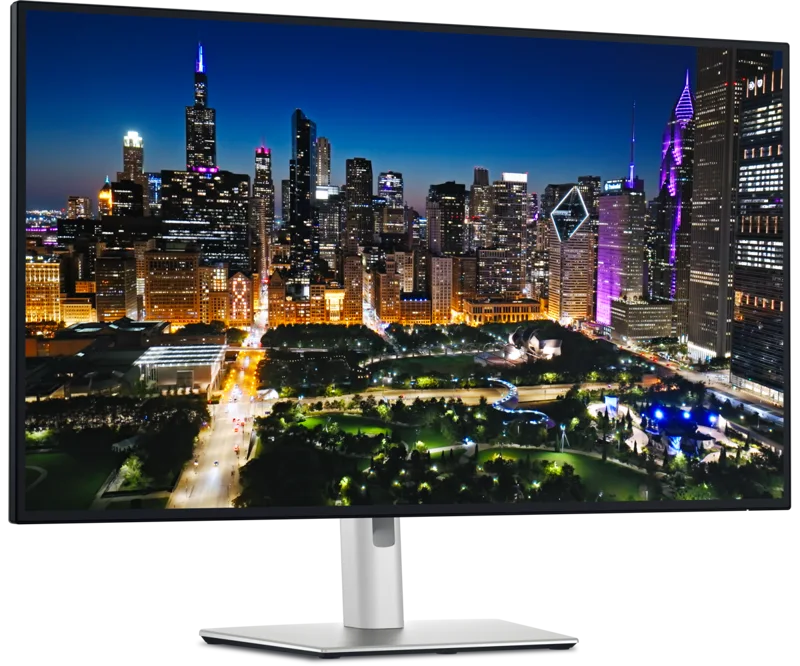
The Dell UltraSharp 32 4K Thunderbolt Hub Monitor (U3225QE) is a professional office monitor that tries to do three jobs at once: be the sharp, comfortable main screen, be the dock for a laptop, and be the switch that lets two computers share one keyboard and mouse. It is not cheap, and it is not aimed at gamers, but for someone who spends a full working day in front of documents, spreadsheets, design tools and video calls, the combination of a large 4K screen with a proper hub is very appealing. This page explains what the features do in practice and what to check before buying.
The screen: 32 inches, 4K and "IPS Black"
The viewable size is 31.5 inches with a 3840 x 2160 resolution, about 140 pixels per inch. At this size 4K gives you a spacious workspace that still looks sharp, and it is the classic pairing recommended for large desks; our guide to monitor size and resolution explains the trade-offs against a 27-inch panel. The panel uses what Dell calls enhanced IPS Black technology. Conventional IPS panels tend to show blacks as a dark grey, especially in a dim room. Dell states a native contrast ratio of 3,000:1 and says the blacks are 47% deeper than on a conventional IPS panel, with a low-reflectance surface that reduces the effect of room light on contrast. For a deeper look at how panel types differ, read our panel technology explainer.
The refresh rate is 120 Hz, which is a real benefit for an office monitor: scrolling, dragging windows and moving the cursor all look noticeably smoother than at 60 Hz. Dell lists the response time as 5 ms in its Fast mode and 8 ms in normal mode, both grey-to-grey, so the two figures on the specification sheet describe different settings rather than a contradiction. Brightness is listed at 600 nits, and the screen carries VESA DisplayHDR 600 certification, so HDR content is handled better than on a basic monitor, though this is still an LCD with an edge-lit backlight and not a dedicated HDR display.
Colour and eye comfort
Colour coverage is listed as 100% sRGB, 100% BT.709, 99% DCI-P3 and 99% Display P3, with 1.07 billion colours. The Display P3 figure matters if you work with Apple devices or with content graded for P3 screens. Dell offers Dell Color Management software, described as Calman Verified, for calibration and for creating and managing ICC profiles on Windows and macOS. If you would like to understand what calibration achieves, see our colour accuracy guide.
Eye comfort is a strong point of the marketing. The latest ComfortView Plus reduces harmful blue light emissions to 35% or less, compared with 50% or less in the previous generation, and the monitor is TÜV 5-star certified for eye comfort. An ambient light sensor adjusts brightness and colour temperature to your surroundings. These are conveniences rather than miracles, but they are useful if you work long hours under changing daylight.
The hub: one cable for a whole desk
This is where the U3225QE separates itself from a plain monitor. The upstream Thunderbolt 4 port carries the video signal (DisplayPort 1.4 with DSC compression), data and up to 140 W of charging using the Extended Power Range specification. In other words, a laptop that accepts USB Power Delivery at high wattage can be charged, connected to every peripheral and driven at full 4K over one cable. Dell includes a 1 m Thunderbolt 4 cable in the box, along with a 1.8 m DisplayPort cable and a 1 m USB-A to USB-C upstream cable.
The rest of the port list is generous. There is a Thunderbolt 4 downstream port rated 15 W for daisy chaining a second 4K monitor, one DisplayPort 1.4 input and one DisplayPort output, an HDMI 2.1 input (up to 4K at 120 Hz with variable refresh rate), and a second USB-C upstream (10 Gbps) used for the KVM function. For your devices there are four USB-A ports at 10 Gbps, another USB-A 10 Gbps port with battery charging support, two USB-C 10 Gbps downstream ports that provide 15 W charging, a 2.5 Gigabit Ethernet port and a 3.5 mm line-out jack. Dell's spec sheet counts eight USB ports in total. If you are unsure what the Thunderbolt and USB-C generations mean for compatibility, our docking compatibility news article is a good primer.
The built-in KVM switch lets you control two computers with a single keyboard and mouse and share the display, which is handy if you have a work laptop and a personal desktop. Picture-in-picture and picture-by-picture are also listed. There is no webcam, so you will need a separate one. For more on wiring several computers and screens sensibly, see our multi-monitor and KVM guide.
A caution from Dell's own notes is worth repeating: daisy chaining several displays over a single cable requires Thunderbolt connectivity, and select M-series Mac chips may not support some features, so check your laptop model before relying on that feature. Dell says it tested the monitor with Macs over Thunderbolt in June 2024. The software Dell Display and Peripheral Manager adds Easy Arrange window tiling (up to five custom partitions) and can control multiple PCs and monitors with one keyboard and mouse.
Stand, size and sustainability
The stand adjusts in height (about 150 mm, or 5.91 inches), tilts from -5 to 21 degrees, swivels 30 degrees each way and pivots 90 degrees for portrait use. It supports 100 x 100 mm VESA mounting. The monitor is about 28.1 inches wide and, according to Dell's sheet, weighs 14.37 lb by itself and 20.59 lb with the stand. It draws about 30.5 W in operation and 0.5 W on standby, and the power supply is rated for a maximum of 335 W because it must feed the laptop as well. The materials list mentions 85% post-consumer recycled plastic, 100% recycled aluminium, 50% recycled steel and at least 20% recycled glass in the build, plus EPEAT Gold with Climate+, ENERGY STAR and TCO certification.
Warranty and price
Dell provides a three-year limited hardware warranty with advanced exchange service, and its Premium Panel Exchange promises panel replacement during the warranty even for a single bright pixel. That is a meaningful reassurance for an expensive monitor. On the product page we checked, the price was listed at 969.99 USD; prices change often and retailers can differ, so treat that as a snapshot, not a promise.
Who should buy it
Choose the U3225QE if you want one big, sharp, comfortable screen that also acts as a full docking station, if you juggle a work laptop and a second computer, or if you frequently connect a laptop and want it charged at up to 140 W. It is less attractive if you mainly need a fast gaming display, if colour-critical work demands a wider gamut than 99% DCI-P3, or if your budget is tight, since a smaller monitor plus a separate dock will cost less. To see how it compares within our catalogue, browse the monitors category; the Dell UltraSharp U2723QE offers a similar office-focused design at 27 inches.