Dell Pro Thunderbolt 5 Smart Dock SD25TB5
Dell's Thunderbolt 5 smart dock: up to 300W charging for Dell laptops, up to four displays, 2.5GbE and remote fleet management over Wi-Fi.
Specifications
| Host Interface | Thunderbolt 5 |
|---|---|
| Power Delivery | Up to 300W (Dell systems), 240W (non-Dell systems) |
| Power Supply | 330W |
| Ports | 2x Thunderbolt 5 (15W each), HDMI 2.1, 2x DisplayPort 2.1, USB-C 3.2 Gen 2 multifunction DisplayPort 2.1, USB-C 3.2 Gen 2 (10Gbps), 4x USB-A 3.2 Gen 2 (PowerShare on 4), 2.5GbE |
| Displays | Up to four displays; 4K 120Hz (quad), 6K 60Hz (dual), 8K 60Hz (single) |
| Management | Dell Device Management Console, Wi-Fi remote updates, Intel AMT over Thunderbolt on select vPro PCs |
| Dimensions | 1.39 x 8.07 x 3.54 in |
| Weight | 1.37 lb |
| Cable | 2.72 ft |
| Warranty | 3 years with Advanced Exchange |
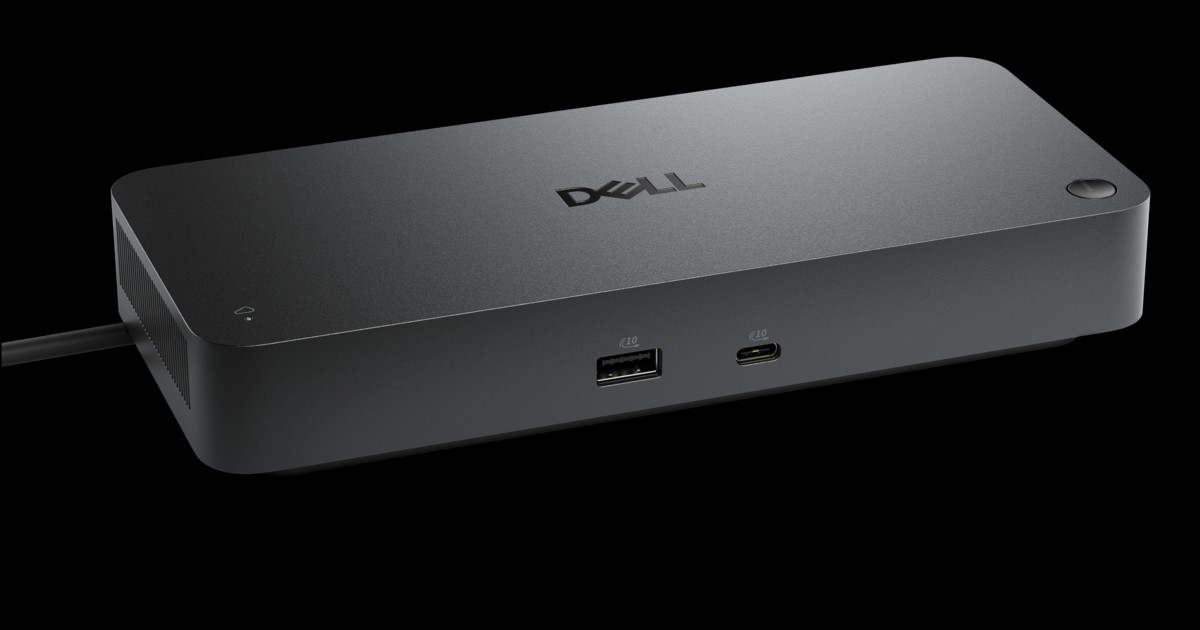
The Dell Pro Thunderbolt 5 Smart Dock (SD25TB5) is not a dock for a casual home desk, and that is exactly what makes it interesting to read about. It is a business-class dock built for laptops that draw serious power, for offices that manage hundreds of machines, and for desks with several high-refresh displays. Dell describes it as the first and most powerful Thunderbolt 5 smart dock, which is Dell's own claim, and the numbers on the page are certainly big: up to 300W of power over a single USB-C cable, up to four 4K 120Hz displays, a 330W power supply and 2.5 Gigabit Ethernet. This page separates the headline from the practical detail, so you can tell whether the SD25TB5 is your dock or simply an impressive spec sheet.
What "smart dock" means here
Most docks are passive: you plug them in and forget them. Dell calls this one smart because it can be managed. According to the product page, IT teams can manage it from the Dell Device Management Console without a PC being connected, schedule firmware updates for off-hours, and remotely configure, deploy and update docks over Wi-Fi. There is enterprise-grade WPA-3 192-bit encryption for that Wi-Fi communication and tamper-resistant hardware-based encryption. The management list in the specifications adds Dell Command Update, dock power button sync, MAC address pass-through, port disablement, PXE boot, Wake-on-LAN, WLAN-to-LAN switching, kernel DMA protection and Intel Active Management Technology over Thunderbolt on selected Intel vPro PCs. If you are a single user this list may read like a foreign language, and that is fine: it is aimed at an IT department that wants to treat a dock as a managed device rather than a plastic box under the desk.
Ports and what they can do
The specification page lists two Thunderbolt 5 ports (15W each), an HDMI 2.1 port, two DisplayPort 2.1 outputs, one USB-C 3.2 Gen 2 multifunction DisplayPort 2.1 port, one USB-C 3.2 Gen 2 port at 10Gbps, four USB-A 3.2 Gen 2 ports and a 2.5 Gigabit Ethernet jack. The port diagram places one USB-A and one USB-C on the front, and the rest on the back. The four USB-A ports support PowerShare, which lets you charge a device from them even when the computer is asleep. Dell states that all of the ports deliver power with or without the PC connected. Downstream power budgets are 4.5W for each USB-A port, 15W for the standard USB-C port, 7.5W for the multifunction USB-C port and 15W each for the Thunderbolt 5 ports. The dock connects to the computer through an ambidextrous USB-C cable that can be routed to the left or the right; the specification lists a cable length of 2.72 feet (about 83 cm), and the package contents list no separate cable, which suggests the cable is attached, although the page does not say so explicitly.
Power: 300W, with conditions
The headline figure is 300W, and here the small print matters. Dell lists 300W for Dell systems and 240W for non-Dell systems, and the note beside it says this requires USB-C Power Delivery 3.1 Extended Power Range. In plain terms, very few laptops on the market ask for more than 100W today, so the top figures apply to the latest high-performance workstations and AI PCs, and only when the laptop and its charger support the extended power range. For an ordinary business laptop that charges at 65W, 90W or 100W, the dock will simply supply what the laptop asks for. The power supply is rated at 330W, which is the budget the dock shares between the laptop and every accessory. If your laptop is a thin ultrabook, the extra headroom will not be used, but it does mean the dock is unlikely to be the weak point in the chain.
Displays and the Thunderbolt 5 advantage
Dell's page lists these resolutions and refresh rates: four displays at 4K 120Hz, three displays at 4K 120Hz, dual 4K 60Hz, triple 4K 60Hz, quad 4K 60Hz, a single 5K 60Hz, dual 6K 60Hz, a single 8K 60Hz, and QHD or WQHD at 60Hz for triple and quad setups. That range shows what Thunderbolt 5 and DisplayPort 2.1 are for. Older Thunderbolt 4 docks are often limited to two 4K 60Hz displays, so if you run several high-refresh monitors, a dock like this changes what is possible. As always, the computer decides. The dock can only deliver what the laptop's graphics and Thunderbolt 5 controller allow, and the host must support Thunderbolt 5 to unlock the top tier. Before buying, look up your laptop's exact display limits, and read our article on Thunderbolt 5 docking stations and multi-monitor setups to see how bandwidth is divided. For a monitor that already carries a Thunderbolt hub, see the Dell UltraSharp U3225QE, which can act as a dock in its own right.
Operating systems and compatibility
Dell lists support for Windows 10 and 11, macOS, ChromeOS 141, Ubuntu 24.04 and Red Hat Enterprise Linux 9.7. The host interface is Thunderbolt 5, and the product page carries a compatibility checker link, which is worth using because some features, such as the management tools and the highest power levels, are aimed at Dell systems. To understand how a Thunderbolt 5 dock behaves on older ports, read the Thunderbolt 3 vs 4 vs 5 compatibility article. Dell states a maximum data transfer rate of 1.25 GB/s on the specification page, which corresponds to the 10Gbps USB-C and USB-A ports.
Size, security and sustainability
The dock measures about 1.39 x 8.07 x 3.54 inches and weighs roughly 1.37 pounds (about 0.62 kg). It has both a Kensington security slot and a Noble Wedge security slot, useful in shared offices. Dell states that it is built with at least 65 percent post-consumer recycled materials and packaged in 100 percent recycled or renewable packaging. The warranty is three years with Advanced Exchange, with optional four- and five-year extensions.
Price and who should buy it
On the Dell US page we read, the price was 624.99 USD. That places it at the top of the dock market, and it only makes sense in certain situations: a fleet of Dell laptops in an office, a power-hungry workstation, a desk with several high-refresh monitors, or a business that values remote management. If you want a capable but far less expensive Thunderbolt 4 dock, look at the Belkin Connect Pro Thunderbolt 4 Dock. A single-user home desk will usually be better served by something smaller, and our docking station buying guide helps you count ports before you overspend. The full range is in the docking stations category.
Verdict
The SD25TB5 is a specialised tool. Its strengths are power, display capacity and manageability; its trade-offs are cost and the fact that some of the best features assume Dell hardware and IT support. If those match your situation, it is a serious piece of equipment. If not, one of the smaller docks will do the job at a fraction of the price.