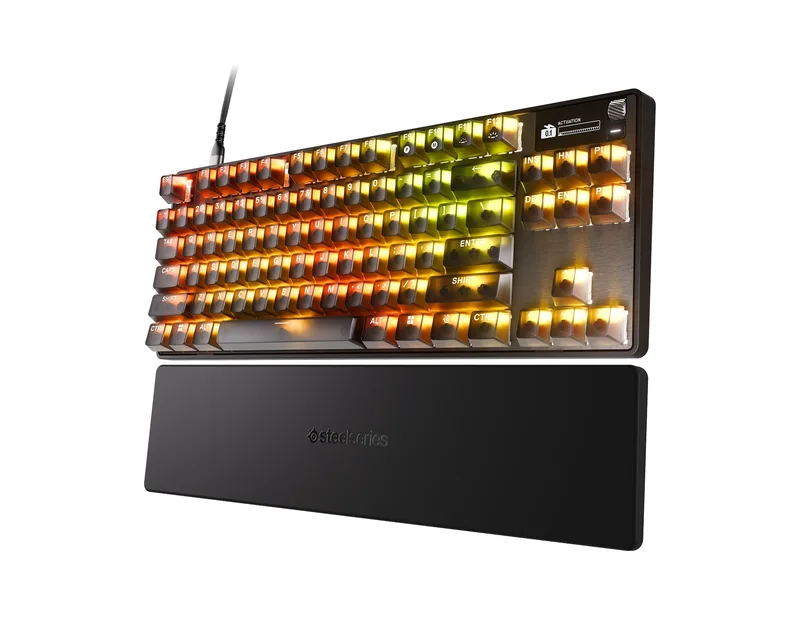
SteelSeries Apex Pro TKL (2023)
A wired tenkeyless keyboard with OmniPoint 2.0 magnetic switches, per-key adjustable actuation, Rapid Trigger, an OLED display and an aluminum top plate.
Specifications
| Layout | Tenkeyless |
|---|---|
| Switches | OmniPoint 2.0 adjustable HyperMagnetic, up to 100 million keystrokes |
| Actuation | Adjustable per key: 0.1-4.0 mm (marketing), 0.2-3.8 mm (spec table) |
| Features | Rapid Trigger, 2-in-1 action keys, OLED Smart Display |
| Memory | 5 onboard profiles, 32-bit ARM processor |
| Keycaps | Double shot PBT |
| Connection | Detachable USB-C braided cable |
| Dimensions | 355 x 128 x 42 mm |
| Weight | 960 g |
| Lighting | Per-key RGB |
| Software | SteelSeries Engine |
The SteelSeries Apex Pro TKL (2023) is a compact, wired, tenkeyless keyboard whose party trick is that every key can be tuned. SteelSeries builds it around what it calls OmniPoint 2.0 Adjustable HyperMagnetic switches: instead of a simple electrical contact, magnetic sensors read how far a key is pressed, so the keyboard can register a keystroke at a distance you choose. Add Rapid Trigger, an OLED display for changing settings on the fly and an aluminum top plate, and you have a keyboard aimed at competitive players who like to tweak. This guide goes through the specification page, flags where the numbers disagree, and tells you who should consider it.
What OmniPoint 2.0 does
SteelSeries says the switches use state-of-the-art magnetic sensors for instant, zero-contact activation. The practical result is adjustable actuation, which is the distance a key has to travel before the keyboard counts it as pressed. The product description says you can choose from 40 levels of per-key actuation between 0.1 and 4.0 mm. That lets you set WASD to a very light, ultra-fast setting and give ability keys a deeper press so you do not fire them by accident. In the FAQ, SteelSeries explains that the Apex Pro TKL differs from the Apex 9 TKL in having the OLED Smart Display, a magnetic wrist rest and the OmniPoint 2.0 switches, while the Apex 9 TKL uses OptiPoint optical switches. If you are new to how switch types feel, our guide to mechanical keyboard switches covers the basics, though adjustable magnetic switches are a category of their own.
The page also contains manufacturer comparisons against conventional mechanical keyboards: 20 times faster actuation, 11 times faster response time and twice the durability. Those are SteelSeries claims measured by SteelSeries, and we treat them as marketing. The switch rating in the specification table, up to 100 million keystrokes, is a more concrete number, and it is a manufacturer figure too.
A number that does not match
Here is a discrepancy you should know about. The marketing sections and product description describe actuation adjustable from 0.1 to 4.0 mm, and the marketing text mentions the feather-light 0.1 mm setting and the firm 4.0 mm setting. The technical specifications table, however, lists adjustable actuation points as 0.2 to 3.8 mm. We cannot tell from the page which is correct for the current firmware, so if the extreme ends of the range matter to you, check the latest SteelSeries documentation, or treat 0.2 to 3.8 mm as the safe expectation. The two ranges overlap for nearly all practical settings.
Rapid Trigger and 2-in-1 action keys
Rapid Trigger, in SteelSeries's description, removes latency from the physical movement of the switch by activating and deactivating keys based on travel distance rather than a fixed point in the key travel. In everyday terms, the key resets the moment you let it rise slightly, so quick repeated taps and strafing feel immediate. The 2-in-1 action keys let you program two different actions on one key depending on how deeply you press: for example, walk forward with a light press and sprint with a deeper one. If you use these features, the payoff comes from tuning them to your own games. To see how other brands approach magnetic and Hall-effect boards, look at the Wooting 60HE+ and the Keychron Q1 HE 8K, and for the broader trend, read our overview of what has changed in mechanical keyboards in 2026.
The OLED Smart Display and SteelSeries Engine
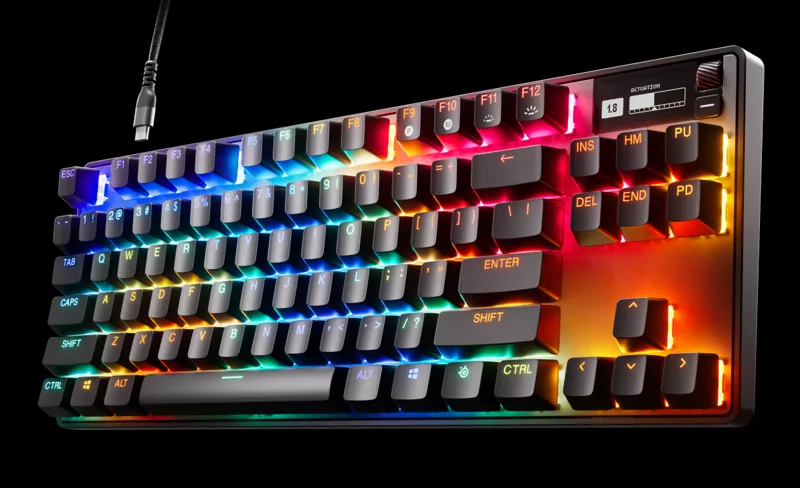
The keyboard has an integrated OLED Smart Display that SteelSeries calls a command center. You use it to adjust settings, change profiles and see updates without opening software. The full range of features is programmed in SteelSeries Engine, which the company says lets you set 2-in-1 action key binds, per-key RGB illumination and custom actuation points. The keyboard stores 5 custom profiles onboard and is driven by a 32-bit ARM processor, so your settings follow the keyboard to another computer. Engine requires Windows 8.1 or newer, or macOS 10.13 or newer, and SteelSeries adds that not all software features are supported on macOS. The keyboard is listed as compatible with Windows, Xbox, PlayStation and macOS, and a USB port is required.
Build quality
The top plate is Series 5000 aluminum, which SteelSeries says is the same alloy used in aircraft, chosen for rigidity and structural stability. The keycaps are double-shot PBT with a textured surface, and the company calls them fadeproof. The cable is a detachable braided USB-C cable, so you can swap it or pack it separately. Height-adjustable tilt legs give three positions: flat, half extension and full extension. The keyboard measures 355 mm wide, 128 mm deep and 42 mm tall (14 x 5.04 x 1.65 inches) and weighs 960 grams (2.1 pounds), which is heavy enough to stay put on a desk. Lighting is per-key RGB.
Tenkeyless, and why that matters
The tenkeyless layout drops the number pad but keeps the function row and navigation keys. SteelSeries pitches the compact shape as saving desk space for big mouse swipes. If you shift between gaming and spreadsheet work, you will miss the number pad; if you play low-sensitivity shooters with a wide mouse motion, you will probably appreciate the room. If you want to compare it against a full-size alternative from another brand, the Corsair K70 MAX RGB is a full-size adjustable-switch board with a different design.
In the box and the wrist rest question
The box list is short: the keyboard, a detachable braided USB-C to USB-A cable, a keycap puller and a product information guide. Two oddities appear on the page. The first line of the box list calls the product the "Apex Pro TKL Wireless Gaming Keyboard", although this listing is for the wired version; SteelSeries also sells a wireless variant, and we assume this is a copy-and-paste slip. The second is that the FAQ mentions a magnetic wrist rest as one difference from the Apex 9 TKL, while the box list does not include one. We would therefore not assume a wrist rest is included; confirm before buying if it matters.
Price and who it suits
SteelSeries lists this wired US-layout Apex Pro TKL at 189.99 dollars, and the price can change. It suits players who enjoy customisation and want per-key actuation, a display on the keyboard and a compact size, and it suits anyone who likes a solid metal build. It suits you less if you never change settings, in which case a simpler keyboard will do the same job for less. If you are choosing between wired and wireless, note that this page covers the wired keyboard only.
The short version
The Apex Pro TKL (2023) is a serious, adjustable tenkeyless keyboard with a display, five onboard profiles and a metal top plate. Treat the speed multipliers as marketing, check the actuation range and wrist rest details before you buy, and you will know exactly what you are getting.