Satechi Thunderbolt 4 Slim Hub Pro
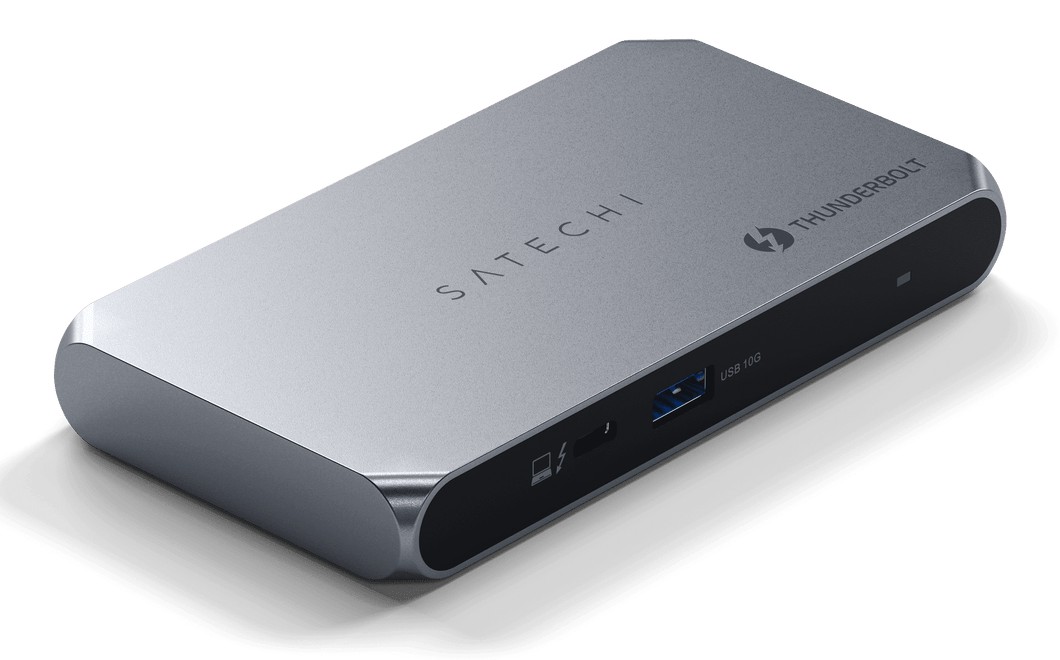
A slim aluminium Thunderbolt 4 hub with three downstream Thunderbolt ports, one 10Gbps USB-A port and up to 96W charging from a 150W GaN power supply.
Specifications
| Upstream | 1x Thunderbolt 4, 96W power delivery |
|---|---|
| Downstream | 3x Thunderbolt 4 (40Gbps, 15W each), 1x USB-A 3.2 Gen 2 (10Gbps) |
| Displays | 2x 4K 60Hz, or 1x 8K 30Hz, or 1x 6K on Mac |
| Power Supply | 150W GaN, DC 20V input |
| Dimensions | 135 x 74 x 17 mm |
| Weight | 248 g |
| Host Cable | 28 in Thunderbolt 4 |
| Warranty | 2 years |
The Satechi Thunderbolt 4 Slim Hub Pro is the answer to a very specific desk problem: your laptop has one or two Thunderbolt ports, and you want more of them, without carrying a brick. It is a flat aluminium hub, with roughly the footprint of a large smartphone and only 17 mm thick, that plugs into your laptop with a short Thunderbolt 4 cable and gives you three more Thunderbolt 4 ports, a fast USB-A port, and enough charging power for most laptops. It is a Thunderbolt hub rather than a full port-rich dock, so it has no Ethernet jack and no card slots, and that focus is what keeps it slim. This page explains what the ports do, where the marketing and the specification table disagree, and which laptops will get the full benefit.
What is on the hub
According to Satechi's specification table, the hub has one Thunderbolt 4 upstream port that connects to the computer and delivers 96W of power delivery, three Thunderbolt 4 downstream ports at up to 40Gbps and 15W each, one USB-A 3.2 Gen 2 data port at up to 10Gbps, and a DC input for the power adapter. You will sometimes see retailers describe the hub as having four Thunderbolt 4 ports. That count includes the upstream port; the number that matters for devices you can attach is three Thunderbolt ports plus the USB-A. Satechi also describes the product as a five-in-one hub, which fits that same count: one upstream, three downstream Thunderbolt and one USB-A. Because Thunderbolt ports accept USB-C devices as well, you can use the downstream ports for USB-C drives, phones or monitors, not only for Thunderbolt-specific gear.
Charging and the 150W adapter
The hub includes a 150W GaN (gallium nitride) power adapter that connects to the DC input. Satechi says this lets the hub pass up to 96W to the host computer, which is a 60 percent increase on the 60W limit of the previous slim hub. In practical terms, 96W is enough for the large majority of laptops, including 14-inch and 16-inch machines that ship with 67W to 96W chargers, though a laptop that ships with a 140W charger may charge more slowly when under heavy load. Remember that the power budget is shared: the 15W supplied to each downstream Thunderbolt port comes out of the same adapter. The hub also delivers 15W to connected peripherals, which is the standard Thunderbolt allowance for bus-powered devices.
Displays: a marketing line and a spec line that differ
Here is a point where careful reading pays. The feature bullets at the top of the Satechi page say the hub drives up to 8K at 60Hz. The specification table, further down, says two 4K displays at 60Hz, or one 8K display at 30Hz, or one 6K display on a Mac. Those cannot both describe the same thing, and we treat the specification table as the reliable one because it is more specific and matches the limits of the underlying Thunderbolt 4 standard. In practice, plan for two 4K 60Hz monitors, or a single higher-resolution screen at a lower refresh rate. The display limits of your laptop matter as much as the hub. Satechi's compatibility notes say base-model Apple M1 and M2 MacBooks are limited to one display, that base M3 MacBook Air and MacBook Pro can drive two 4K displays at 60Hz only when the lid is closed in clamshell mode, and that a 2026 MacBook Neo is compatible but supports only one external display. Our article on Thunderbolt and USB-C docking compatibility explains why a dock cannot exceed what the computer's graphics allow.
Speed, daisy-chaining and PCIe
Satechi states that the downstream ports offer up to 40Gbps and that the hub allows you to daisy-chain up to six devices in a Thunderbolt chain. It also mentions 32Gbps of native PCIe support, which is the figure that matters for Thunderbolt SSDs and external GPU enclosures, since these use PCI Express rather than ordinary USB. The hub is certified through Thunderbolt and is backward compatible with Thunderbolt 3 and USB standards. That said, the single USB-A port is a 10Gbps data port, so an older USB-A flash drive or a wireless mouse dongle will work, while more demanding devices should use the Thunderbolt ports.
Size, weight and materials
The hub measures 135 x 74 x 17 mm and weighs 248 grams, and it has a slim aluminium body. Weight matters when you carry it: 248 grams is light for a Thunderbolt hub, though the 150W adapter adds its own weight, so if you commute with it, weigh the whole kit rather than only the hub. The box contains the hub, a 28-inch Thunderbolt 4 host cable, an AC power adapter with a C5 power cable, a user manual and a quick guide. The hub carries a two-year warranty, and Satechi's page lists 30-day returns. There are two plug variants, US and EU, so make sure you pick the right one for your region.
Who it suits
This hub is a good match for a MacBook or a thin Windows laptop that has only a couple of Thunderbolt ports, and for someone who wants to attach a monitor, a fast SSD and one or two accessories at a small desk. It is not the right tool if you need wired Ethernet, an SD card slot or many USB-A ports; for those, a fuller dock such as the Anker 575 Docking Station is a better fit. If you want a full Thunderbolt 4 dock with dual displays and more ports, look at the Belkin Connect Pro Thunderbolt 4 Dock. Our docking station buying guide helps you decide how many ports you really use, and a neat cable management routine keeps the three Thunderbolt cables from cluttering the desk.
Price and value
On the Satechi US page we read, the sale price was 199.99 USD. That is a substantial amount for a hub with five ports, so it makes sense mainly if the Thunderbolt ports, the 96W charging and the slim aluminium body are what you need. If you only want one monitor and a couple of USB devices, a much cheaper hub will do. Browse the wider docking stations category to compare.
Bottom line
The Thunderbolt 4 Slim Hub Pro does one thing well: it turns one Thunderbolt port into several, with proper charging and a body that looks at home next to a laptop. Read the display notes carefully, trust the specification table over the headline, and confirm your laptop's own limits before you order. If you do, the hub is a tidy and capable addition to a compact desk.